Instead of agreeing a time over ten messages, send your booking link — they pick a free time, and you can see which ad brought them.
In review: written from the product, not yet walked through live.
1Open Share my booking link
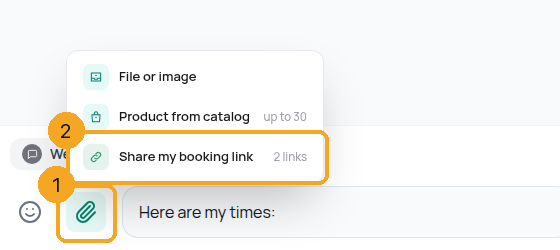
In the chat, click + beside the reply box (1) and pick Share my booking link (2). On a phone, tap + and then Booking link.
2Pick a link
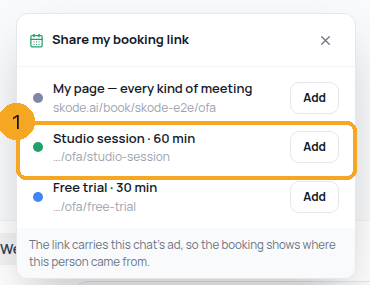
With more than one link, pick the one to send (1) — each meeting is its own link. With one link this step is skipped.
3Send it
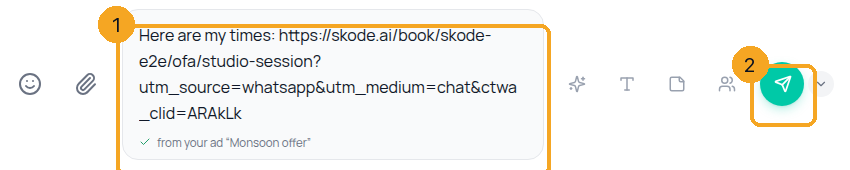
The link is in the reply box after anything you typed (1). When the chat came from an ad, the box says from your ad with its name — the booking will show it. Change the words if you like, then press Send (2).
© 2026 SkedX · Sample data only · Share and link freely · Copying the product or its design is not allowed · Terms
Common questions
Why is the link so long?
The end of it says where this chat came from (the channel, and the ad when there was one). That is how the booking shows the ad that brought the person. It holds no name or phone number.
I don’t see the row.
Booking links are not switched on for your company yet, or you are not using SkedX CRM’s Calendar. When they are, the row appears in every chat.
It says Create your booking link.
You have no booking link that is on. The row opens Calendar › Booking links in SkedX CRM, where you make one; then it shows here.
Why did it open Templates?
WhatsApp lets you message a customer freely only within 24 hours of their last message. Outside that, send a template first.
Previous: Offer a time from the inbox — the customer taps one and it is booked · All Inbox guides
Did this guide help?
Still stuck?Chat with support →


