Send the open times; one tap books it.
In review: written from the product, not yet walked through live.
1Open Offer a slot
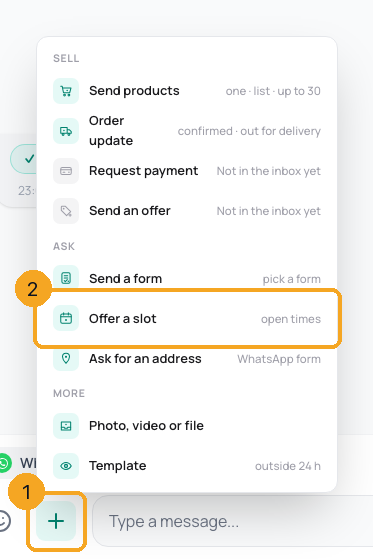
In the chat, click + beside the reply box (1) and pick Offer a slot (2). It says turn on calendar booking until an assistant books into the SkedX calendar (Skills → Bookings → Skode CRM calendar).
2Send the times
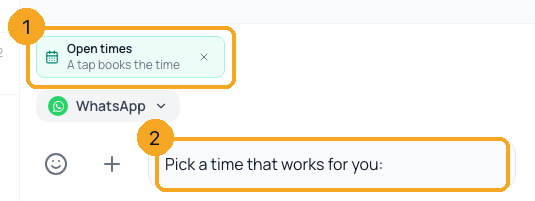
The open times wait on the reply box (1) with “Pick a time that works for you:” (2). Change the words if you like and press Send.
3See the booking
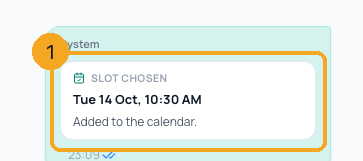
When the customer taps a time, it is booked and the chat shows Slot chosen with the time (1). A time someone else just took shows Time just taken, and the next times go out by themselves.
© 2026 SkedX · Sample data only · Share and link freely · Copying the product or its design is not allowed · Terms
Common questions
Where do the times come from?
From Calendar: the working hours, breaks and time off of the person the chat is assigned to, minus their meetings — only their free times are offered. Set the hours in Calendar settings › Working hours; an assistant no longer keeps hours of its own.
Why does it say nobody is assigned?
The times are one person’s own free times, so the chat needs someone assigned to it. Assign the chat, then offer the times again.
What if two people tap the same time?
The first is booked; the second is told it was just taken and gets the next open times.
Why did it open Templates?
WhatsApp lets you message a customer freely only within 24 hours of their last message. Outside that, send a template first.
Next in InboxShare your booking link in a chat →
Previous: Send a form from the inbox · All Inbox guides
Did this guide help?
Still stuck?Chat with support →


