Send the form instead — the answers land on the contact, typed once.
In review: written from the product, not yet walked through live.
1Open Send a form
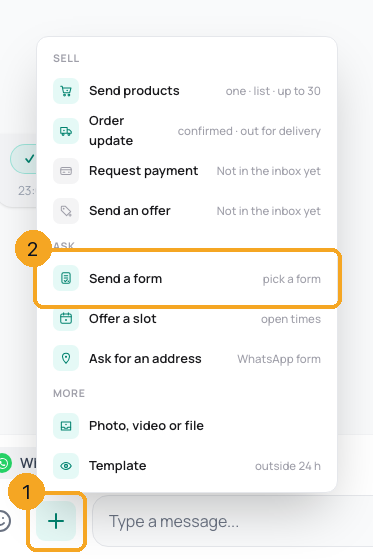
In the chat, click + beside the reply box (1) and pick Send a form (2). On a phone, tap + and then Form.
2Pick the form
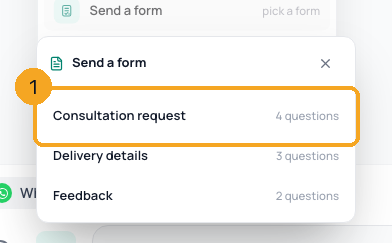
Pick one of your SkedX Forms (1). No forms yet? Make a form opens SkedX Form.
3Add your words and send
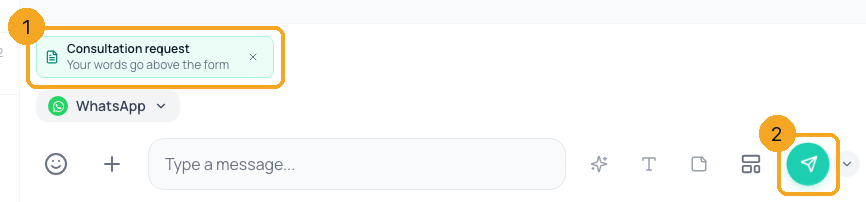
The form waits on the reply box (1). Type a line to go above it if you like, then press Send (2). The customer’s answers appear under the form in the chat.
© 2026 SkedX · Sample data only · Share and link freely · Copying the product or its design is not allowed · Terms
Common questions
Why did it open Templates?
WhatsApp lets you message a customer freely only within 24 hours of their last message. Outside that, send a template first.
Will it look the same on Instagram or Messenger?
There the customer gets the form’s link; on WhatsApp, with WhatsApp Flows on, it is a form card inside the chat.
Where do the answers go?
Under the form in the chat, and onto the contact’s fields.
Previous: Ask a customer for their delivery address in the chat · All Inbox guides
Did this guide help?
Still stuck?Chat with support →


