This guide shows how each kind of message appears in the Flow inbox, so you can read a chat without opening WhatsApp or Instagram.
In review: written from the product, not yet walked through live.
1Templates and campaign messages
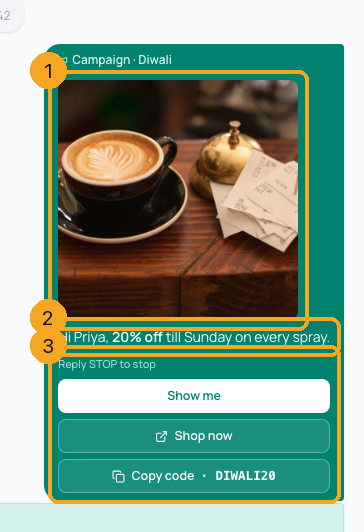
A template shows its header picture (1), its words with the customer’s name where the placeholder was (2), and its footer with every button it carried (3) — reply buttons solid, link and copy-code buttons tinted. The badge at the top says Template · name, or Campaign · name when a campaign sent it. A campaign send stays in the conversation, so the customer’s reply sits under the message it answers.
2Carousels
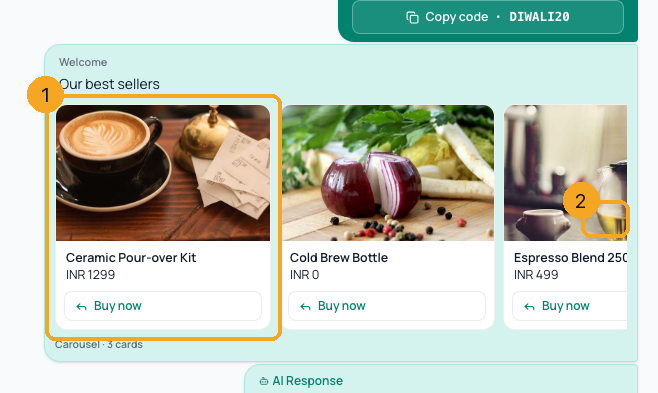
A carousel shows its cards — picture, words, price and buttons (1) — in a row you scroll with the arrow (2) on the side that has more. The line under the row counts the cards.
3WhatsApp forms and their answers
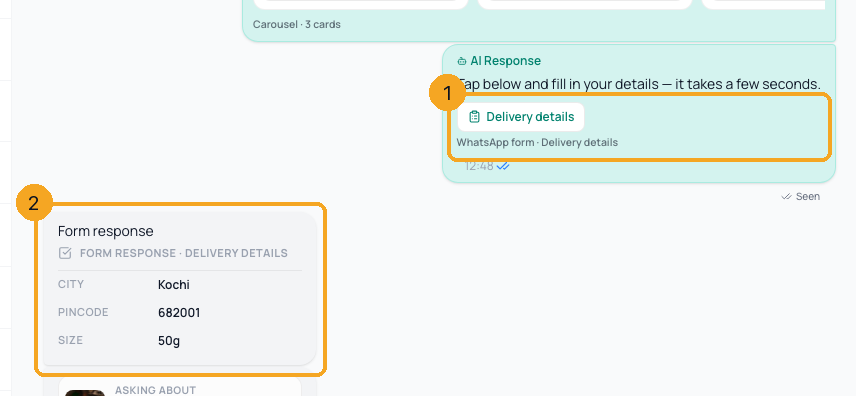
The form you sent shows its button and name (1). When the customer submits it, their answers appear as the next message (2), every field with its value — on Meta and Gupshup numbers alike.
4Questions about a product
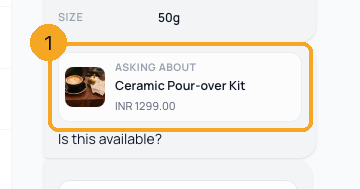
When a customer asks about a product from your catalog, the product — picture, name and price (1) — sits above their question, so you know what “Is this available?” means.
5Instagram stories and shared posts
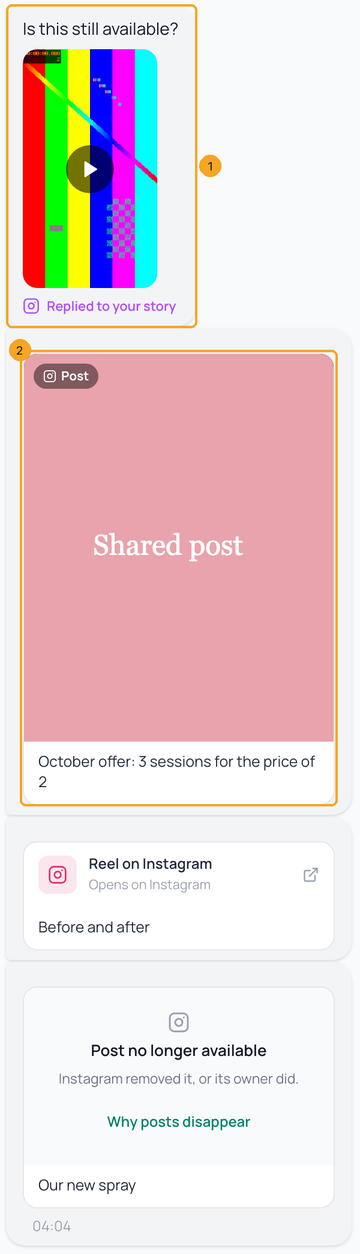
A reply to your story shows the story it answered, the way Instagram shows it (1): a video story plays when you tap it. Instagram stories last 24 hours and Meta does not let apps keep a copy, so once Instagram stops showing it, it says no longer available. A post the customer shared plays inside its card (2) — the video or the picture SkedX kept, with the post’s caption under it. A reel Instagram sends only as a link stays a card that opens it on Instagram, and a post that was removed says Post no longer available, keeping its caption.
6A comment they left on your post
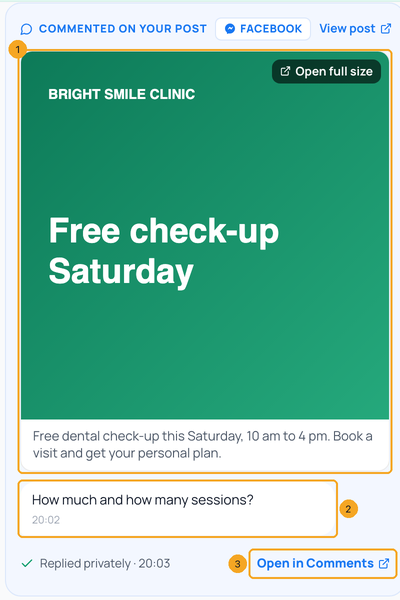
When someone commented on your Facebook or Instagram post and also wrote to you, their comment sits in the chat at the time they wrote it, as a card. It shows the post — picture and caption (1), with View post — then what they commented (2), and whether you replied privately. Open in Comments (3) opens that comment in Comments, where you reply publicly or message them privately. Your private reply shows under it marked private reply to the comment. Someone who only commented is not in the inbox — they are in Comments until they write to you.
7Contacts, call permission and orders
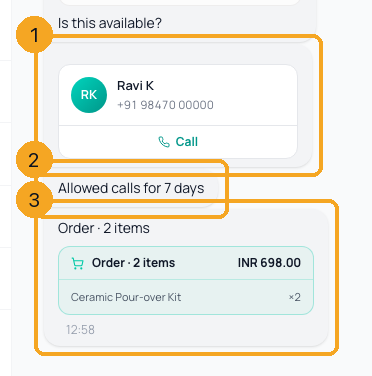
A shared contact shows as a card with the name, number and a Call button (1). A customer’s answer to “may we call you?” shows as a plain line (2). A cart sent from your catalog shows its items and total (3).
© 2026 SkedX · Sample data only · Share and link freely · Copying the product or its design is not allowed · Terms
Common questions
How do I get the newest version of Flow?
You don’t need to do anything. When SkedX releases an update, Flow picks it up the next time you open another page, and a tab you come back to after a while refreshes by itself — never while you have words in a box. Your unsent replies are kept as drafts.
Why did I see “(carousel · 3 cards)” instead of the cards?
Older messages were saved before the inbox kept the cards. Carousels sent after this release show their cards; older ones keep the short line.
Why did bold text show stars around it?
WhatsApp marks bold with stars. The inbox now draws the bold text and hides the marks, in bubbles, buttons and cards alike.
A customer replied to a campaign and I can’t see what we sent
A campaign send is added to the conversation when the customer already has one, and on their first reply otherwise, so the reply sits under the message it answers. Campaigns sent before this release are not added.
Where do form answers go?
Into the form itself and onto the contact, and the inbox shows them as the next message under the form you sent.
Does the CRM inbox and the Chrome extension show the same?
Yes. The Flow inbox inside SkedX CRM and the SkedX extension’s chat draw the same templates, carousels, forms, product questions and stories.
A message says “Held back by WhatsApp” — what does that mean?
WhatsApp decided not to deliver it — for example the person got too many marketing messages that day, or is not on WhatsApp. It is grey, not red, because nothing is wrong with your message, and you are not charged. The note under it says why; What this means opens Why WhatsApp held back some of your messages.
We reply from the Instagram or Facebook app — do those replies show here?
Yes. A reply your team types in the Instagram app, Messenger or Meta Business Suite appears in the conversation, marked Instagram app or Facebook app, and automations stand down as they do for a reply from the inbox. Replies typed in the apps before 27 Oct 2026 are filled in from Meta.
Are chats from before we connected Instagram or Facebook in the inbox?
Yes, as far back as Meta still keeps them. When you connect an Instagram account or a Facebook Page, SkedX reads its past conversations and adds them, each at the date of its last message, so they don’t crowd today’s chats. Nothing is sent to anyone, no automation runs, and the people are not added as contacts until they write to you again.
A message says “Sent something Instagram doesn’t share with apps”
The customer sent something Instagram does not pass on to other apps, such as a post from a private account. Open the chat in Instagram to see it. You can still reply in the inbox. Card-style messages — your Page’s automatic welcome with its Chat on WhatsApp button, or Instagram’s “You have a new appointment request” — show as their words, and a story or photo Instagram had not finished when it arrived fills in within half an hour.
Why does a story say “no longer available”?
Instagram stories last 24 hours, and Meta’s rules let an app keep only a link to a story, never a copy of it. Once Instagram stops showing the story, the chat says it is no longer available. Photos and videos sent in the chat itself are kept.
A customer sent several photos at once on WhatsApp — where are they?
Each photo shows as its own message, in the order it was sent. WhatsApp sends a group of photos as an album, which apps can’t show as one; SkedX shows the photos and nothing else. A note reading “Message type not supported — ask the customer to resend as text” means something WhatsApp doesn’t share with any app, such as a view-once photo or a poll: ask the customer to send it again.
A message says “Unsupported message” — what was it?
Meta sometimes calls a file it can’t describe “unsupported” — for example a video sent from the Instagram app. When the file behind it is a video, photo or voice note, SkedX keeps a copy and shows it as that, in the Flow inbox, the CRM inbox and the extension. The card stays only when Meta no longer serves the file; open the chat in Instagram or Messenger to see it there.
Could a message be missing from the inbox?
SkedX compares every Instagram account and Facebook Page with Meta every 30 minutes, and the last two days once a day, and adds anything that did not arrive. WhatsApp has no way to read past messages back, so for WhatsApp SkedX compares each number’s daily count of incoming messages with WhatsApp’s and our team looks into any difference. If something is still missing, tell us which chat.
We use the WhatsApp Business app on the phone too — what shows here?
Replies typed on the phone show in the conversation marked Phone app, including products shared from your catalog and button replies. Photos and voice notes from before you connected come in with your past chats; one WhatsApp no longer shares says so in the bubble instead.
Instagram shows as not connected, but our Facebook Page is linked to it
SkedX connects Instagram with Instagram’s own sign-in, not through a Facebook Page — Meta does not let SkedX read Instagram messages through a Page. On the Instagram card, click Connect and sign in to the Instagram account.
Someone commented on our post — why are they not in the inbox?
A comment is answered in Comments, and the inbox holds chats. A person who only commented is in Comments; when they write to you, their chat comes into the inbox with their comment inside it. On Facebook a business may message a commenter privately once, within 7 days of the comment.
A Messenger or Instagram chat says “Waiting on” the customer
Messenger and Instagram let a business write only for a while after the customer’s last message, and they have no templates to reopen a chat. Once that time has passed, the chat says Waiting on them, and Add a follow-up task reminds you to pick it up when they write again.
One person shows as two chats on Facebook
If your business has more than one Facebook Page, a comment and a later message from the same person could land in two chats. From 2 Nov 2026 a comment records its Page, so both go into one chat. Older pairs are joined by our team.
A customer answered our SMS or email — is it in the same conversation?
Yes. Their reply joins the conversation of the message it answers, however their number or address is written — with or without +91, in capital letters, or with their name before the email address. An automation waiting for their answer hears it there.
Useful links
- Inbox in SkedX Flow — every conversation
Previous: Reply to Instagram and Messenger chats: up to 7 days · All Inbox guides
Did this guide help?
Still stuck?Chat with support →


