Some people in a campaign are not reached, and the campaign page tells you why.
Most reasons are WhatsApp deciding not to deliver — not a mistake in your campaign — and you are never charged for them. This page says what each one means, what Flow does about it for you, and what you can do.
In review: written from the product, not yet walked through live.
1See what happened — every group named
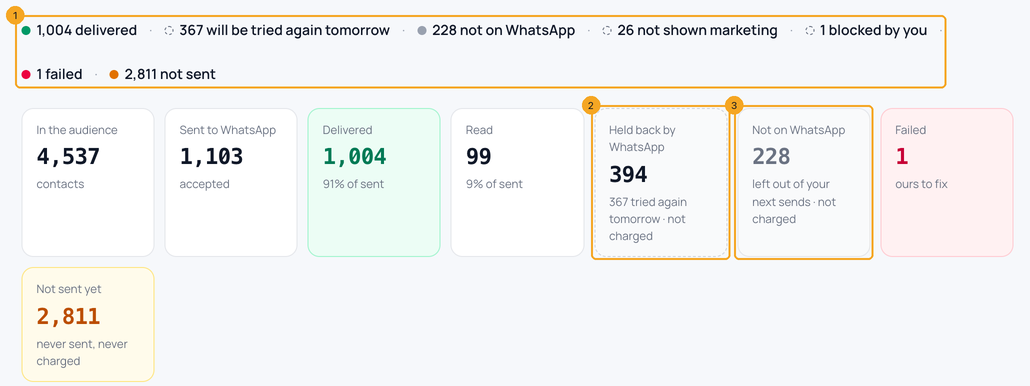
Open the campaign in Bulk Messaging. The line at the top (1) names every group — delivered, will be tried again tomorrow, not on WhatsApp, not shown marketing, blocked by you, failed and not sent — and each part opens those people. Held back by WhatsApp has its own grey, dashed tile (2): WhatsApp’s passing decisions, not charged. Not on WhatsApp has its own tile too (3): numbers that can’t receive WhatsApp, left out of your next sends. Below them, each reason is listed with its count and What this means.
2See who, person by person
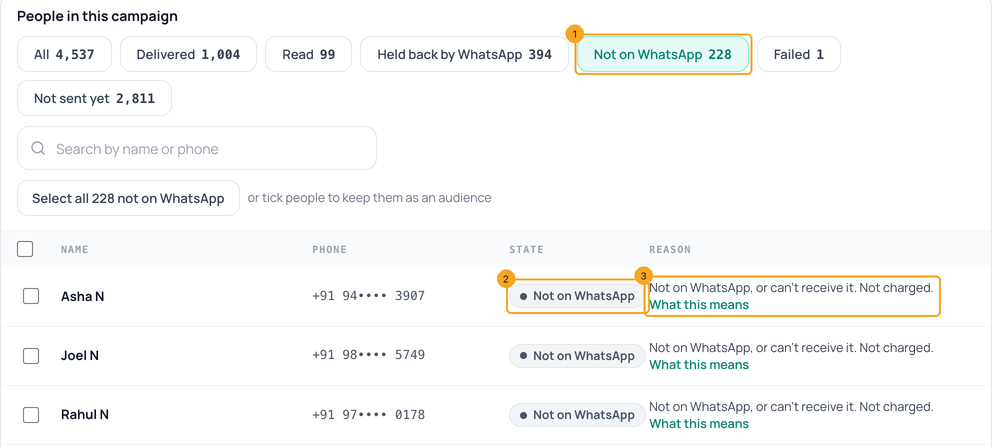
Under People in this campaign, press Not on WhatsApp (1) — or Held back by WhatsApp for the others. Each person shows their own grey pill (2) — never the red Failed one — and the reason in one line, with What this means (3). A number that looks a digit short or long says so. Red Failed is kept for what you or SkedX can fix.
3“Held back to protect engagement” (#131049) — too many marketing messages
WhatsApp limits how many marketing messages one person receives in a day from all businesses together. This person had reached it, so WhatsApp did not deliver yours. WhatsApp does not publish the number or how long it lasts. Not charged. What to do: wait at least a day before sending them marketing again — sending sooner gets the same answer. Order updates and replies are not affected. Flow can do it for you — see Try them again.
4“Message undeliverable” (#131026) — not on WhatsApp, or cannot receive it
WhatsApp could not deliver to this number: it is not on WhatsApp, cannot receive it, has not accepted WhatsApp’s latest terms, or the app is very old. WhatsApp does not say which, and no one can check a number before sending to it. Not charged. On the campaign these people have their own box, Not on WhatsApp (1), not “held back”, and Flow leaves them out of every WhatsApp send from now on — campaigns, automations and the inbox. 30 days later it tries once more, in case they joined. See them or Export the list (2) to check the numbers; Reach them by SMS (3) when SMS is set up for your account. Each of them is marked on their contact too — see A contact is marked Not on WhatsApp.

5“Part of an experiment” (#130472) — WhatsApp is not showing them marketing
WhatsApp keeps a small group of people who do not receive marketing messages for now, as an experiment. There is no end date and no way to opt out, and sending again gets the same answer. Not charged. What Flow does: keeps them out of your marketing for 60 days, or until they message you; order updates still go. What to do: reach them another way, or wait for them to message you — then you can reply on WhatsApp.
6“Stopped marketing” (#131050) — they turned off your marketing
The person chose, in WhatsApp, not to receive marketing messages from your business. Not charged. What Flow does: keeps them out of your marketing for 90 days, then tries once more; messages they ask for, like order updates and replies, still go. If they send START, marketing is back on at once.
7“The business has blocked this person” (#130403) — you blocked them
Your business blocked this person on WhatsApp — for example in your WhatsApp Business app. WhatsApp will not deliver anything to someone you have blocked. Not charged. What Flow does: keeps them out of your template messages until you choose to try them again. What to do: if the block was a mistake, unblock them in the WhatsApp Business app, then open the contact in Flow and press Try them again under Reachability.
8“Restrictions on this number” (#131048) — about your number, not the person
WhatsApp is limiting how many messages your number may send right now, usually after many messages were blocked or reported as spam. This one is about your number. Flow pauses the campaign so it does not keep failing. What to do: wait a few hours before resuming, and send to people who know your business — people who messaged you recently get your messages far more often.
9Tried again tomorrow, by itself — only the ones held back for too many marketing messages
Flow does this by itself. Every WhatsApp campaign tries the people held back for too many marketing messages once more, 24 hours after the send — the campaign page says when (1). Only those people, once, never anyone who got it, charged only for the ones it sends. Don’t want it? Press Don’t retry (2), or untick Try again tomorrow on the Sending step. If your wallet is short at that time, the retry waits, says how much to add, and carries on by itself after a top-up. Afterwards the page says what it reached: “Retry done — 250 more delivered”. Someone held back again is not tried a third time.

10In a chat and in automations
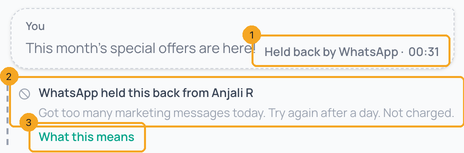
In the inbox, a message WhatsApp held back says Held back by WhatsApp in grey under the bubble (1) — not “Not delivered” in red — and the note under it (2) gives the reason in plain words with What this means, which opens that reason here (3). In an automation, a question WhatsApp held back stops that run as held back by WhatsApp: it is not counted as a failed run and no “send failed” email goes out. A template an automation sends to someone Flow keeps out is skipped, with the reason in the run.
© 2026 SkedX · Sample data only · Share and link freely · Copying the product or its design is not allowed · Terms
Common questions
Is this a problem with SkedX?
No. These are WhatsApp’s own answers, the same for every WhatsApp platform. Flow shows them next to each person, grey, so you can see who was reached and who was not.
Am I charged for these messages?
No. A message WhatsApp refused is refunded to your wallet, and people Flow keeps out are taken off the cost before you send.
Why does the cost step say some people are kept out?
WhatsApp refused them before — you blocked them, they are not on WhatsApp, or they turned off your marketing. Flow leaves them out so you do not pay for messages WhatsApp will refuse again. People not on WhatsApp have their own line, “Not on WhatsApp — left out, not charged”; the others read “WhatsApp refused them before (blocked, marketing off) — kept out, not charged”.
How do I send to someone Flow is keeping out?
Open the contact. Under Reachability it says “WhatsApp refused them before”; press Try them again. If WhatsApp refuses again, they go back on hold. A hold also ends by itself when they message you.
Why so many on one campaign?
Campaigns sent to everyone in your contacts — including people who have not talked to you for a long time — get far more of these, especially “too many marketing messages”. People who messaged you recently get your messages much more often. When most of your contacts have not written to you in 90 days, the Audience step says so and offers Send to those N instead — one click picks Messaged you recently, and Send to all subscribers instead takes you back.
Do these pause my campaign or use up my daily limit?
No. Held-back messages do not count toward the check that pauses a campaign, and only messages that went out count toward your number’s daily limit.
Next in WhatsApp templatesGet a WhatsApp template approved →
Useful links
- Bulk Messaging in Flow — see a campaign’s results
Previous: Send a WhatsApp campaign to many contacts · All WhatsApp templates guides
Did this guide help?
Still stuck?Chat with support →


