When WhatsApp says a number can’t receive messages, Flow marks that person once — and every screen and every send follows the mark, so you stop paying to find out again.
This page shows where you see it and how to check the number again.
In review: written from the product, not yet walked through live.
1Find them in Contacts
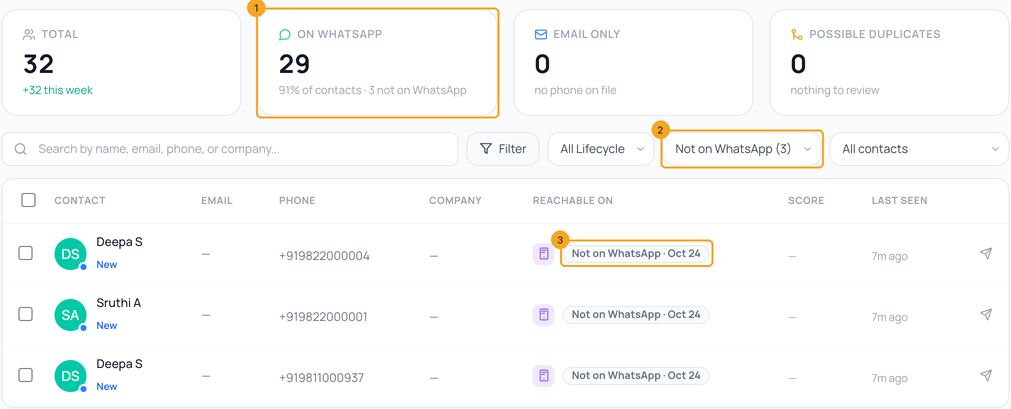
Open Contacts. The On WhatsApp tile says how many are not (1). Pick Not on WhatsApp in the channel filter (2) to list only them. In each row, Reachable on shows Not on WhatsApp · date (3) instead of the WhatsApp logo — the date WhatsApp said so. A person who wrote to you on WhatsApp shows On WhatsApp in green. An Indian number with a digit missing or extra says number looks a digit short: fix the number first.
2On the contact
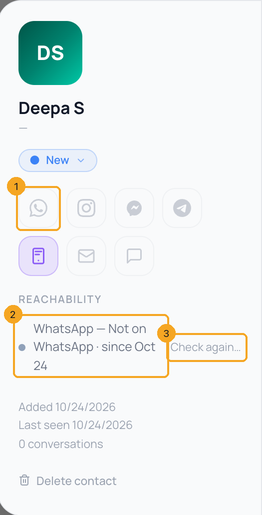
Open the person. The WhatsApp logo is faded (1) — hover it to see since when. Under Reachability (2) the line reads WhatsApp — Not on WhatsApp · since the date. Check again… (3) is how you lift the mark — see Check again.
3In a chat
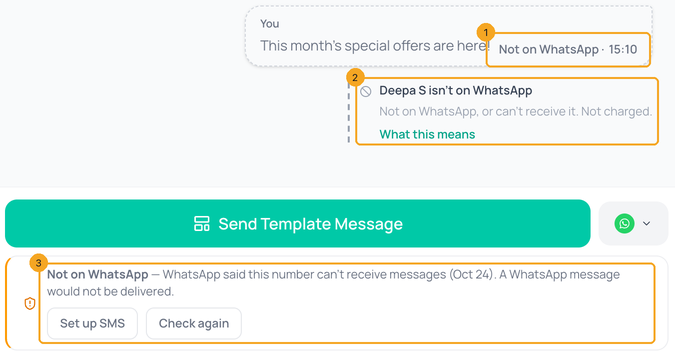
In the inbox the message says Not on WhatsApp under the bubble (1), in grey — not “Not delivered” in red — and the note under it says the person isn’t on WhatsApp, not charged, with What this means (2). Above the composer (3), Flow says a WhatsApp message would not be delivered and offers Send an SMS instead — or Set up SMS when SMS is not set up for your account — and Check again.
4What Flow does with the mark
Every WhatsApp send leaves them out, so you are not charged for a message WhatsApp will refuse again: campaigns take them off the cost before you send, automations skip them with “Not on WhatsApp” in the run (not counted as a failed run), and template sends skip them. Audiences stop counting them as reachable on WhatsApp. Email and SMS are not affected.
5Check again
Think the number is on WhatsApp now? On the contact press Check again…, or Check again above the composer in the chat. The mark is lifted and the next WhatsApp send tries them once. If WhatsApp refuses again, the mark comes back, and that send is not charged either. You do not always need to: the mark ends by itself when the person writes to you on WhatsApp, and Flow tries once more after 30 days.
© 2026 SkedX · Sample data only · Share and link freely · Copying the product or its design is not allowed · Terms
Common questions
Can Flow check a number before I send to it?
No. WhatsApp offers no way for any business platform to check a number before sending — not SkedX, not Gupshup, not Meta’s own API. Tools that claim to do it log a real phone into WhatsApp Web, which breaks WhatsApp’s rules and can get numbers banned. Flow learns from the first send, refunds it, and remembers.
Am I charged for the message that found out?
No. A message WhatsApp refused is refunded to your wallet.
Does another company in SkedX see my mark?
No. The mark comes from your own sends and stays in your company.
Why is someone who wrote to me marked?
They are not: a person who wrote to you on WhatsApp shows On WhatsApp, and writing to you ends a Not on WhatsApp mark at once.
Next in ContactsBuild an audience in SkedX Flow →
Useful links
- Contacts in SkedX Flow — filter Not on WhatsApp
Previous: A contact’s Activity in SkedX Flow: everything that happened, in one list · All Contacts guides
Did this guide help?
Still stuck?Chat with support →


