An audience is who a campaign or an automation reaches.
4 min readFor adminsUpdated 11 Nov 2026Verified 11 Nov 2026
Build it from what Flow knows about each person — their chat’s stage, tags, when they last wrote, your own fields — and watch the count change as you go.
Transcript · 0:58
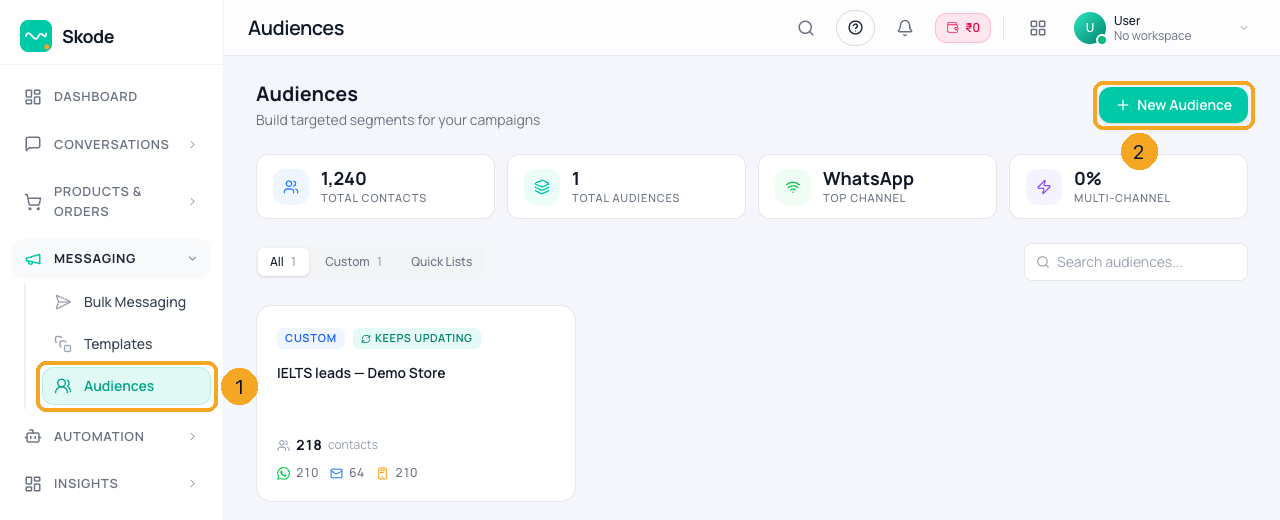
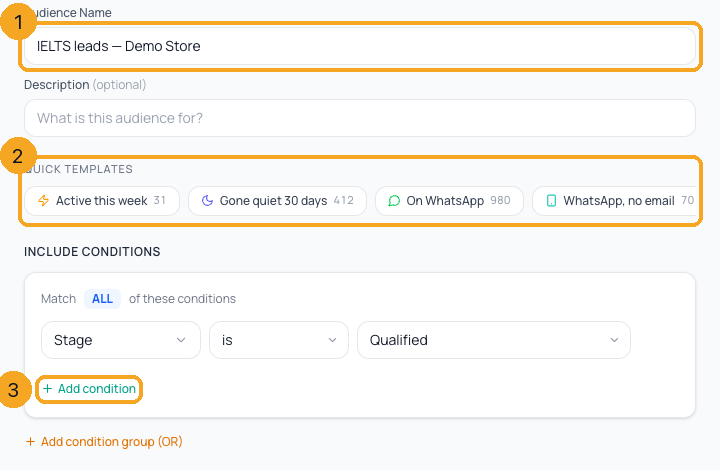
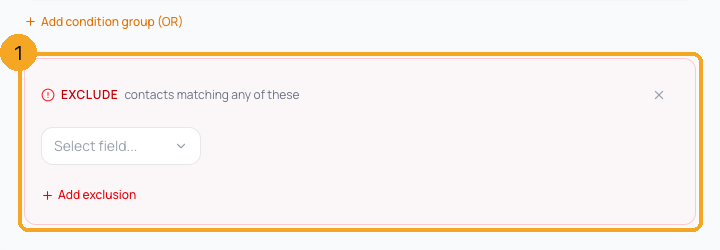
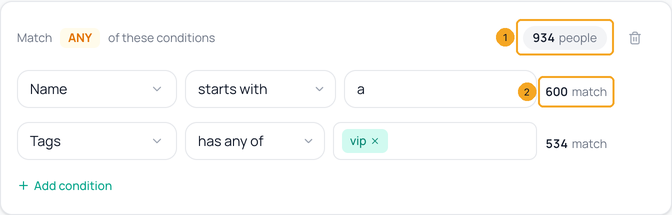
To build an audience in SkedX Flow, open Audiences from the left menu, and click New Audience. Here, we open one we already have. Give it a name. Start from a quick template, each one shows how many people it matches, or add a condition. Here, Stage is Qualified, from your own stages. Your custom fields are in the same list. To leave people out, add an exclusion. Anyone who matches it stays out, even people you added by hand. Beside each group is how many people it brings in, and beside each condition, how many it matches on its own. An exclusion shows how many it removes. The live preview counts who matches, and how many you can reach on each channel. On WhatsApp leaves out numbers WhatsApp said are not on WhatsApp. Save it. On a saved audience, Use in Campaign opens a new campaign with this audience chosen.
1Open Audiences
Open Audiences (1) — under Messaging in the left menu — and press New Audience (2). Choose Build a rule for a group that keeps itself up to date, or Pick contacts / Import a sheet for a fixed list.
Name it (1). Start from a quick template (2) — each shows how many it matches — or press Add condition (3): pick a field, how it compares, and the value. Stage uses your own stages; your custom fields are at the bottom of the field list. ALL / ANY switches how the conditions in a group combine; Add condition group (OR) adds another way in.
3Leave people out
Press Add exclusion filter (NOT). In the red Exclude box (1), pick a field: anyone matching any exclusion is left out — also people you added by hand.
4See what each filter adds
Beside each group is how many people it brings in (1), with its ALL / ANY; beside each condition, how many it matches on its own (2). An exclusion says how many it removes. A condition that is not finished says Finish it instead of a number. The numbers change as you type.
5Check the count
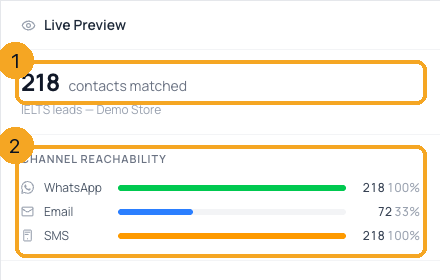
The Live preview counts who matches (1) and how many you can reach on each channel (2). On WhatsApp leaves out numbers WhatsApp said are not on WhatsApp. If nobody matches, Change a condition; if the count fails, Retry. A condition that is not finished is named in red with Remove it — the audience cannot be saved until it is fixed.
6Save and use it
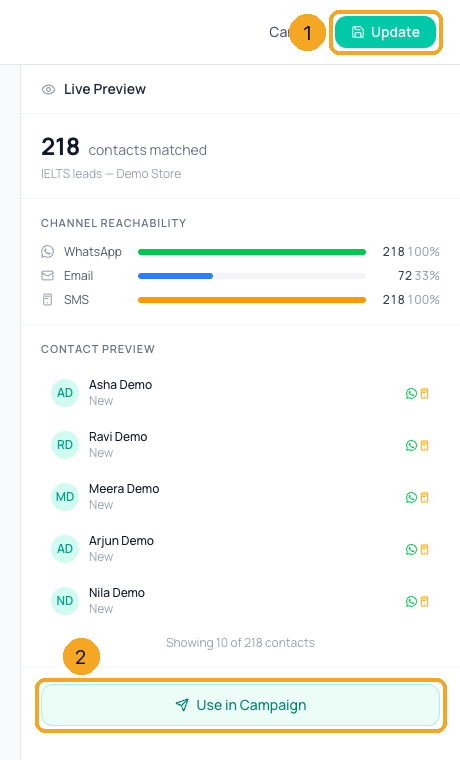
Press Save Audience — Update (1) when you are editing one. On a saved audience, Use in Campaign (2) opens a new campaign with it chosen.
Why does "Gone quiet 30 days" include people who never wrote?
“Last seen” is when the person last wrote to you. Someone who has never written has not been seen at all, so they count as quiet. Importing contacts, a CRM sync or adding someone by hand does not make them “seen”.
Why is "On WhatsApp" smaller than the number of contacts with a phone?
It leaves out the numbers WhatsApp already said are not on WhatsApp. A campaign leaves them out too, so the count is who can really get the message.
What is Stage here?
The stage of the contact’s newest chat — the same stage the inbox and the contact show — from your own list in Settings → Contacts → Stages. A chat never moved to a stage counts as your first stage.
What happens to a list when everyone in it is removed?
It holds nobody. It never turns into “everyone”, so a campaign sent to it reaches no one.
Why don’t the numbers beside the groups add up to the total?
One person can match more than one group but is counted once in the total, and exclusions take people out after. The Live preview shows the final count.
Does deleting an audience delete the contacts?
No. Only the audience goes; every contact stays.
Which day is "on 5 Nov"?
Your company’s day, in its own time zone.
Are people who opted out sent to?
No. A campaign leaves out everyone who opted out of that channel, even when they are in the audience.
Is an audience fixed or does it update?
A rule updates by itself: people join when they start matching and leave when they stop. A list stays as it is until someone changes it. The badge on the card says which.