Verify shows what will happen before anything is saved — and fixes the one thing that most often stops WhatsApp: a number written without its country code.
In review: written from the product, not yet walked through live.
1Open the import sheet
Open Contacts and press Import (1). The sheet opens over the page.

2Put your people in
Press Choose a file (a .csv, .xlsx or .xls), drop the file anywhere on the grid, or copy the rows in Excel or Google Sheets and paste them into the first cell. Flow matches your headings to its fields; a column it cannot place stays grey until you choose its field. You can type in any cell, like a spreadsheet.
3Verify — and see what Flow did to the numbers
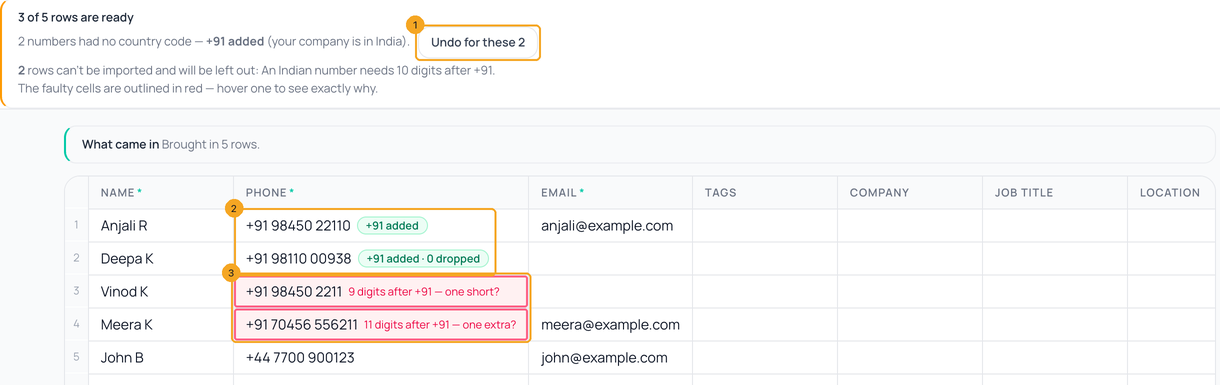
Press Verify. Nothing is saved yet. If your company is in India, numbers written as 10 digits, or with a 0 in front, get +91: the banner says how many, with Undo for these (1) to keep them as you typed them, and each one shows +91 added (2). A cell that can’t be imported is outlined red with the reason on it — for a +91 number, how many digits it has after +91 (3). Fix it in the cell and press Re-verify, or leave it: that row is left out.
4Numbers with no country code
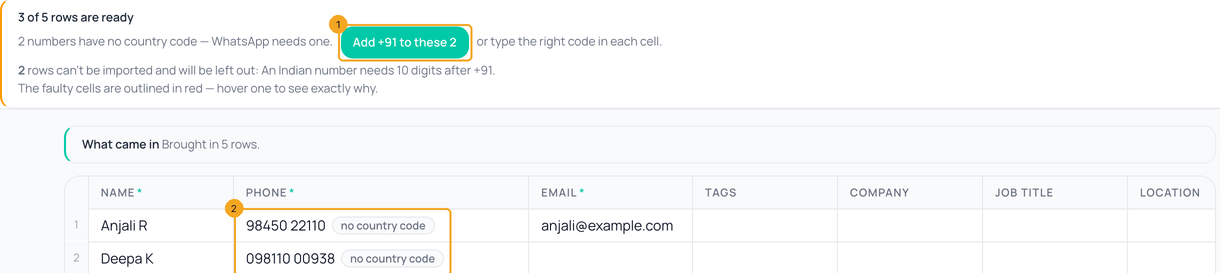
WhatsApp needs every number with its country code. When some have none — your company is outside India, or you pressed Undo — the banner says so with one click to add your own code, here Add +91 to these 2 (1). Each of them is tagged no country code (2). If they are from somewhere else, type the right code in each cell instead. If your company has no country in SkedX, the banner asks which country they are from.
5Import
Press Import N rows. The sheet closes and a small box at the bottom of the page counts the rows as they land, then names anyone who was matched to a contact you already had instead of being added twice.
© 2026 SkedX · Sample data only · Share and link freely · Copying the product or its design is not allowed · Terms
Common questions
Why did Flow add +91?
Your company is in India, and a 10-digit mobile without a country code can’t be reached on WhatsApp. Flow adds +91 only to numbers that are clearly Indian mobiles (10 digits starting 6–9, or 0 and those 10). Press Undo for these to keep them as typed.
Will it find people I already have?
Yes — someone saved earlier as 98450 22110 is the same person as +91 98450 22110, so the row updates them instead of adding a second contact.
Does Flow change numbers I saved before?
Not by itself. Contacts shows one line when some saved numbers have no country code — see Add the country code to numbers saved without one.
Can Flow tell me which numbers are on WhatsApp before I send?
No — WhatsApp offers no way to check. The first message tells, it is not charged when it fails, and the person is then marked Not on WhatsApp.
Next in ContactsAdd the country code to numbers saved without one →
Useful links
- Contacts in SkedX Flow — Import is at the top
Previous: Build an audience in SkedX Flow · All Contacts guides
Did this guide help?
Still stuck?Chat with support →


