Contacts counts them and adds your code to all of them in one click — only when you press it.
In review: written from the product, not yet walked through live.
1See how many, and who
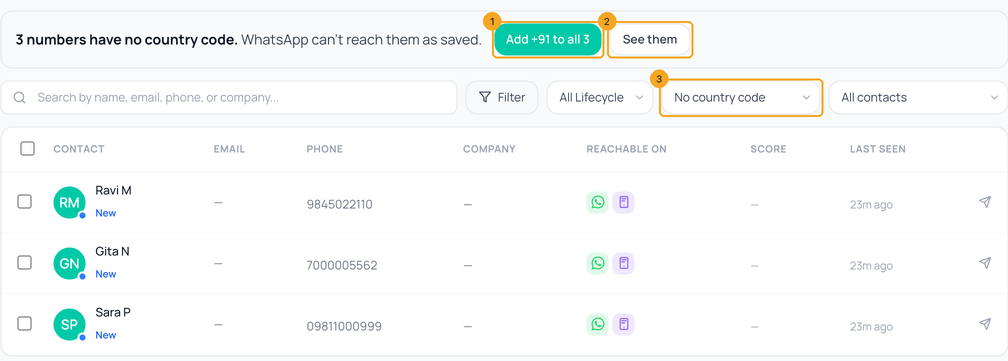
Open Contacts. While some numbers have no country code, a line above the list says how many, with Add +91 to all (1). See them (2) lists only those people — the filter reads No country code (3).
2Add your code to all of them
Press Add +91 to all (1 in the picture above) — your company’s own code. Each number gets it, with a 0 in front dropped (098110 00999 becomes +91 98110 00999), and the line then says how many were changed. A number that would become one another contact already has is left as it is: the line counts those — merge the two contacts instead.
3New numbers get it as they come in
You won’t need this line again for new people. When your company is in India, Flow adds +91 to a 10-digit mobile as it comes in — an import, Add contact, or the API. Typing a number in Add contact shows what will be saved under the field, or how many digits a +91 number has when it is not 10. See Import contacts for the sheet.
© 2026 SkedX · Sample data only · Share and link freely · Copying the product or its design is not allowed · Terms
Common questions
Does Flow change my numbers without asking?
No. Saved numbers change only when you press Add +91 to all. New numbers get +91 as they come in, and the import sheet shows it before anything is saved, with Undo.
Some of my contacts are in another country.
Press See them and edit those numbers on the contact with their own code first; then add yours to the rest.
I don’t see “Add +91 to all”.
Your role needs permission to edit contacts, and your company needs its country in SkedX. Without them the line still offers See them, and you can edit each number.
Useful links
- Contacts in SkedX Flow — the line sits above the list
Previous: Import contacts into SkedX Flow from a spreadsheet · All Contacts guides
Did this guide help?
Still stuck?Chat with support →


