A skill is something SkedX can do in a chat — show your products, take a booking, collect a form.
Your AI models, your automations and your team all use the same skills, so you set each one up once, here.
In review: written from the product, not yet walked through live.
1Open Skills
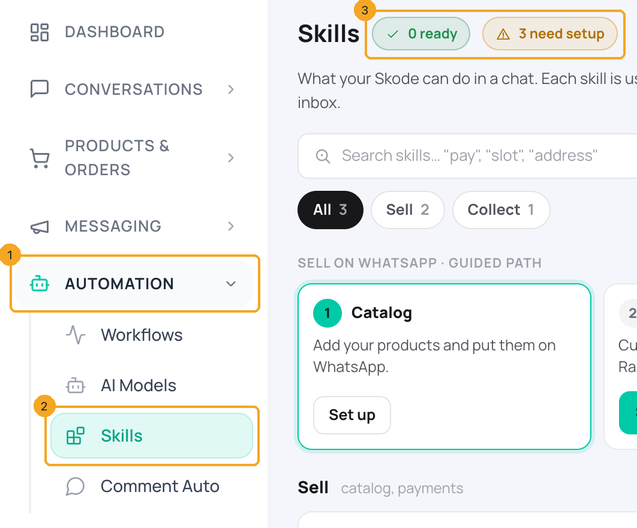
In the menu, open Automation (1) and click Skills (2). The top of the page counts how many skills are ready and how many need setup (3).
2Follow the path to sell on WhatsApp
The Sell on WhatsApp path shows the order to set things up in. Start with Catalog (1). A step that is still being built offers Notify me (2), and a step that needs an earlier one says which (3).

3Find a skill
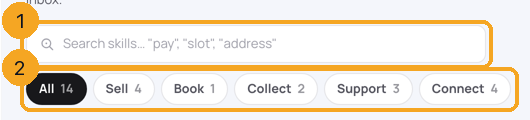
Type what you want in the search box (1) — for example “pay”, “slot” or “address”. Or pick a group (2): Sell, Book, Collect, Support or Connect.
4Read a skill’s card
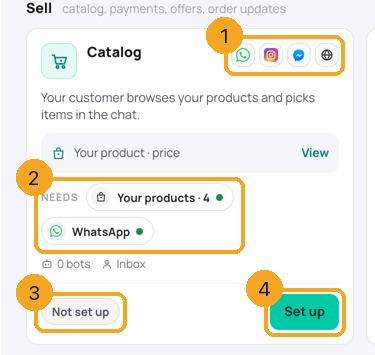
Each card shows the channels the skill works on (1) and what it needs (2) — a green dot is in place, an amber dot is missing; click one to fix it. Its state is at the bottom (3): Ready, Not set up, Waiting for Meta or Coming.
5Set it up, or ask to be told
Click Set up (4 in the picture above) to open the skill’s setup — for Catalog that is Set up your catalog. On a skill marked Coming, click Notify me; SkedX tells you on this page when it opens.
© 2026 SkedX · Sample data only · Share and link freely · Copying the product or its design is not allowed · Terms
Common questions
Is a skill the same as an automation?
No. A skill is what can be done in a chat, such as sending a product. An automation decides when to do it, such as “when someone taps Buy now, send the product list”. Your AI models, your automations and your team all use the same skills.
Why does Payments say Coming?
Payments inside WhatsApp is being built. Click Notify me and you will be told on the Skills page when it opens.
What does “0 bots” on a card mean?
None of your AI models uses that skill yet. The catalog setup’s last step lets you switch it on for each AI model.
Next in Skills & sellingSet up your catalog: put your products on WhatsApp, step by step →
Useful links
- Skills in SkedX Flow — menu Automation → Skills
Did this guide help?
Still stuck?Chat with support →


