Send WhatsApp’s address form instead: the customer fills it in once, and the address lands on their contact for whoever delivers.
In review: written from the product, not yet walked through live.
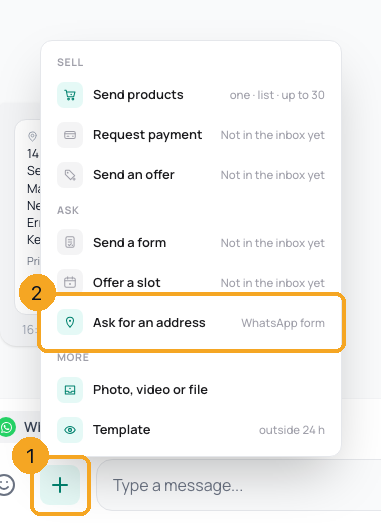
1Open the + menu and pick Ask for an address
In a WhatsApp chat, click + beside the reply box (1) and pick Ask for an address (2). It says WhatsApp form; with the 24-hour window closed it says by template and opens Templates, and on another channel it says as a message and types the question for you.
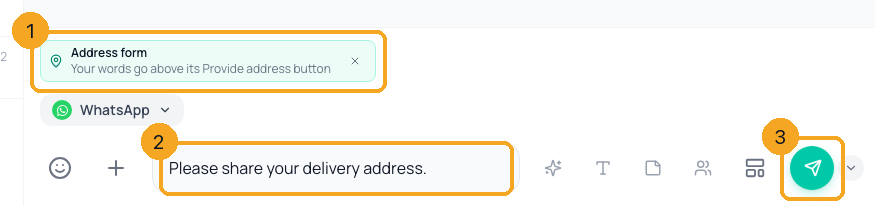
2Write the words above the button and send
The Address form waits above the reply box (1). What you type (2) goes above its Provide address button — or leave “Please share your delivery address.” Press Send (3).
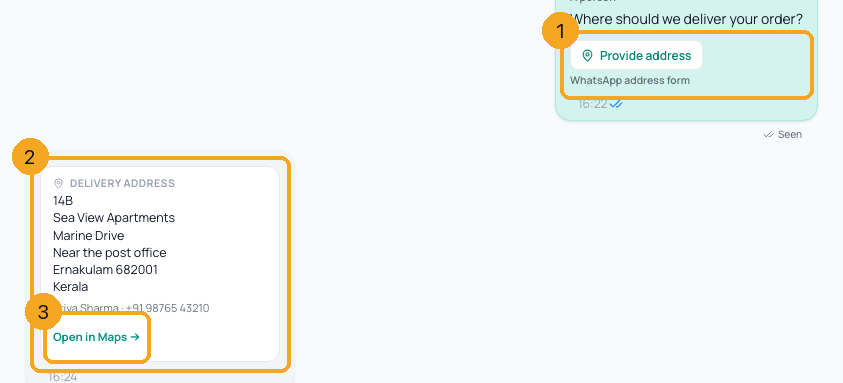
3See the address arrive
The form you sent shows its button (1). When the customer fills it in, a Delivery address card appears (2) with every line, their name and number, and Open in Maps (3).
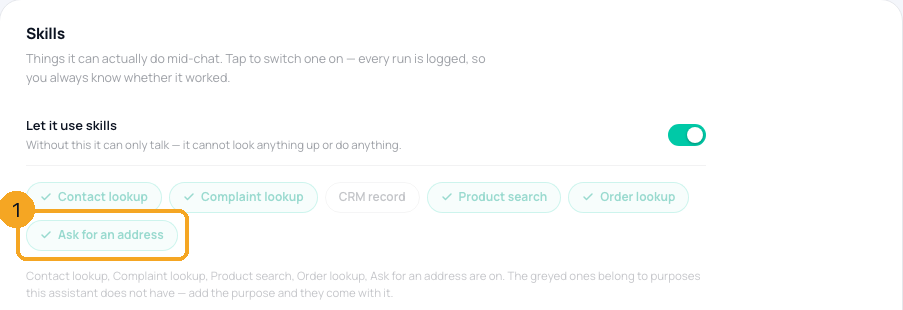
4Let an AI model or an automation ask
An AI model whose purpose includes Order & tickets gets Ask for an address among its skills (1) and sends the form when a customer is ready to order. In an automation, add the Ask for an address step; it waits for the answer, then the next step runs.
© 2026 SkedX · Sample data only · Share and link freely · Copying the product or its design is not allowed · Terms
Common questions
Where does the address go?
Onto the customer’s contact in SkedX Flow: delivery address, pincode, city and state, and their location if it was empty. A field that already has something is never overwritten.
Why did my customer get “Send location” instead of a form?
WhatsApp’s address form works for Indian (+91) numbers only. Everyone else is asked to share their location on a map.
Can I ask on Instagram or Messenger?
Not with a form — those apps have none. The same menu item types the question into the reply box so you can send it as a message.
Does the address reach SkedX CRM?
No. The CRM shows the conversation, address card included, but only name, email, phone and campaign are copied between products.
Next in InboxSend a form from the inbox →
Useful links
- Inbox in SkedX Flow — the + button beside the reply box
Previous: Send products from the inbox: one product or a list, in the chat · All Inbox guides
Did this guide help?
Still stuck?Chat with support →


