SkedX Call lets your team call customers from the CRM using their own phones, while the customer sees your business number.
Every call is logged against the right person automatically. No app to install and no special phone — everyone uses the mobile they already have.
In review: written from the product, not yet walked through live.
1What happens when you press Call
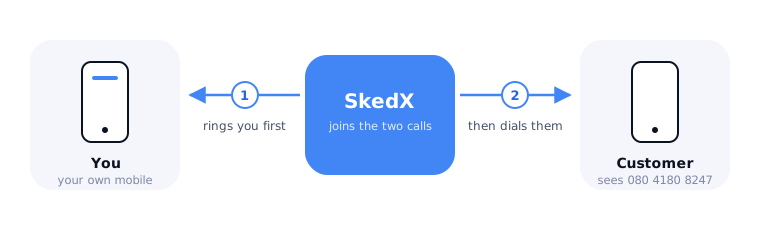
SkedX rings your phone first. The moment you answer, it dials the customer and joins you together. To the customer it looks like a normal call from your business.
- Press Call on a profile. You’ll see “Your phone will ring first; answer it to connect the call.”
- Answer your phone. You’ll hear “Connecting you to Priya”, then the customer’s phone ringing — or the network’s own message if their phone is off or busy. On screen the call card says “Ringing Priya — you’ll be connected…”. Let it ring: most people pick up after 10–20 seconds.
- Talk. The call, how long you talked and whether they answered are saved on the profile. If your company records calls, it chose how the customer is told (the rep asks, a short notice as they answer, or their own agreement — Calls → Settings → Recording & consent), and the recording appears on the profile afterwards.
2What a business number is
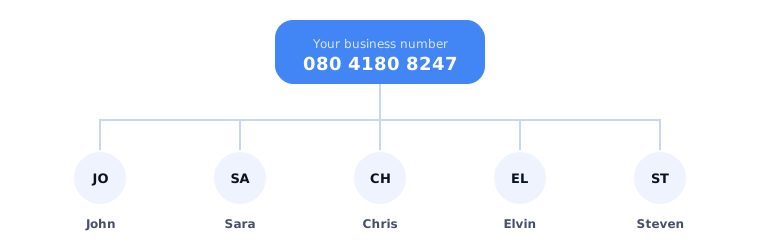
A business number is the number your customers see and call. You put people on a number: everyone on it calls out as that number, and a call to that number reaches them. In the app this is called a line.
A number isn’t tied to one person or one phone. Each person answers on their own mobile, which SkedX checks once with a short test ring. One person can be on more than one number; their calls go out as the first number they were put on.
3When a customer calls you
A call to your business number is offered to the people on that number, in this order:
- A customer you already know goes to their owner. SkedX matches the caller’s number to their profile.
- Everyone else is shared out the way your admin chose in call settings: taking turns (the default), everyone at once (first to answer takes it), one after another, or whoever is least busy.
- A missed call is never lost. If nobody answers, SkedX creates a Return missed call task for the right person. A caller SkedX has never seen becomes a new profile.
4How many numbers do you need?
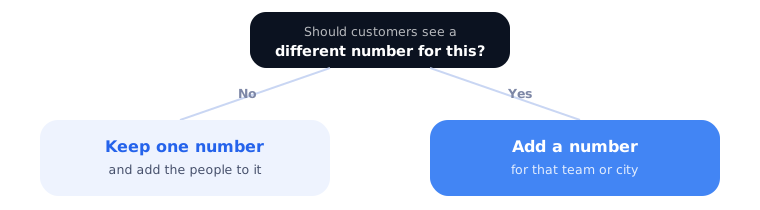
Numbers are for teams and places, not people. A number is shared, so adding salespeople never means adding numbers. Ask one question: should customers see a different number for this?
| Your business | Numbers | Why |
|---|---|---|
| A sales team of any size | 1 | Everyone calls out as the same number; incoming calls are shared. |
| Sales and support that customers reach separately | 2 | One per team, so a support call never lands with sales. |
| Offices in Mumbai and Bengaluru | 2 | One per city, so each office has a local number. |
| Two brands run from one account | 2 | Each brand shows its own number. |
| One number per salesperson | — | Not needed. Calls are already logged per person, and a shared number keeps working when someone leaves. |
Not sure? Start with one. Each number is billed monthly — the price is shown when you choose. You can add another later.
5Minutes
Each person on your plan adds their minutes to one shared pool for the whole team, and the pool resets every month — a busy caller can use more than their share while a quiet one uses less. Only real conversations count: the minutes you talked with the customer, on calls you make and calls you receive. A call the customer never picked up uses none.
6Common questions
Do I need to install an app?
No. You answer on the phone you already have. Each person’s phone needs to be an Indian mobile number, confirmed once with a test ring.
Will customers see my personal number?
No. They only see your business number.
Can I choose a number in my own city?
Numbers are currently available in Bengaluru and Mumbai. A number from either works for calls anywhere in India.
Why do I need to verify my business first?
Indian regulations only allow business numbers to be issued to verified businesses. It’s a one-time check, usually approved within one or two working days. You can look through available numbers while you wait.
A salesperson left. What happens to their calls?
Take them off the number. The number, and every call and recording on your profiles, stays with your business.
The Calls page keeps asking me to add my phone. Can I hide it?
Yes. Press ✕ on the card (Hide this until I need it): it stays hidden for you, in this company, on this browser. The same goes for Take a test call, Put you on the line and Add your team. If you look after SkedX Call — you chose the plan and the numbers — the page does not ask for your phone at all. Either way, the moment you press Call without a phone on file, SkedX asks for it there. The setup steps (sign, verify, choose and pay for a number) cannot be hidden: calls cannot work without them.
© 2026 SkedX · Sample data only · Share and link freely · Copying the product or its design is not allowed · Terms


