SkedX listens to the call so you don’t have to type it up — but nothing lands on the record until you say yes.
In review: written from the product, not yet walked through live.
1Keep, change or dismiss the note
Open the enquiry after the call. The note SkedX wrote sits in the note box (1) with the Skode AI Suggestion pill (2). Tap the tick (3) or the box’s own Note button (5) to post it, the cross (4) to throw it away, or type to make it your own. Write my own (6) drops it and gives you an empty box.
2Keep or dismiss a suggested field
In Lead Info, an empty field the call made clear shows the suggested value (1) with the spark, tick and cross (2). Point at the pill to see Skode AI Suggestion and the words it came from (3). The tick saves it; the cross leaves the field empty.
3Say when to follow up
If the call or your note named no time and the enquiry is open with nothing planned, SkedX asks Needs you · Follow up with Priya about the sample class? (1) — what it is about comes from the call, note or chat, and is left out when nothing made it clear — and offers times (2) — the time you usually pick comes first, marked your usual. Pick… opens the same date-and-time picker as a task: choose the day, add a time, tick Alert me 15 min before if you want a reminder, then Done. Pick one and SkedX books the call on your calendar — it shows in Follow-ups, with Undo (3) for 10 minutes. No follow-up (4) says you don’t want one for now.
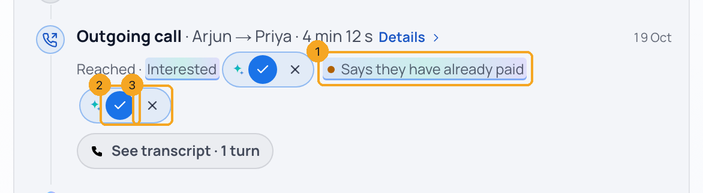
4When the customer says it’s already paid
On the call row, after the amber dot, SkedX shows what it heard (1). Keep (2) notes it on the call — the row then says noted · payment to check — and makes one Check the payment to-do, so someone confirms the payment. The enquiry’s status does not change: Paid only comes from a confirmed payment or a person. Clear (3) removes it if it was misheard.
5Answer several things, one at a time
When SkedX has more than one thing to ask, the box says Needs you · 1 of 3 (1). Answer with a chip (2) and the next question comes in. Skip › (3) leaves it for later — it comes back at the end and is never counted as a no. ⋯ (4) has Don’t suggest this to me and Why am I seeing this?. Every answer stays under the box with Undo (5).
© 2026 SkedX · Sample data only · Share and link freely · Copying the product or its design is not allowed · Terms
Common questions
Does SkedX learn from what my team picks instead?
Yes. When your team changes or keeps a suggested status, that choice guides the next suggestion — for example, if your team marks a workshop confirmation as Contacted, SkedX suggests Contacted next time. It learns from your company only, and uses your status names exactly as your team sees them.
Does SkedX change my enquiry on its own?
Not while suggestions are on. Nothing is written until you tick it. Later, a field your team has kept again and again without changes may be filled automatically, always with an Undo.
Which fields can it suggest?
Only empty ones, such as course, job title, company or city. Never full name, phone, email, owner or lead source, and never a field it wasn’t sure of.
Does it suggest the status?
Yes, as a suggestion only — for example Quote sent → Can be converted, with the words it came from. It never moves an enquiry to Paid, Not interested or any closed status by itself.
How does SkedX know our course names?
Once a week it reads your website, your ad campaign names and the words your team repeats in notes and calls, so “Claude” isn’t written as “cloud” and your price is never taken as the customer’s budget. No customer’s details are kept in it.
The customer said they already paid — what happens?
SkedX flags it for you and suggests a “Check the payment” task, so someone confirms it before the status changes.
Does it read my notes, emails and chats too?
Yes, when suggestions are on: a note you write, an email on the enquiry and a WhatsApp, Instagram or Messenger chat (once it has been quiet for a few minutes) leave the same tick-or-cross suggestions. Notes SkedX wrote itself are never read again. Phone numbers, emails and the person’s name are hidden before the AI reads anything.
I wrote a note but no follow-up — what happens?
If the enquiry is open and nothing is planned, SkedX asks “When should we follow up?” with a few times to pick from, so every open enquiry ends with a next step.
Why does a call-back go on my calendar?
A call-back with a time is a booking: when you keep it, it is one call on your calendar at that time. A follow-up without a time, or one that is not a call (send the brochure), is a to-do instead.
I crossed something out and typed my own — does SkedX learn from that?
Yes. What you put instead is kept next to what SkedX suggested, so we can measure how often it was right for your company before anything is ever filled on its own.
Will SkedX ask me the same thing again after every email?
No. While a suggestion is waiting on the enquiry, another email, note, chat or call that says the same thing does not add it again — you answer it once. A different value is a new suggestion.
Can SkedX suggest moving an enquiry back to the start?
No. SkedX never suggests sending an enquiry back to its first status once it has moved on — a person decides that.
What if I ignore a suggestion?
It stays until you answer it. After 48 hours it is counted as ignored, not as a yes.
Why is the call outcome sometimes blank?
SkedX only suggests an outcome when the call clearly says it — the exact words are shown with it. “Not interested” or “wrong number” need those words; “interested” needs the customer to say they want to join, pay or register; “call back later” needs them to ask for a call-back or a time. When it is not that clear, the outcome is left for you to set — a blank is better than a wrong one.
Can I stop SkedX suggesting something?
Yes. Open ⋯ on the question and choose Don’t suggest this to me — that kind of suggestion stops for you at once, and Undo brings it back. If you say Not now to the same kind twice in a row, SkedX rests it for 30 days on its own. Others on your team still see it unless they turn it off too.
Why does the follow-up say what it is about?
So it makes sense wherever you see it — in Tasks, on the calendar, on the dashboard and in the daily brief: “Call back Priya about the sample class”. SkedX only adds the subject when the call, note, email or chat clearly says it, and shows the words it came from; otherwise it is just “Call back Priya”.
What does “your usual” mean?
When you pick the same follow-up time three times in a row (for example two days later at 11:00), SkedX puts that time first and calls it your usual. It is learned from what you picked, nothing else.
What does SkedX keep to learn this?
Only counts: which kind of suggestion, what you did with it, and when. No note, call or message text is kept for it, and no AI is used to work it out.
Previous: How SkedX Call works — and how many numbers you need · All Calling guides
Did this guide help?
Still stuck?Chat with support →


