The call card is where the next step is set, while the person is still on the line.
In review: written from the product, not yet walked through live.
1Notes while you talk
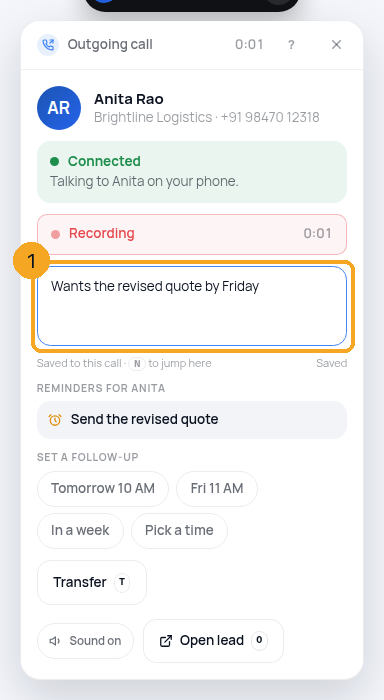
On the connected card, type in the note box (1) — it saves to this call as you type. Press N to jump there. After the call, the note is already on the after-call card.
2Open the lead
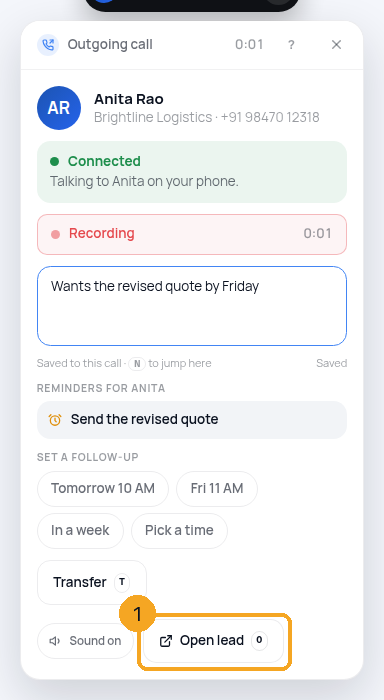
Open lead (1), or press O, opens the person's record in this tab. The card stays on screen.
3Reminders, a few seconds in
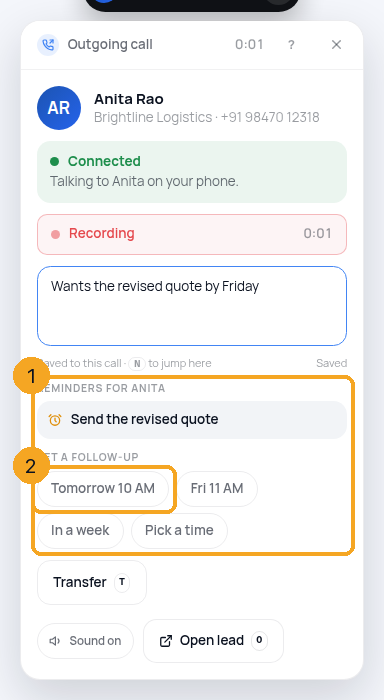
About four seconds after the call connects, the card opens by itself with Reminders for this person (1) — what you already promised — and a Set a follow-up row (2). Minimise folds it back; click the island to open it again.
4Set the follow-up after the call
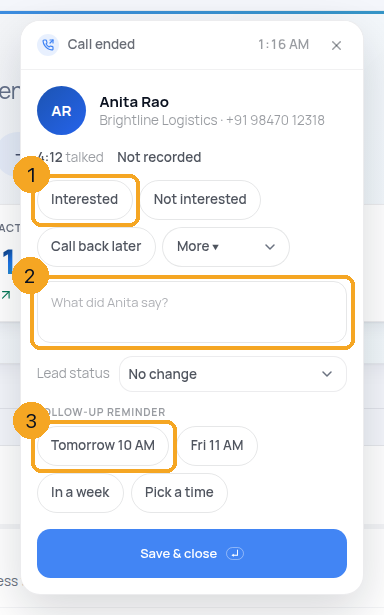
When the call ends, pick the outcome (1), keep or edit the note (2), and tap a time under Follow-up reminder (3): Tomorrow 10 AM, Fri 11 AM, In a week or Pick a time. It becomes a task on your list — "Call Anita: pricing for 40 seats" — and reminds you then. If the person moved on, change their status on the same card. Save & close (Enter; in the note, Ctrl+Enter). ✕ closes — if you picked or typed something, it asks once first.
5Transfer to a free teammate
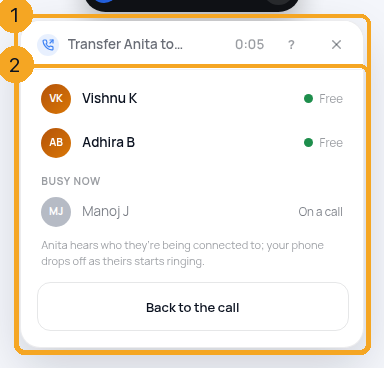
Transfer (1), or T, lists only teammates who are free right now (2) — signed in, not on a call, with a phone set up; anyone busy is shown below with why. Pick one: the person you are talking to hears “Connecting you to Vishnu”, Vishnu’s phone rings from your company’s number, and your phone drops off. If nobody is free, there is no Transfer button.
6A second call comes in
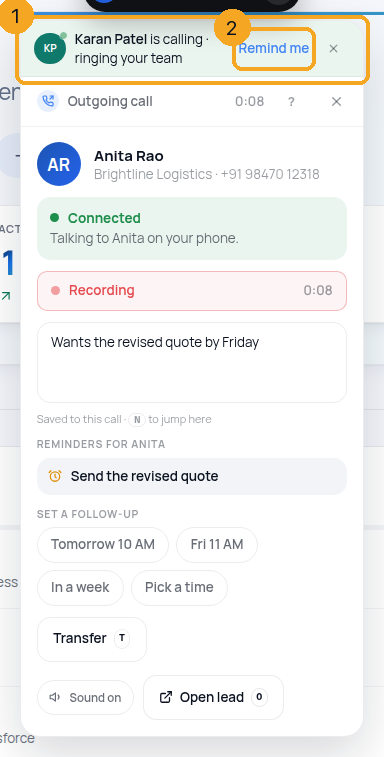
Your phone is busy, so a new caller shows as a strip above your call (1): who it is, and that it is ringing your team. Remind me (2) sets a task to call them back.
© 2026 SkedX · Sample data only · Share and link freely · Copying the product or its design is not allowed · Terms
Common questions
Where does the reminder go?
To your Tasks, as a call task with the person on it. It reminds you at the time you picked, the way any task reminder does.
I chose Call back later but did not pick a time
Call back later always asks for the time first, so a call back never ends up without a task.
Transfer is missing
Nobody on your team is free right now — signed in, not on a call, with a phone set up. The button appears when someone is.
Do I stay on the line while it transfers?
No — your phone drops off as soon as the transfer starts, and the person hears who they are being connected to while your teammate’s phone rings.
Can the second caller be answered by me?
Not while you are on a call — your phone is busy. The call rings the rest of the team; Remind me sets a task so you call them back.
Next in CallingRead a call’s transcript: who said what →
Previous: The call card: what it shows while you call, and how to close it · All Calling guides
Did this guide help?
Still stuck?Chat with support →


