Here is how to read the list, and how to settle an older call from its history.
In review: written from the product, not yet walked through live.
1The icon on each call
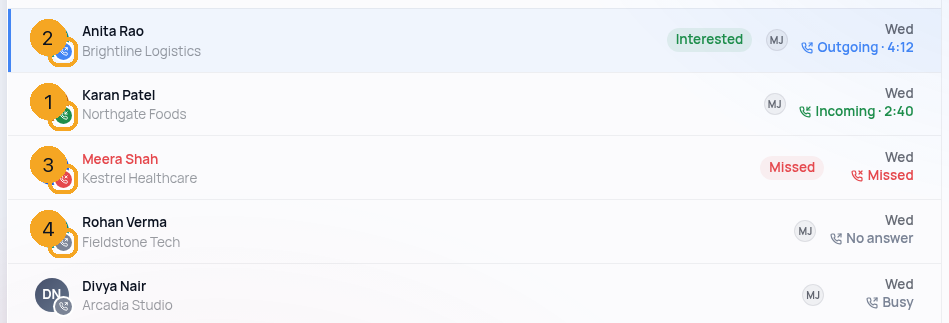
Open Calls. On each row the small badge on the person's photo is the call: incoming (1) in green, outgoing (2) in blue, missed (3) in red — the only red one — or not answered (4) in grey. It is never the app the person first wrote to you on.
2What the line under the time says
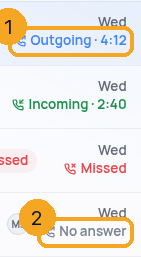
Under the time, the row says the kind and the length — Outgoing · 4:12 (1) — or, for a call that did not connect, why: No answer, Busy, Cancelled or Failed (2).
3Settle an older call from its history
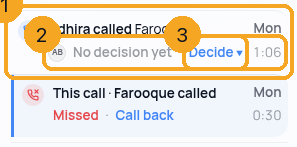
Open a call. History with the person lists every call on two lines: who called whom and the day (1), then who took it, the result and the length (2). A call still on No decision yet has Decide ▾ (3): pick the outcome from your company's own list and it is saved on that call. A missed call has Call back.
4Listen to the recording — faster if you like
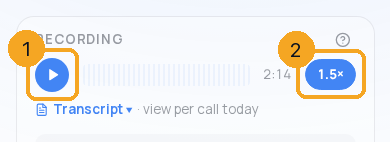
Open a call. Under Recording, press play (1). The pill beside the length (2) sets the speed: tap it for 1.5×, again for 2×, once more for 1×. It turns blue whenever it is not 1×, the length beside it stays the real length of the call, every part of a call in two parts plays at the same speed, and the speed stays for the next recording you play on this device. The call’s transcript opens under the recording by itself.
5On a phone
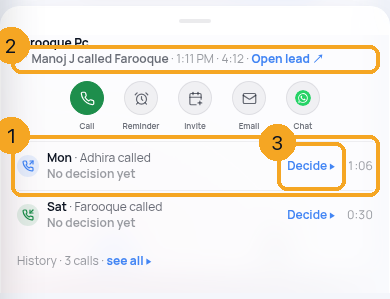
Open a call on your phone: the sheet lists the two calls before it (1), each with its icon and what happened — Missed, No answer or the outcome. A call still on No decision yet has Decide ▸ (2), which opens the full history to pick it; a missed call has Call back. see all ▸ (3) opens every call with the person.
© 2026 SkedX · Sample data only · Share and link freely · Copying the product or its design is not allowed · Terms
Common questions
Can I play a call recording faster?
Yes. Beside the recording’s length is a pill that says 1×. Tap it for 1.5×, again for 2×, and once more to go back to 1×. Your choice stays for the next recording you play on the same device.
A person came from Instagram — why is there no Instagram logo on the call?
Because the call was a phone call. The badge shows the call, not where the person came from. Where they came from is on their record and on the call's page.
Why is only the missed call red?
Red means something is owed: someone called and nobody answered. An outgoing call they did not pick up is grey, with the reason under the time.
Why don’t I see Decide on an older call?
Decide appears only when your company has call outcomes set up (Calls → settings). Without a list there is nothing to pick, so the link stays away.
Can I change an outcome I picked?
Yes — open the call and pick another from the outcome list. The latest pick is the one on the call.
Previous: Get your calls answered · All Calling guides
Did this guide help?
Still stuck?Chat with support →


