Here is what it shows at each step, and how to hide or close it.
In review: written from the product, not yet walked through live.
1The island
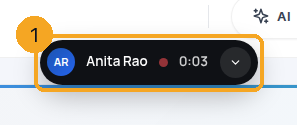
When a call starts, a small card sits at the top centre (1): the person, a coloured dot and the timer. Rest the mouse on it for half a second to see one line — where the call is and the recording — without opening anything. Click it to open the full card (2); click again or press Esc to fold it back. It folds by itself after 12 seconds. On a call list it stays small and shows your place — 13 of 50 — because the list already shows the rest.
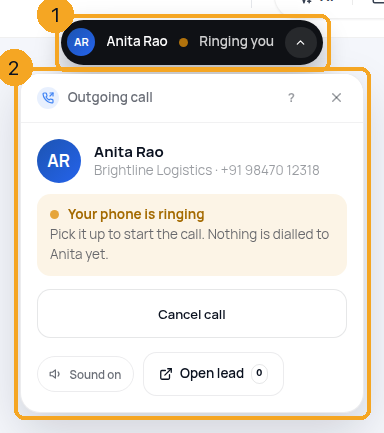
2Your phone is ringing
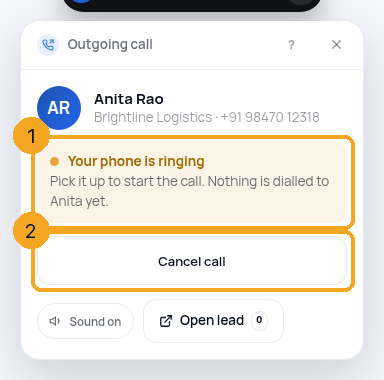
Every SkedX Call is answered on your own phone. Amber (1) means it is ringing now: pick it up to start the call. The computer plays a soft ring at 40% volume until you do. Cancel call (2) stops everything. If a phone does not answer, the card says whose — You didn’t pick up, or No answer / Busy with how long it rang — and offers Try again, Call later… (a reminder) and Close.
3Call started, then connected
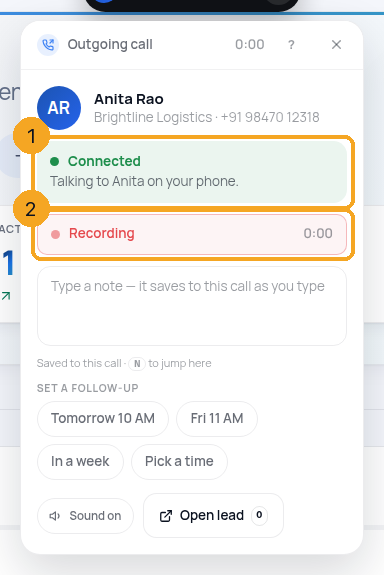
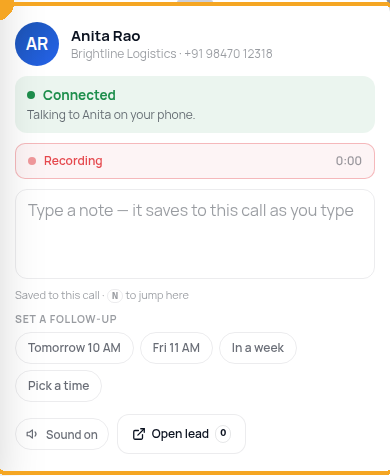
When you pick up, the ring stops and the card turns blue: Call started (1) — SkedX is ringing the other person; you hear it on your phone. Green (2) means connected, and the timer runs.
4The recording line
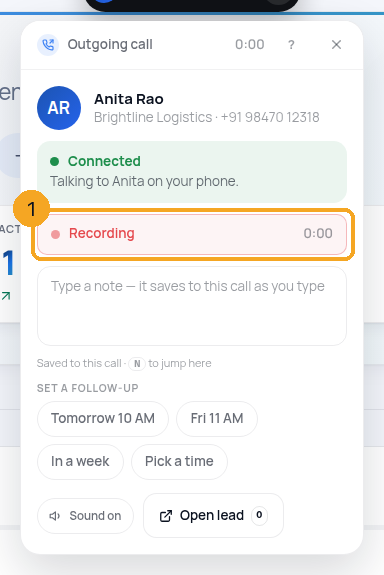
The card always says what is happening to the recording: Recording with the time (1), Not recording with the reason and a link to the setting (2), or Recording paused with how much is saved (3).
5When someone calls you
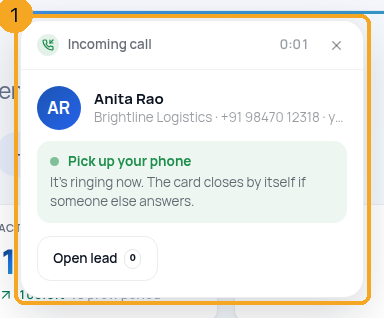
Your phone rings and the card shows who it is and why it rang you (1) — Pick up your phone, with Open lead (O). If a teammate answers first, the card says so and closes by itself after 3 seconds. If nobody answers, it becomes a red Missed call card (2) with how long it rang, Call back and Close.
6Hide or close the card
Every state has ✕ (1). During a call it hides the card into the island (2) — the call carries on. After a call, ✕ closes the card; if you typed something it asks once whether to keep it as a draft. If the carrier goes quiet for a minute, the card says Checking the call… and closes with what really happened — it never stays stuck.
7On a phone
The card is a sheet at the bottom of the screen (1). Swipe it down to hide it; a green bar at the top (2) shows the timer and the recording dot. Tap the bar to bring the sheet back.
© 2026 SkedX · Sample data only · Share and link freely · Copying the product or its design is not allowed · Terms
Common questions
Cancel call did nothing once they answered
Cancel works only before the call connects — while your phone or theirs is ringing. Once you are talking, hang up on your phone; the card closes by itself.
The card did not go away after my call
Press ✕ — it closes in every state. If the carrier has not confirmed the call ended, the card checks the call log itself after a minute and closes with the real result.
Why does the ringing stop when I pick up?
The computer rings only to tell you your own phone is ringing. Once you pick up, everything you need to hear is on the phone, so the computer goes silent and the card says Call started.
How do I turn the sound off?
The sound switch is on the card and in Calls → settings. It is per person. Your phone still rings either way.
Can I answer the call on the computer?
Not for calls on Indian numbers — they are answered on your phone; the card tells you what is happening. Calls inside WhatsApp are a separate feature.
Why does the card show the full phone number?
Under the name the card shows the company and the number, as your role may see it. If your role hides phone numbers on records, the card shows the masked number too.
Next in CallingNotes, reminders and follow-ups from a call →
Previous: Read your calls list: incoming, outgoing, missed, not answered · All Calling guides
Did this guide help?
Still stuck?Chat with support →


