A call you can read back, line by line, with who said each thing — on the record, as a note, and on the Calls page.
In review: written from the product, not yet walked through live.
1Wait about a minute after the call
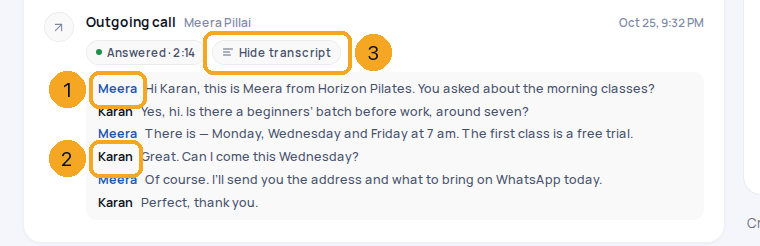
When an answered call of 15 seconds or more ends, its row in the record’s activity says Transcribing… (1) while the words are written. You don’t need to reload — the transcript opens by itself when it is ready, usually within a minute.

2Read who said what
The conversation opens under the call, one turn per line, each with the speaker’s first name: your teammate on the call in blue (1), the person on the record in black (2). Hide transcript (3) folds it away; Transcript brings it back.
3Find it as a note on the record
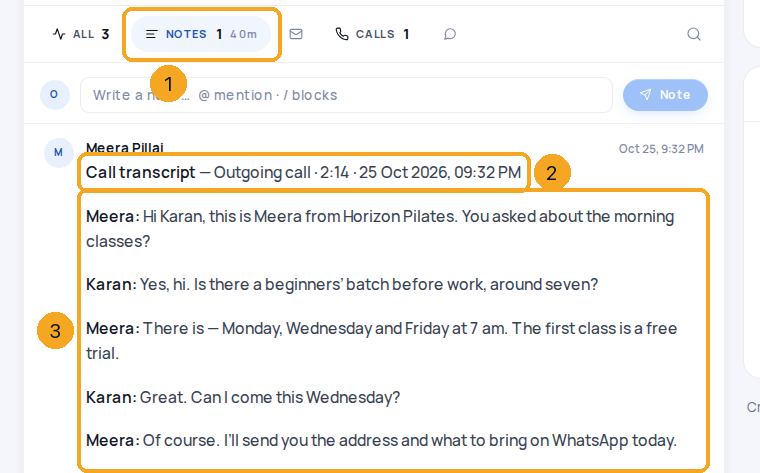
The transcript is also saved as a note, written by the teammate on the call, so it stays with the record. Press Notes (1): the note starts with Call transcript (2), then the direction, length and time, and the conversation follows (3). Under All it is not shown twice — the call row already shows it.
4Read it on the Calls page
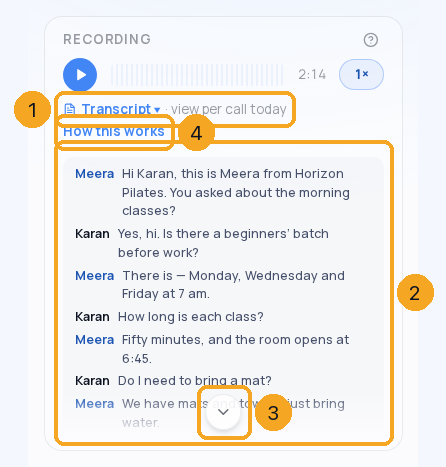
On Calls, pick the call. Its transcript opens under the recording by itself, named (2); Transcript ▾ (1) folds it away and opens it again. A long call scrolls in its box — the down arrow (3) shows the next part and goes when you reach the end. How this works (4) opens this guide.
© 2026 SkedX · Sample data only · Share and link freely · Copying the product or its design is not allowed · Terms
Common questions
Why does an older call have no names?
It was turned into text before your company’s transcripts named each speaker, so it shows the words as one block. Names need each side of the call recorded on its own, which starts from the day they are switched on — an older recording can’t be split.
Why wasn’t a call transcribed?
Calls under 15 seconds, and calls nobody answered, are not transcribed — the call says Not transcribed — the call was under 15 seconds. Transcripts also come only with SkedX Call Pro and Intelligence; Essentials records calls without them.
The call was in Hindi or Malayalam
Transcripts are always written in English, whatever language is spoken. A translated call says Spoken in Malayalam · shown in English above the conversation.
It says Caller instead of a name
The person isn’t named on the record yet — an incoming caller nobody has named is Caller, an outgoing one Customer. Add their name to the record and the next call’s transcript uses it.
What happens to transcripts if we change plan?
They stay readable. A plan decides what is made for new calls, never what you can read: on Essentials new calls are recorded but not transcribed.
Can we turn transcripts off?
An admin can: Calls → settings → Transcription & AI → Turn calls into text. Off means no new transcripts — and no AI notes, which read them. Recordings are still kept.
Next in CallingTalk to a teammate first, then hand the caller over →
Previous: Notes, reminders and follow-ups from a call · All Calling guides
Did this guide help?
Still stuck?Chat with support →


