Here is how to put someone on a number and give it their own phone.
In review: written from the product, not yet walked through live.
1Choose who answers a number
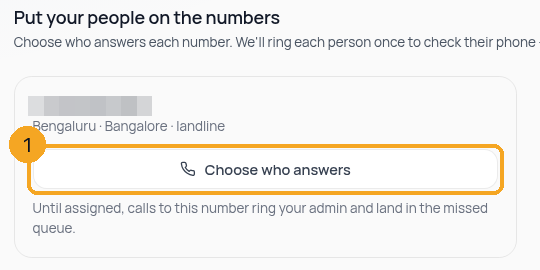
On the last step of setting up SkedX Call — Set up your lines — or in Calls → settings → Numbers & plan, find the number and press Choose who answers (1). The list shows everyone in Settings › Users, whether or not they have a phone yet.
2Add their phone — paste it any way
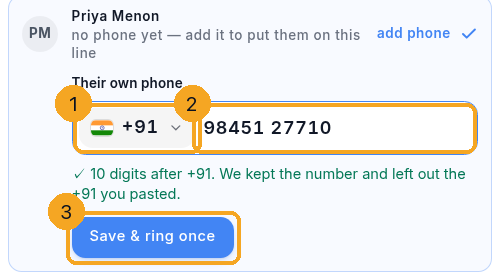
Tick the person. If they have no phone yet, Their own phone opens under their name: the country chip (1) shows India’s flag and +91, and you type or paste the number (2) with or without +91, 0091, a leading 0, spaces or dashes — the line under the box says what was left out. Then Save & ring once (3) saves it and rings that phone once, so you know calls reach them.
3Other countries
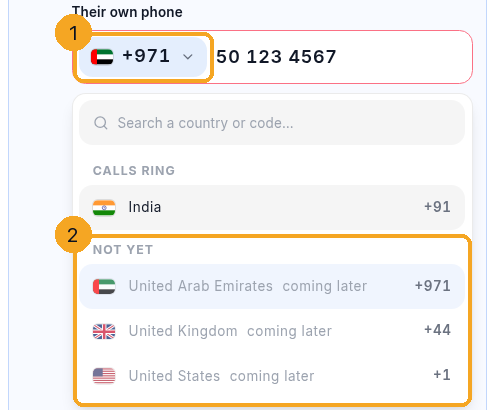
SkedX Call rings Indian numbers only for now. Open the chip (1): India is under Calls ring, and the other countries are listed under Not yet as “coming later” (2) — they cannot be picked yet. If you paste a number with another country’s code, the line under the box names the country and Save stays off: it is never cut down into a different Indian number.
© 2026 SkedX · Sample data only · Share and link freely · Copying the product or its design is not allowed · Terms
Common questions
The person I want is not in the list
The list is everyone in Settings › Users. Invite them there first; they appear here straight away.
Where is my own row?
At the top, marked You. Add your own phone there — add my phone — so calls ring you.
It asks “Is this Riya’s phone?” when I save a phone
You typed a phone into someone else’s row. If it is theirs, press Yes, it’s Riya’s — save & ring once. If it is yours, press It’s mine — put it on my row and it moves to your row. One phone belongs to one person: a phone already saved for someone else is refused by name.
Why can I only choose India?
SkedX Call rings Indian numbers today. Other countries are listed as coming later so you can see they are on the way; they cannot be picked yet.
I typed 11 digits by mistake
The box keeps all of them and says “11 digits — an Indian mobile is 10 after +91”. Fix the number; nothing is trimmed for you, so a wrong number is never saved.
A number says “picked · not paid for yet” — why can’t I choose who answers?
Picking a number doesn’t keep it: until it’s paid for, someone else can take it, and nobody can be put on it. Press Pay in accounts ↗ on that number — it’s there on the setup page, on Numbers & plan and on the Calls page — pay in the accounts tab that opens, and come back: the number goes live within a few minutes and Choose who answers appears.
Nobody is on a number yet — what happens to calls?
Until someone is on it, calls to that number ring your admin and land in the missed-calls queue.
“Ring it once” says calling is paused on our side
The test ring uses the same line a real call does, so when calling is paused on SkedX’s side the test stops too. Nothing is wrong with the phone you added. Choose Contact support under the message to chat with us; once we have it going, press Ring it once again. If you connected your own calling account, the message says to top it up there instead.
Next in CallingRemove a phone number you no longer need →
Previous: Keep or dismiss what SkedX suggests from a call, a note, an email or a chat · All Calling guides
Did this guide help?
Still stuck?Chat with support →


