Here is how to give it back — safely, with two checks.
In review: written from the product, not yet walked through live.
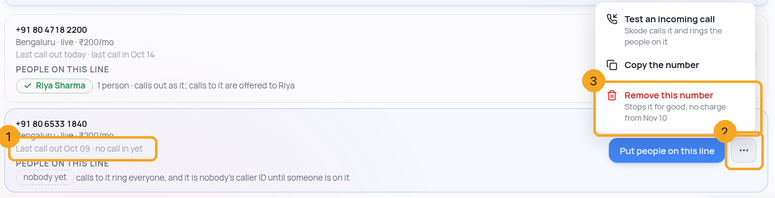
1Find the number and its ⋯
Open Calls → settings → Numbers & plan. Each number says when it was last used (1) — a number nobody calls from stands out. Press ⋯ (2) on the number, then Remove this number (3). Only people allowed to change Call settings see the ⋯.
2Read what will happen
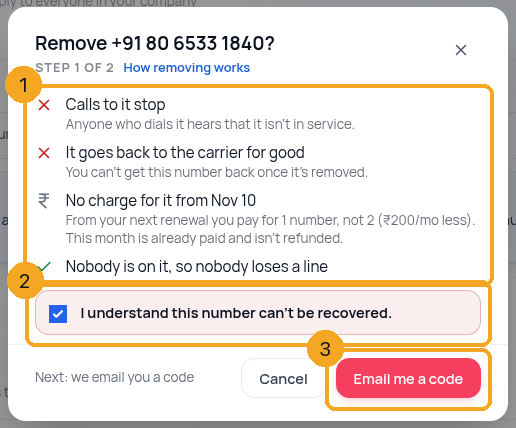
Step 1 of 2 says what removing does (1): calls to it stop, it goes back to the carrier for good, and there is no charge for it from your next renewal — this month is already paid and isn’t refunded. If someone would be left on no number, it names them and offers to put them on another number first. Tick I understand this number can’t be recovered (2), then press Email me a code (3).
3Enter the code we email you
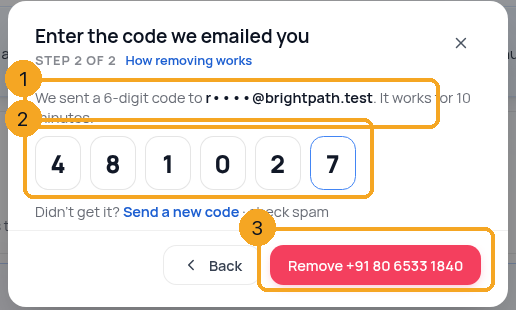
We email a 6-digit code to you (1) — the person removing the number. Type or paste it (2); it works once, for 10 minutes. Press Remove (3). If you get it wrong five times, or it expires, send a new code from the same place.
4It is removed
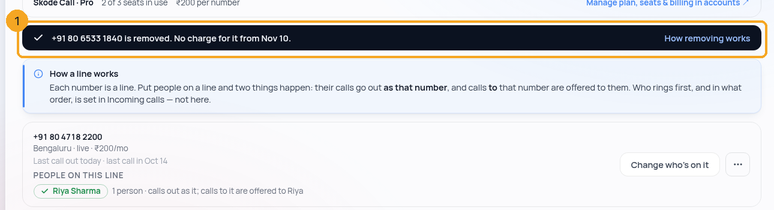
Numbers & plan says the number is removed and when the charge stops (1). Everyone who was on it is taken off, calls no longer go out as it, and your company’s owners and admins get a short notice.
© 2026 SkedX · Sample data only · Share and link freely · Copying the product or its design is not allowed · Terms
Common questions
Do I get money back for this month?
No. The carrier charges for the whole month, so the month you already paid isn’t refunded. From your next renewal you pay for one number fewer.
Can I get the number back later?
No. It goes back to the carrier and someone else can rent it. If you might need it again, keep it.
Can I remove our last number?
Yes, with a warning: after it, nobody in your company can make or take SkedX calls until you get another number.
I didn’t get the code
It goes to the email of the person removing the number. Check spam, then press Send a new code. You can ask for five codes an hour.
It says our carrier didn’t answer
Nothing was changed and nothing was charged — the number is still yours. Press Try again in a minute; the same code still works until it expires.
I don’t see the ⋯ button
Only people whose role has Calls → “Call Settings” (admins by default) can remove a number. A number from your own carrier account has no ⋯ — it isn’t billed by SkedX.
Next in CallingTest that calls to your number reach your team →
Previous: Put your people on your numbers: who answers, and their phone · All Calling guides
Did this guide help?
Still stuck?Chat with support →


