Here is how to choose which one.
In review: written from the product, not yet walked through live.
1See which number you call from
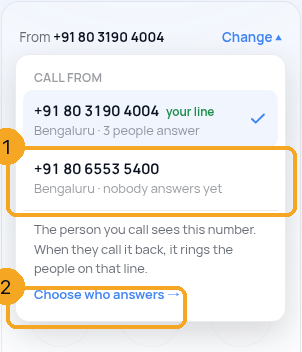
Open Calls → Dialer. Above the keypad, From (1) shows the number the person you call will see. If you may use more than one number, Change (2) is next to it.

2Choose another number
Press Change and pick the number (1). Each one shows its city and who answers it; your line is the one you use by default. Your choice is remembered on this browser for every Call button, including the one on a record. If you may change call settings, Choose who answers (2) opens Numbers & plan.
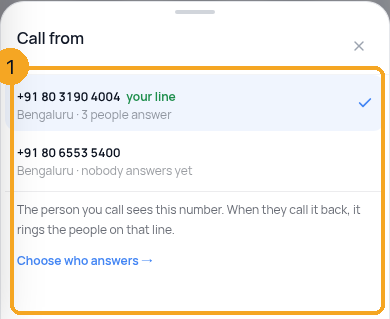
3On a phone
In the Dialer, tap the From line under the keypad. The same list opens as a sheet (1); tap a number and it closes.
© 2026 SkedX · Sample data only · Share and link freely · Copying the product or its design is not allowed · Terms
Common questions
A number we bought is not in my list
You can call from the numbers you answer. Ask an admin to add you to that number in Calls → settings → Numbers & plan → Choose who answers. A number the carrier is still checking appears once it is live.
There is no Change button
You have one number to call from, so there is nothing to choose. When you are added to another number, Change appears.
What happens when someone calls the number back?
It rings the people on that number, as set in Numbers & plan — not necessarily you.
Does my choice change it for my team?
No. It is remembered for you, on this browser. Each person chooses their own.
Next in CallingA plan gift from SkedX: accept it, and what happens after →
Previous: Test that calls to your number reach your team · All Calling guides
Did this guide help?
Still stuck?Chat with support →


