A number can look set up and still never ring: here is how to prove calls to it reach your team.
In review: written from the product, not yet walked through live.
1See whether calls reach the number
Open Calls → settings → Numbers & plan. A number that has been live for two days with no incoming call says No call has reached this number yet (1). Press Test an incoming call (2) — it is also in the number’s ⋯ menu.

2Choose the number your customers dial
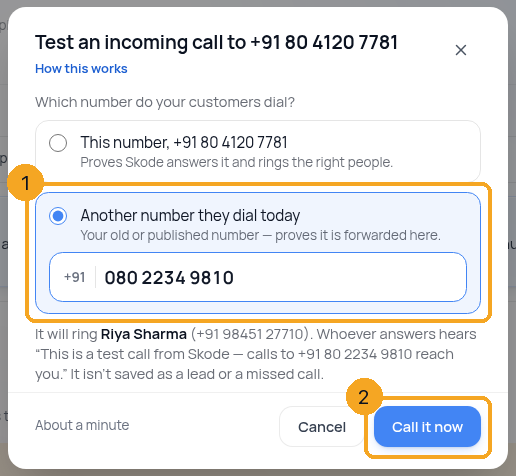
Pick the number your customers actually dial (1): the SkedX number itself, or another number they dial today — an old or published number, which proves it is forwarded to SkedX. Then press Call it now (2). It rings the people on the number; whoever answers hears that it is a test.
3Watch the call travel
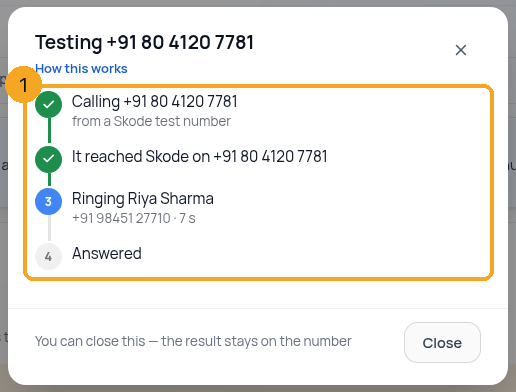
Each step shows as it happens (1): calling the number, reaching SkedX, ringing the person on it, answered. You can close the window — the result stays on the number.
4If it never reaches SkedX
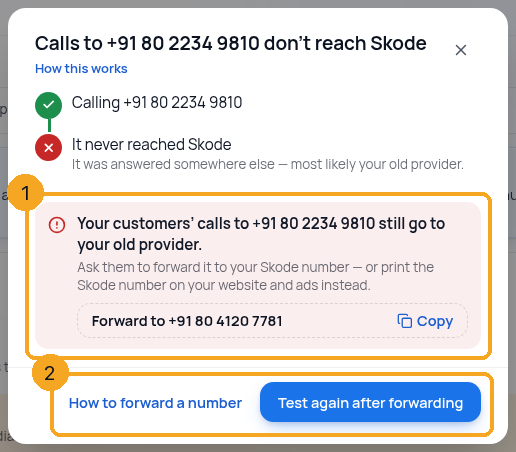
The number your customers dial still goes to your old provider (1). Ask that provider to forward it to your SkedX number (Copy puts it on your clipboard), or print your SkedX number on your website and ads instead. Then press Test again after forwarding (2).
© 2026 SkedX · Sample data only · Share and link freely · Copying the product or its design is not allowed · Terms
Common questions
Is a test call saved anywhere?
Only its result, on the number’s row. It is not a lead, not a missed call and not in your Calls list.
Does it cost me anything?
No. SkedX pays for test calls. You can run five an hour.
It reached SkedX but nobody answered
The number works. Check that the phone saved for the person on it is right and switched on — in Who is on this number?, press change on their row — then test again.
How is this different from “Ring it once”?
“Ring it once” only checks a person’s own phone. This test calls your number the way a customer would, so it also proves the number reaches SkedX and is forwarded.
Next in CallingChoose the number you call from →
Previous: Remove a phone number you no longer need · All Calling guides
Did this guide help?
Still stuck?Chat with support →


