Your clients and the outside people on your tasks get emails from SkedX in your company’s name.
Here is each one, what it shows, and where it comes from — so nothing goes out that you have not seen.
In review: written from the product, not yet walked through live.
1An invoice or a quote
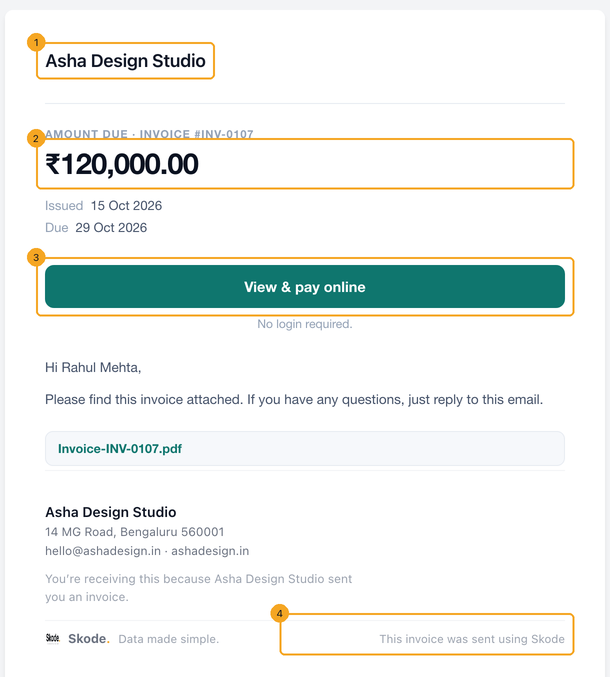
The email wears your company (1), shows the amount the way your company reads money (2), gives the client one button — View & pay online for an invoice, Review & accept online for a quote (3) — and attaches the PDF. A small line at the end says it was sent using SkedX (4). Every invoice email carries the button — the one you send, a resend, a scheduled or recurring invoice — and so does every payment reminder and overdue notice, which use the same email with your message on top.
2A payment receipt
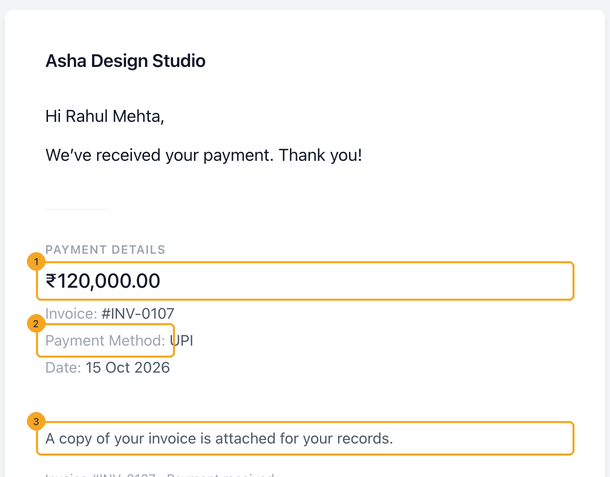
When a payment is recorded or paid online, the client gets a receipt: the amount (1), how and when they paid (2), and a note that a copy of the invoice is attached (3). It only goes when you tick Send receipt, or always for an online payment.
3An outside person on a task
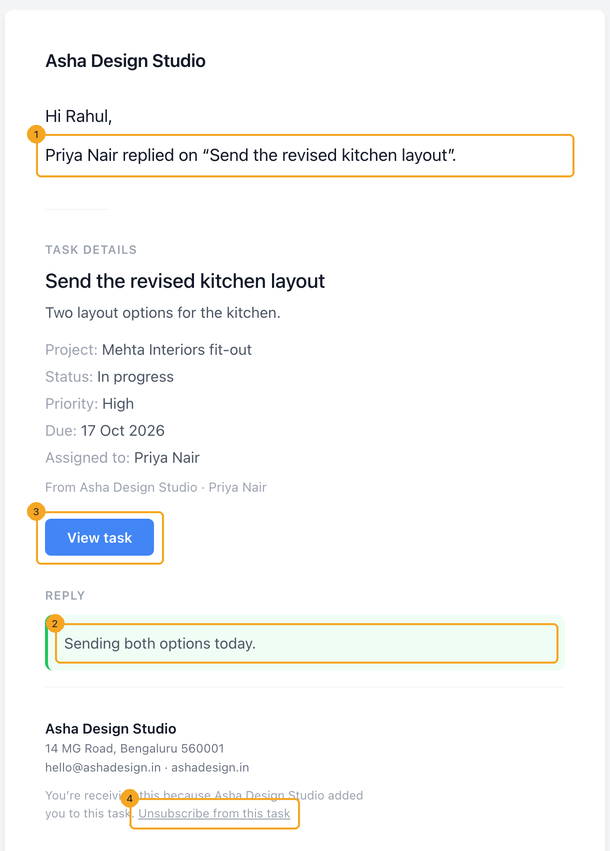
Someone you add to a task by email address, or who commented through a shared board, is emailed when they are added, when the task is completed, when a result is shared, and for a reply in a conversation they started — who replied (1), the reply itself (2), and View task (3). They never get your team’s own comments unless the board is set to show them. Every one of these carries an unsubscribe link (4).
4A board you shared
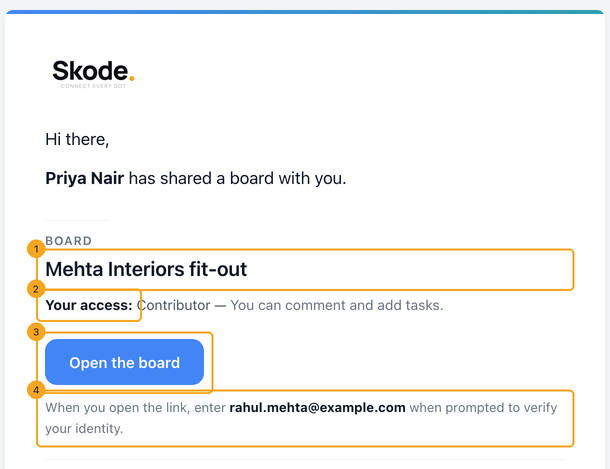
When you share a board with outside email addresses, each person gets an invitation naming the board (1) and what they may do on it (2), an Open the board button (3), and the address they must enter to prove it is them (4).
5The access code
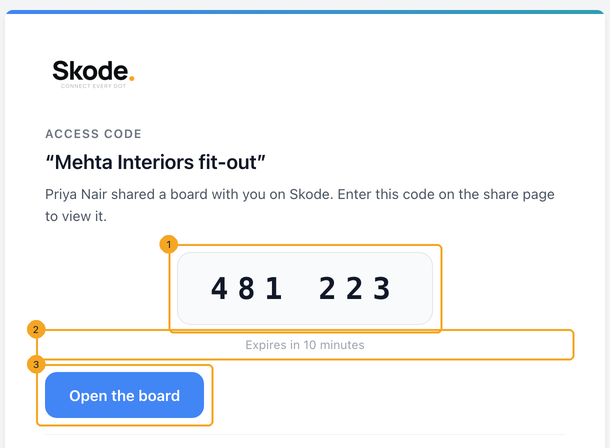
When they open the board, SkedX emails them a six-digit code (1). It expires in ten minutes (2); Open the board (3) takes them back to type it in. A shared report that asks for a code sends the same email.
6Change who it comes from, and the words
These emails go from your own mailbox once one is connected in Settings → Integrations; until then they come from SkedX with your company name on them. The wording of invoice and quote emails is yours to change in Settings → Email templates, and the team’s copies of quote and invoice events are switched on or off in Settings → Notification System.
© 2026 SkedX · Sample data only · Share and link freely · Copying the product or its design is not allowed · Terms
Common questions
Which address does an email about a meeting come from?
The mailbox the meeting was booked from — reminders, the booking email and any change all come from it, even when your company has several mailboxes connected. If it can’t send (connected for Calendar only, or disconnected), they come as “your name via SkedX”, never from another mailbox. Guests of a meeting copied in from your Outlook or Google calendar get nothing from SkedX.
Why does the client see “sent using SkedX” on my invoice?
It is the one line SkedX keeps on documents sent in your name, in small print at the end. The rest of the email — name, logo, address, colour — is your company’s.
An outside person on a task says they are getting our internal discussion.
They only get replies in a conversation they started, or every comment when the board they came from is set to show internal comments. Check that board’s settings. A comment marked as the task’s result reaches them once, as the result email.
How does someone stop the task emails?
Every email to an outside person has an Unsubscribe link in the footer, for that task. Removing them from the task’s outside people stops them too.
Why are amounts shown as ₹1,20,000.00 in one company and $1,200.00 in another?
Each email uses the money format of the company that sent it — its currency and grouping — the same way its lists and documents do.
What does my client see if I delete an invoice I already sent?
Its link stops opening and can no longer take a payment. The page names your company and gives the client one button to email you for a new link. If you restore the invoice, the same link works again.
My own invoice template has a {{payment_link}} — does it work?
Yes. In an invoice or reminder template it is the client’s View & pay link; in a quote template {{quote_link}} (and {{payment_link}}) is the Review & accept link.
Does the client get a link after accepting a quote?
Yes. The “quote accepted” confirmation links back to the quote, so they can look at what they signed while the link is valid.
Did this guide help?
Still stuck?Chat with support →


