Merging puts it back on one record in a minute.
In review: written from the product, not yet walked through live.
1Open the duplicate mark
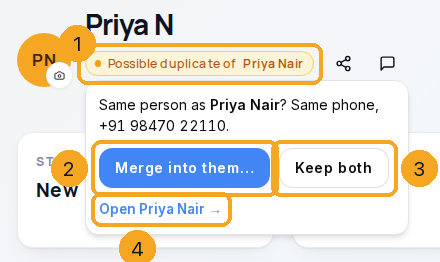
On the lead, click Possible duplicate of name (1) beside the name. Choose Merge into them… (2), or Keep both (3) to mark them as different people — they are never flagged again. Open name (4) goes to the other lead.
2Pick what stays, then merge
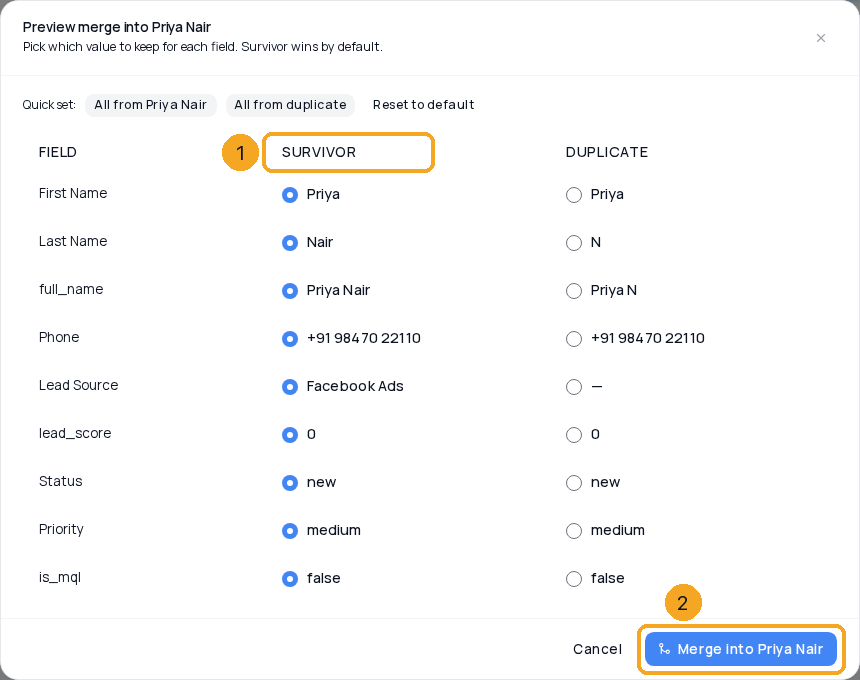
The merge preview shows every field where the two differ. The Survivor column (1) is the lead that is kept — pick the other side for any value you want instead. Then Merge into name (2). This lead goes into the kept one, and you land on it.
© 2026 SkedX · Sample data only · Share and link freely · Copying the product or its design is not allowed · Terms
Common questions
Which lead is kept?
The one the mark names — the older one, so the first ad, first touch and created date stay. The owner and latest status come across when the older one did not have them.
Can I undo a merge?
Yes. Open the merged lead (its old link still works): its banner says which lead it went into and offers Undo. It comes back as its own lead; notes, chats and tasks that moved stay on the kept lead.
Next in ProfilesProfiles and your Flow inbox →
Previous: Reminders and follow-ups · All Profiles guides
Did this guide help?
Still stuck?Chat with support →


