Your laptop knows when you have landed in another time zone.
1 min readFor all rolesUpdated 14 Nov 2026In review
SkedX CRM now notices too — and one tap makes every time on screen follow it, with Undo if you did not mean to.
In review: written from the product, not yet walked through live.
Transcript · 1:16
Travelling? When your laptop moves to another time zone, SkedX CRM notices. One tap makes every time on screen follow it. At the top of the page, a line says this device is on India time. Use India time switches your time zone. Keep GMT leaves it as it is, and stops asking on this device. Point at the dotted title to see which time zone your times follow now, with an example. Press Use India time. The notice goes, and every time on screen moves at once. A message says times are now in India time. If you did not mean to, press Undo. If the save does not go through, nothing changes. Press Try again, or open Your account to choose your time zone there. When you fly home, the same notice brings you back in one tap. It only ever changes your own time zone, never your company's.
1The notice: this device is on another clock
When your device and your account are on different clocks, a line appears at the top of every page: This device is on India time (1). Use India time (2) switches you; Keep GMT (3) keeps your time zone as it is. The names follow your device and your account — Eastern time, Central European time, GMT and so on.
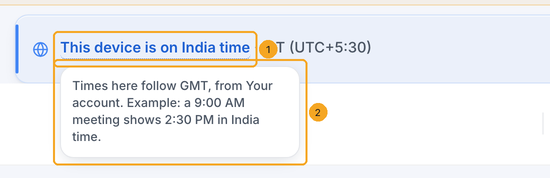
Point at the dotted title (1) — or tap it on a phone. It says which time zone your times follow now, from Your account, and shows an example (2): a 9:00 AM meeting on your account's clock, on this device's clock.
3Use India time — and Undo if you did not mean to
Press Use India time. The notice goes and every time on screen moves at once. A message at the top says Times now in India time (1) for a few seconds; Undo (2) puts back what Your account held before, and the notice will not ask about it again on this device.
4If it could not save
If the save does not go through, nothing changes and the notice says Couldn't save your time zone. Press Try again (1), or Your account (2) to choose your time zone there.
5Back home? The same notice brings you back
When you fly home and your device moves back, the notice appears again — Use GMT switches you back in one tap. You can also choose any time zone yourself in Your account → Timezone.
No. It changes only your own. Reports, numbers everyone must agree on, customer emails and business hours keep your company's time zone, which an admin sets in Your organization.
Do my other SkedX apps follow it?
Yes. Your time zone lives in Your account, so SkedX Flow, Form and Calendar use it too — each picks it up the next time you sign in to it.
I pressed Keep. How do I change it later?
Open Your account and choose your time zone under Timezone. The notice also comes back by itself if your device or your account moves to another clock.
Why did the notice not appear?
It shows only when the two clocks really read differently — a device on Asia/Kolkata and an account on India Standard Time match. It also waits while a call is ringing and until the cookie question is answered.
Can someone change my time zone for me?
No. The button changes the time zone of the person signed in, and nobody else's.
Can it switch by itself when I land?
No — it always asks first, so a device with the wrong clock, or a VPN, never moves your times without you. One tap on Use is all it takes.