Add your riders once; every Out for delivery update carries the right name and number.
In review: written from the product, not yet walked through live.
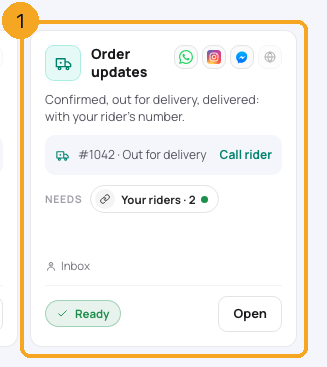
1Open Skills → Order updates
In the menu, open Automation → Skills and find Order updates (1). Its button says Add your riders until you have one, then Open.
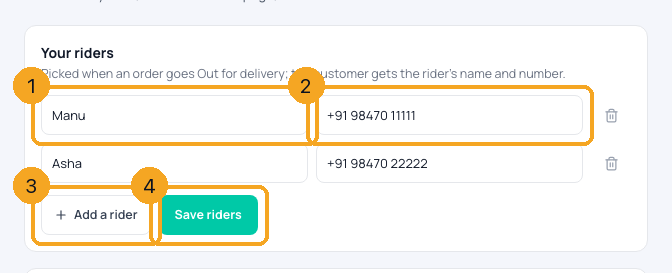
2Type each rider and save
Type the rider’s name (1) and phone (2); Add a rider (3) adds another row. Click Save riders (4). A row without a name or a phone of 8+ digits is left out, and the page says how many.
© 2026 SkedX · Sample data only · Share and link freely · Copying the product or its design is not allowed · Terms
Common questions
Does the rider get a message?
No — only the customer is told. The rider’s name and number go in the customer’s update.
Who can change the list?
An admin (anyone allowed to change the business’s settings).
Useful links
- Order updates in SkedX Flow — Your riders
Previous: Send an order update: Confirmed, Packed, Out for delivery, Delivered · All Skills & selling guides
Did this guide help?
Still stuck?Chat with support →


