Send the update instead — one click from the chat, or an automation — and the customer has the rider’s name and number before they think to ask.
In review: written from the product, not yet walked through live.
1Open Order update in the chat
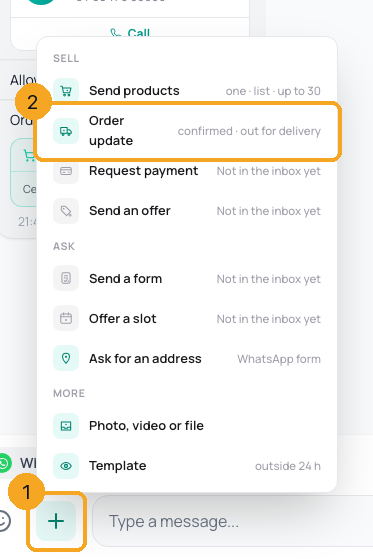
In the chat that placed the order, click + beside the reply box (1) and pick Order update (2).
2Pick the status, the rider and the time
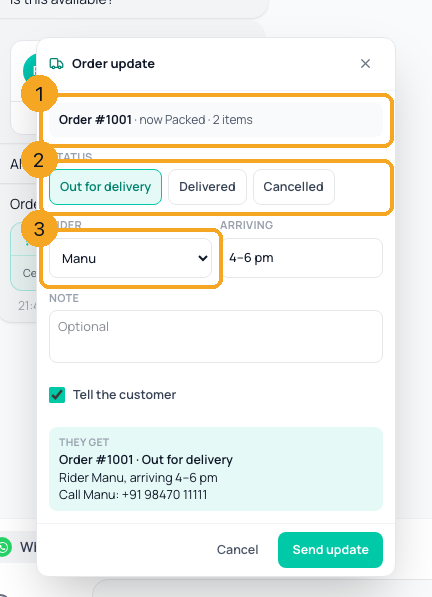
The order shows its number and where it is now (1). Pick where it goes next (2). For Out for delivery, pick the rider and when they arrive (3) — riders come from your list.
3Check the message and send
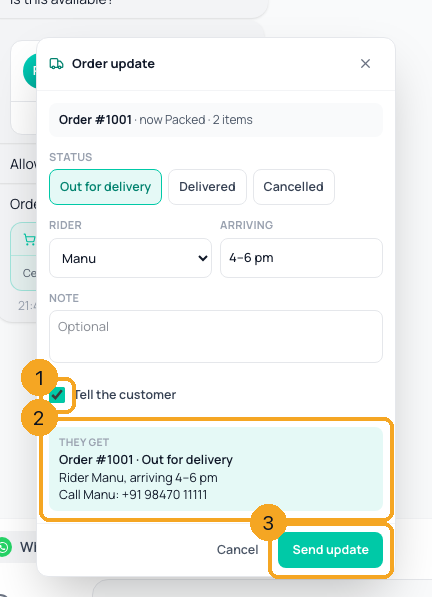
Tell the customer is on (1) and the preview is the exact message (2). Click Send update (3). Untick Tell the customer to only save the status.
4See it in the chat
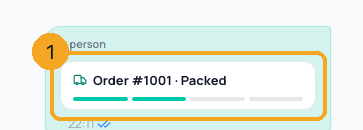
The chat shows the update as a card — the order, the step it reached and, when out for delivery, the rider with a Call button (1). It rings through SkedX Call when you have a number, your phone’s dialer otherwise.
5Or update it from the Orders page
On the Orders page every order has its number, Update (1) — the same sheet — and its History (2): every status, when, and the rider.

© 2026 SkedX · Sample data only · Share and link freely · Copying the product or its design is not allowed · Terms
Common questions
Why was my update not sent?
WhatsApp lets you message a customer freely only within 24 hours of their last message. Outside that the update is not sent and the order does not move — send a template first, or untick Tell the customer to only save the status.
Can I undo Delivered or Cancelled?
No — a delivered or cancelled order does not move again. A new order arrives as a new number.
Why is there no “Call rider” button on WhatsApp?
A WhatsApp chat message cannot carry a button that rings someone else’s number. The rider’s number is in the message, where WhatsApp makes it tappable.
Can an automation send it?
Yes — add the Send order update step. It can start on Order Received (a cart from your catalog) or Order Status Changed, for example to send “Delivered — how was it?” a day later.
Where is “Paid”?
Paid is set by the payment itself, never by hand.
Next in Skills & sellingAdd your riders for order updates →
Useful links
- Orders in SkedX Flow — Update and History on every order
Previous: Set up your catalog: put your products on WhatsApp, step by step · All Skills & selling guides
Did this guide help?
Still stuck?Chat with support →


