Add a GSTIN — or your country's tax number — and an address when you need them on the invoice; nothing is required to pay.
In review: written from the product, not yet walked through live.
1Open Invoice details
In Billing, the Invoice details card says what your invoices show now. Press Add invoice details (1). Only an owner or admin can change them.

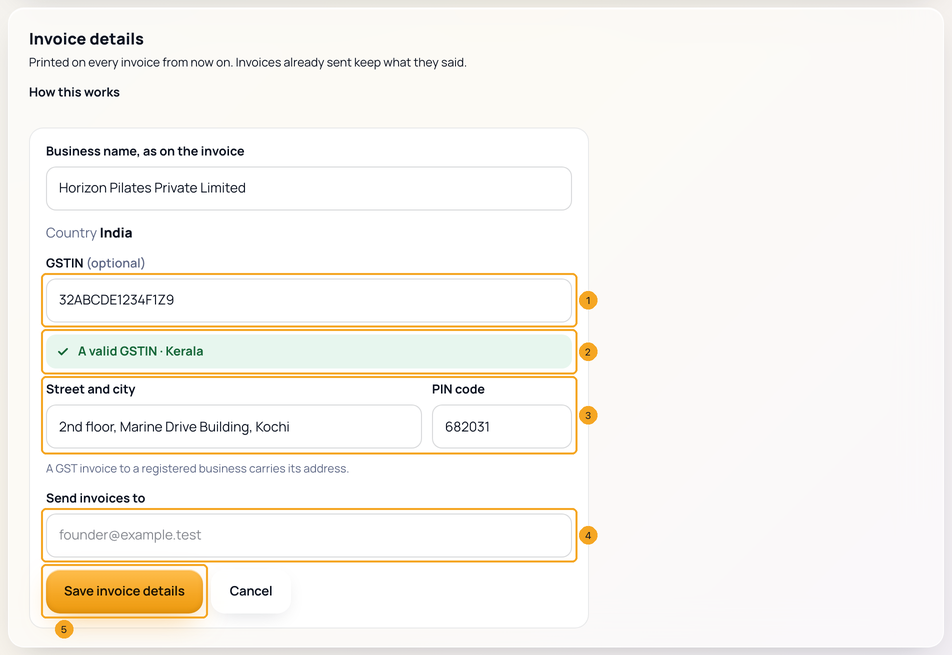
2Add your GSTIN and its address
Type your GSTIN (1). When it checks out you see A valid GSTIN and its state (2). A GSTIN needs the street and city and the PIN code (3), because a GST invoice to a registered business carries its address. Send invoices to (4) is optional — leave it and invoices go to your company's contact email. Press Save invoice details (5).
3Check what your invoices will say
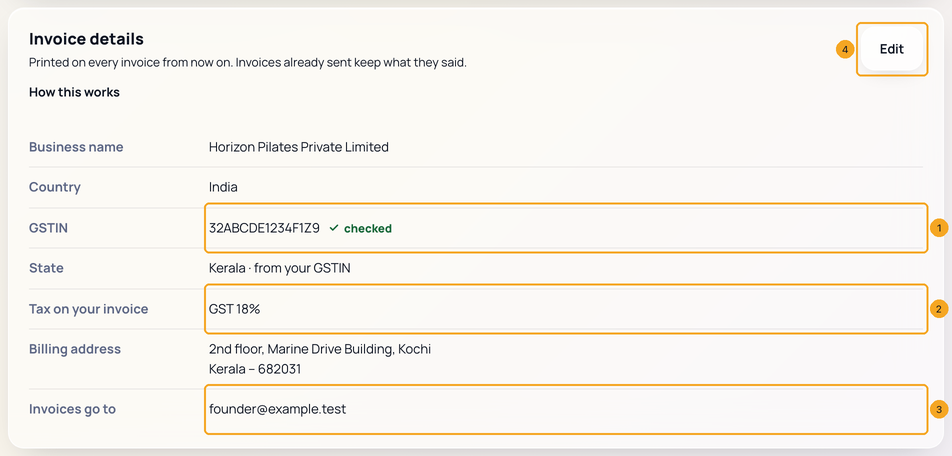
The card lists it all: the GSTIN, checked (1), GST 18% as the tax on your invoice (2) and where invoices go (3). Edit (4) changes it any time. Invoices already sent keep what they said.
4Or add them while you pay
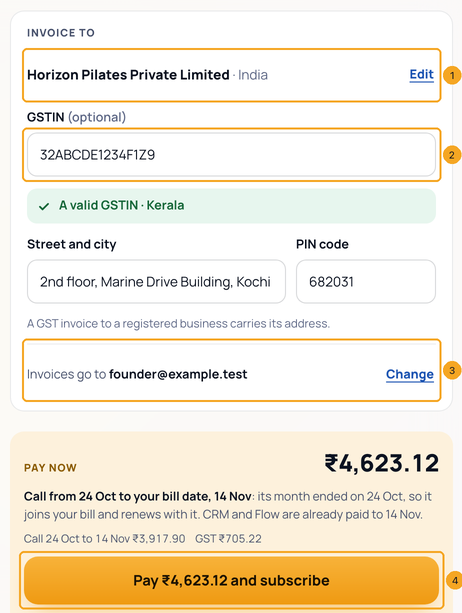
In Buy, the order has an Invoice to block above Pay now: your company and country, with Edit (1), the GSTIN (2) and where invoices go, with Change (3). Pay … and subscribe (4) saves what you typed first. It waits only for a GSTIN with a typo or without its street and PIN code — and says so.
5Outside India: your country's tax number
A company billed outside India sees its own country's number instead of a GSTIN — a TRN in the UAE, a VAT number in the UK, a VAT ID in the EU, a GST number in New Zealand, an ABN in Australia. It is optional and printed on your export invoice, which carries no GST. The United States has none to add.
© 2026 SkedX · Sample data only · Share and link freely · Copying the product or its design is not allowed · Terms
Common questions
Do I have to add anything to pay?
No. Your company name, country and contact email are already known. Add a GSTIN only if you are registered for GST.
Can I get the GST back?
If you are GST-registered, yes — as input credit, against an invoice that carries your GSTIN. Add it before you pay so that month's invoice carries it. Every Indian invoice is GST 18% either way.
Where are my monthly invoices?
In Billing → Invoices. We email the invoice for your first payment and for every payment made by hand; autopay renewals wait on Billing. To get every invoice by email, turn on Email every invoice in Invoice details. Your bank may still tell you before each debit.
Can I change my country here?
No — it decides your currency and tax, and locks at your first payment. It is shown so you can check it.
Do old invoices change when I edit?
No. Each invoice keeps the details it was issued with; edits apply from your next invoice.
Why does checkout say GST 18% but my invoice shows CGST and SGST?
Checkout and Billing show the one rate you pay, 18%. Your tax invoice splits it as GST rules ask: CGST 9% + SGST 9% when you are in Kerala (or have no address on record), IGST 18% for another state. The total is the same either way.
Do you look up my GSTIN with the government?
No. We check its format and check digit, and read the state from it. Please type your registered name and address as on your certificate.
Next in Plans & billingRenew a plan whose month has ended →
Previous: Buy several SkedX products on one bill · All Plans & billing guides
Did this guide help?
Still stuck?Chat with support →


