Renew it onto your one bill — you pay only the days up to your bill date.
In review: written from the product, not yet walked through live.
1Or see it in the CRM
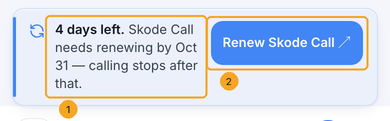
When SkedX Call is the plan that needs renewing, the CRM tells you too, at the top of every page: how long calling still works (1) and Renew Skode Call (2), which opens Billing in your SkedX account. A team member who is not an owner or admin sees Ask an admin instead. The CRM itself keeps working — only calling stops if it is not renewed.
2See which plan needs renewing
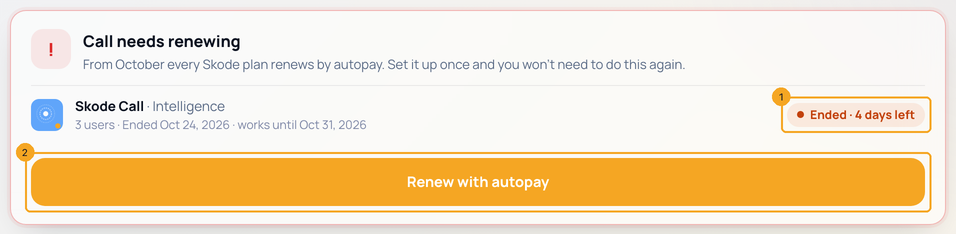
Open Billing. A card names the plan that needs renewing and how long it still works (1). Press Renew with autopay (2).
3Check the cart
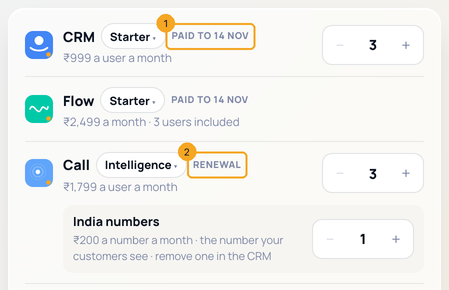
The cart opens with everything you pay for. The plans that are paid say Paid to your bill date (1); the one whose month ended says Renewal (2). You can change its users or numbers here too.
4Pay only the days it was used
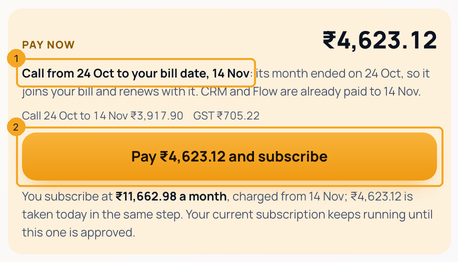
The gold box says what today’s amount covers: the plan from the day its month ended to your bill date (1) — the days you used are paid, nothing twice. Press Pay … and subscribe (2) and approve the autopay in your bank’s app.
5One bill from then
From your bill date every plan renews together on one autopay: Every month, charged on the same day each month (1). Your old autopay stops once the new one is approved.

© 2026 SkedX · Sample data only · Share and link freely · Copying the product or its design is not allowed · Terms
Common questions
Does my CRM stop if SkedX Call is not renewed?
No. Only calling stops after its days of grace; enquiries, contacts, tasks and everything else in the CRM keep working.
Do I pay for the days after the month ended?
Yes, once: the plan kept working during its days of grace, so today’s amount runs from the day its month ended to your bill date. Nothing is charged twice — the plans that are already paid cost nothing today.
What if more than 7 days have passed?
The plan is paused after its 7 days. Renew it from Billing: its new month starts the day you pay.
What if no other plan is running?
Then there is no bill to join: Billing renews it on its own, for a whole month from the day its month ended.
Will my old autopay still take money?
No. Until you approve the new autopay the old one keeps running; once the new one is approved and paid, the old one stops.
Why is Every month bigger than Pay now?
They are two different amounts. Pay now is what you pay today: only the plan being renewed, up to your bill date. Every month is your one autopay from the bill date, for all your plans together. It replaces your old autopay, so it is not charged on top of it.
Can I renew SkedX Call with fewer users?
Yes. On the SkedX Call card in the cart, press − next to Users before you pay. You pay for the users you keep, today and on your autopay. The shared minutes go down with the users. Fewer users does not choose who can call: set that in the CRM under Settings → Users → Roles → Calls. To remove a number, release it in the CRM.
Next in Plans & billingYour autopay: change the card or UPI, and fix a payment that didn’t go through →
Previous: Add your invoice details — GSTIN, tax number and address · All Plans & billing guides
Did this guide help?
Still stuck?Chat with support →


