Every SkedX product in one cart: one payment today, one bill on the same day each month, one subscription.
Taking several apps? The SkedX Suite puts CRM, Flow and Forms on Pro, with Automate, at one price a user.
In review: written from the product, not yet walked through live.
1Pick an app
Open Buy. Each app is a tab (1); one in your order shows its plan and seats, like CRM · Starter ×3 (2). Automate comes with your plans; SkedX Call is sold in India.

2Choose its plan and seats
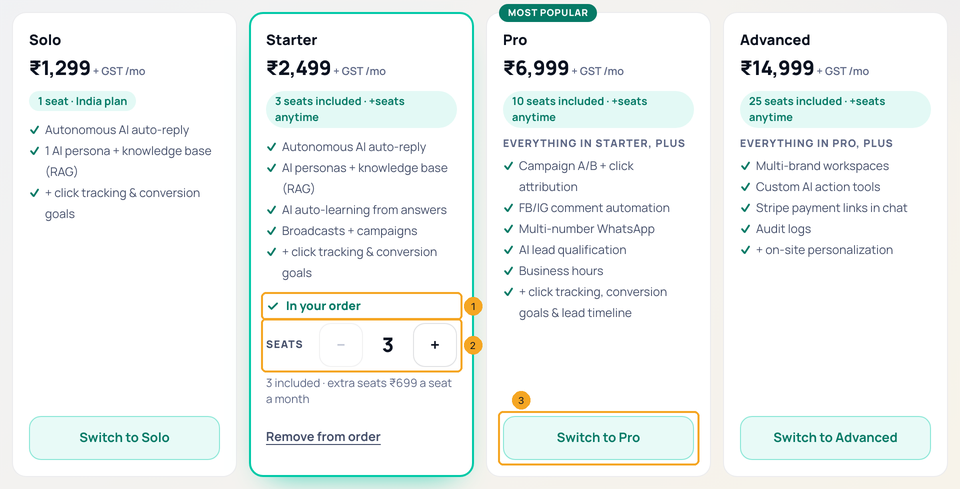
The plans are cards. The one in your order says In your order (1), with its seats inside the card (2). Pick another with Switch to … (3): a higher plan starts today, a lower one on your bill date. Want yearly? Press Yearly at the top — yearly is bought one app at a time.
3Keep an eye on the total
Switching tabs changes only the cards. The bar at the bottom keeps your order (1), Every month and Pay now (2); Review and pay (3) takes you to the order.

4Read the order
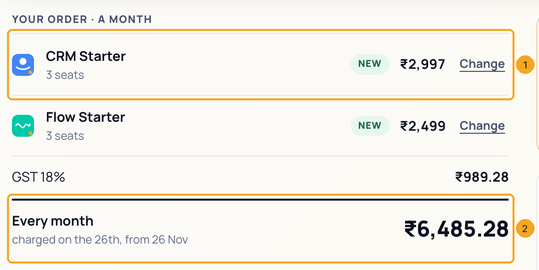
Each app shows what happens to it — NEW, UPGRADE TODAY, PAID TO your bill date — and its price a month (1); Change opens its tab. Every month ends the order, with the day it is charged (2). Each app is its own price; SkedX Call's 12-month offer is in its price.
5When the Suite costs less
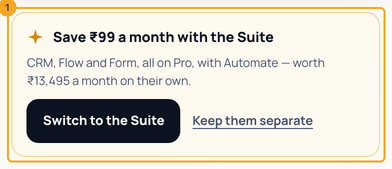
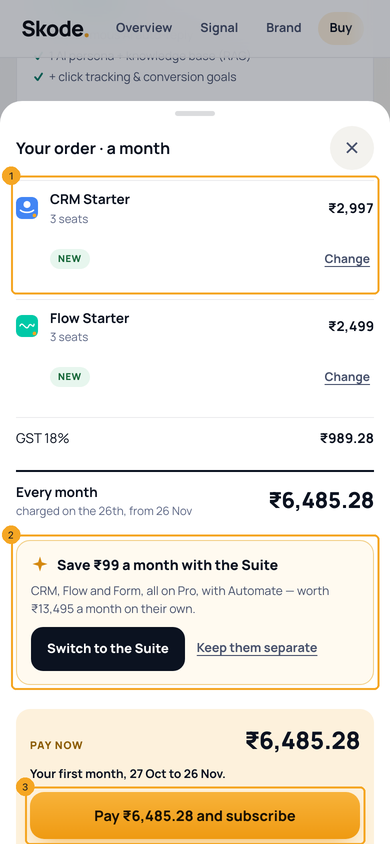
With two or more of CRM, Flow and Form, the order compares the SkedX Suite for you (1): what your order would cost on it, and what the same apps on Pro cost on their own. Switch to the Suite, or Keep them separate.
6Pay now, approve once
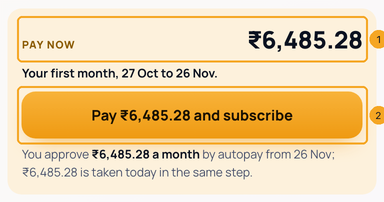
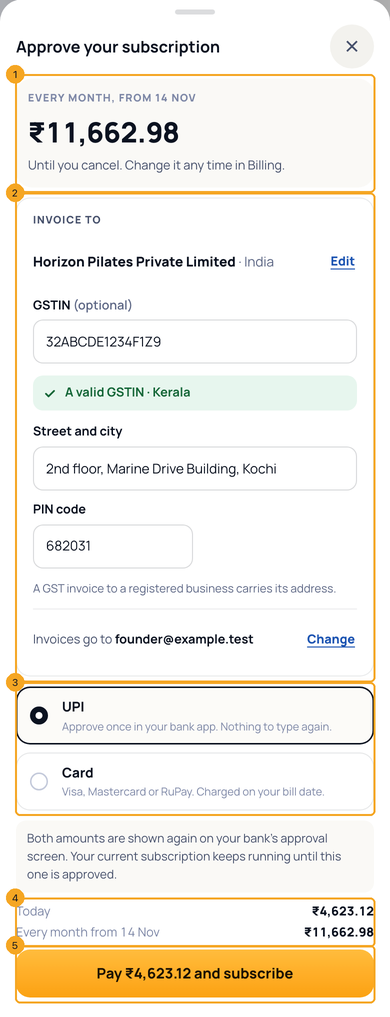
Pay now (1) is only the days until your bill date, for what you add or change today. Press Pay … and subscribe (2): the same approval sets the monthly amount. A subscription you already had keeps running until this one is approved. Above it, Invoice to shows who the invoice names — add a GSTIN there if you have one (see Add your invoice details).
7A coupon code
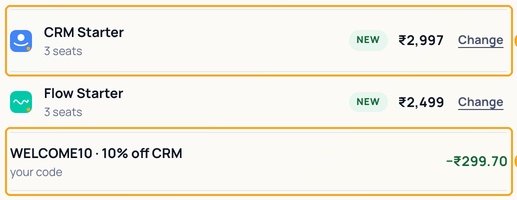
Type it in Have a coupon code? under the order. It lands on the app it is for (1) as its own line (2). A code applies only when it takes off more than that app's automatic discount (SkedX Call's 12-month offer, or a deal on your plan); when it doesn't, the order says so and why — you keep the better one.
8Or take the Suite
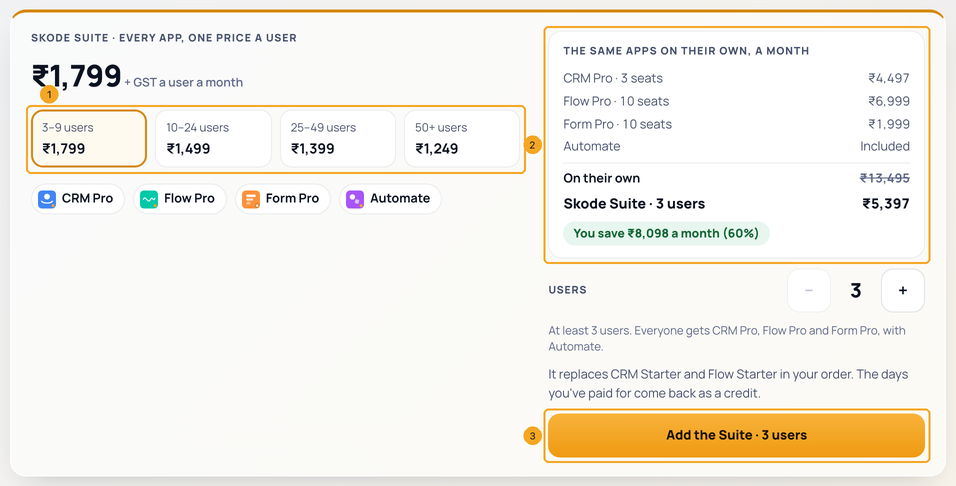
On the Suite tab, the price a user falls as your team grows (1). The same apps on their own (2) shows what it saves. Add the Suite (3): it replaces CRM, Flow and Form in your order, and the days you have paid come back as a credit. SkedX Call is added at the Suite rate.
9On a phone
The bar stays at the bottom. Review and pay opens your order in a sheet: each app (1), the Suite comparison (2), and Pay … and subscribe (3).
10Approve on a phone
Pay opens Approve your subscription: the monthly amount (1), Invoice to (2), UPI or card (3), today and every month side by side (4), and Pay … and subscribe (5).
11Your one bill
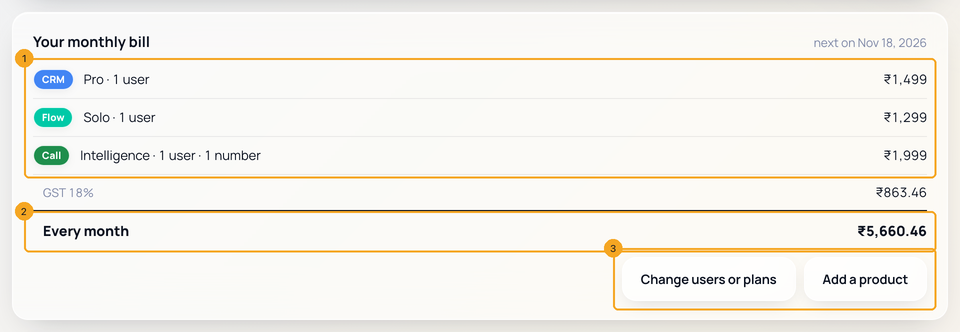
Billing shows Your monthly bill: every product with its discount already off (1), Every month (2), and Change users or plans or Add a product (3), which open the same cart. How it is paid — the card or UPI, and the next date — is on the Autopay card above it.
© 2026 SkedX · Sample data only · Share and link freely · Copying the product or its design is not allowed · Terms
Common questions
I pay yearly. Can I add another product to my bill?
The one bill is monthly, so a yearly or quarterly plan stays on its own and the cart says so. Write to [email protected] and we add the product on your plan’s own dates.
I cancelled a product. Will I still see a renew message?
No. A product you cancel runs to its date and then stops: no renew banner, no renew emails, and the rest of your bill carries on. Buy it again any time and it joins your bill.
Which day is my bill date?
The day of your first purchase. A product added later pays only the days up to that date, then renews with the rest.
Is there a discount for buying several apps?
Yes: the SkedX Suite. Every app on Pro, one price a user, from ₹1,799 (3–9 users) down to ₹1,249 (50+). Apps bought separately each cost their own price.
Why wasn't my coupon applied?
It applies on a line only when it takes off more than that line's automatic discount. The order says which one you kept, and why.
Can I pay yearly or quarterly?
Not in the cart yet — one bill is monthly. Buy a product on its own page for yearly, or the Suite on its own for quarterly and yearly.
A plan of mine renews on another date. What happens?
It is shown in the cart and keeps renewing on its own date. Change it on its own page for now.
How do I lower my users?
A month you have paid for keeps its users, so the − stops there. Under it, press Fewer users from your bill date, choose how many to keep and, if asked, who loses access. Nothing changes until your bill date. The page then says what your autopay becomes, or what to do if your bank will not let it change.
What happens to the subscription I already have?
It keeps running until you approve the new one, then stops by itself — never before, so a plan is never left without one.
Next in Plans & billingAdd your invoice details — GSTIN, tax number and address →
Previous: Buy a plan or add seats · All Plans & billing guides
Did this guide help?
Still stuck?Chat with support →


