Every payment has an invoice, and every refund a credit note.
2 min readFor adminsUpdated 6 Nov 2026In review
They all live in Billing → Invoices.
In review: written from the product, not yet walked through live.
Transcript · 0:50
Every SkedX payment has an invoice on Billing. Click an invoice's number to open it, or press PDF to save it. On the invoice, press Download PDF for the tax invoice, or Print. When money comes back, a credit note appears above the invoice it reduces, with its own number and its own PDF. The invoice says Part refunded, or Refunded when the whole amount came back. The credit note names the invoice it is against, and gives back the GST the way that invoice was taxed. Total credit is what went back to the card or account that paid. Every owner and admin, and the email your invoices go to, get the credit note by email, with its PDF.
1Find your invoices
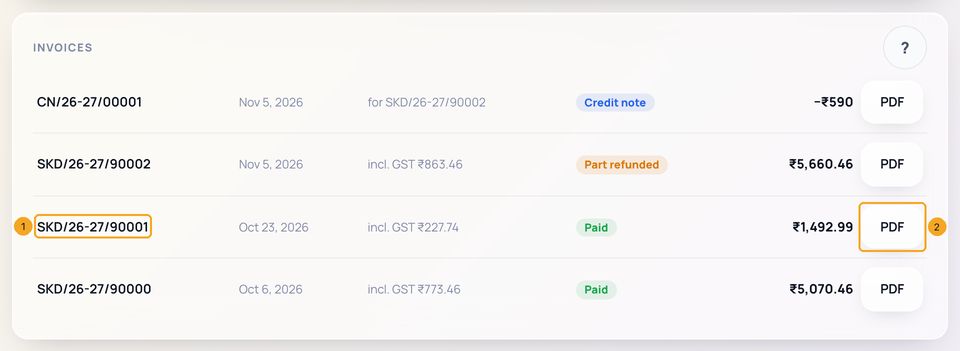
Open Billing and find Invoices. Every payment has one — plans, added users, wallet top-ups and autopay charges. Click an invoice’s number (1) to open it, or press PDF (2) to save it.
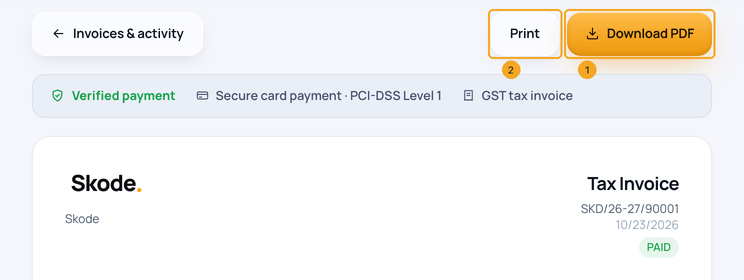
On the invoice, press Download PDF (1) for the tax invoice, or Print (2). A company in India gets a GST invoice; a company abroad gets an export invoice with no GST.
3When money comes back
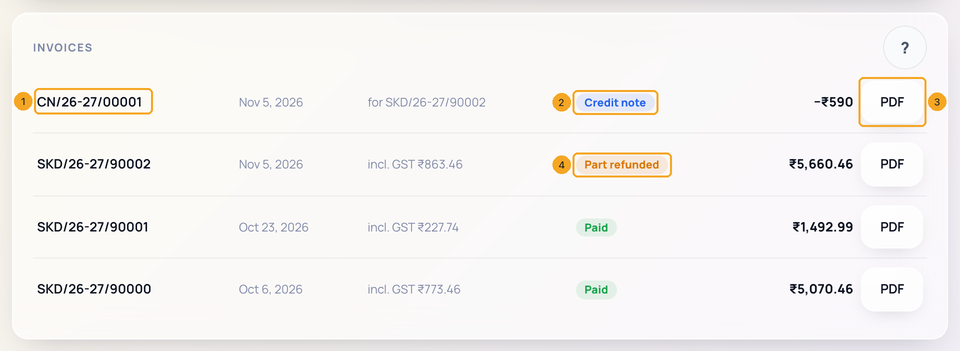
A refund gets a credit note, listed above the invoice it reduces: its own number (1), Credit note (2) and its PDF (3). The invoice says Part refunded (4), or Refunded when the whole amount came back.
4What the credit note shows
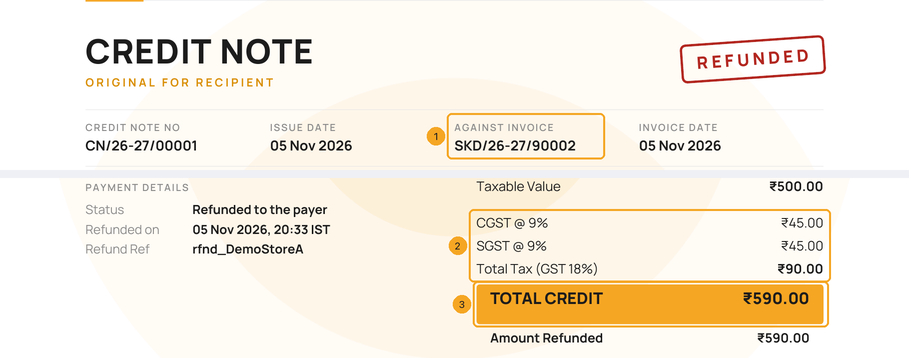
The credit note names the invoice it is against (1) and gives back the GST the way that invoice was taxed (2). Total credit (3) is what went back to the card or account that paid.
5The credit note by email
Every owner and admin, and the email your invoices go to, get the credit note by email with its PDF attached.
Why is there no GST on my invoice from outside India?
SkedX exports its service under a Letter of Undertaking (LUT), so no Indian GST is charged. The invoice says so and shows that year’s LUT number.
Why is there an amount with a minus sign?
That row is a credit note: money given back to you against the invoice it names. The invoice itself is never changed — the credit note reduces it.
When does the refunded money reach me?
Usually within 5–7 working days, back to the card or account that paid, depending on your bank.
Is the credit note a GST document?
Yes. It has its own number, the invoice it is against, and the taxable value and GST given back — CGST and SGST, or IGST — the same way that invoice was taxed. Keep it with the invoice for whoever files your GST.
Where are wallet top-up invoices?
In the same Invoices list as plan payments. A refunded top-up also takes its credit back out of the wallet.
Can I see refunds in Activity?
Yes. Activity on Billing lists each one as Refund, with its credit note number and the amount.
Are autopay invoices emailed?
The first one is; the rest wait here unless Email every invoice is on in Invoice details. A credit note is always emailed.
Will my old invoices change if a company name or address changes?
No. Every invoice and credit note keeps the seller’s name, address, GSTIN and letterhead it was issued with, and the buyer details it was made out to. Only invoices issued after a change carry the new details.
The company name or GSTIN on my invoice is wrong.
Fill in Invoice details on Billing — see Add your invoice details.