Signal keeps only your website and tells you what it left out.
In review: written from the product, not yet walked through live.
1See what was not counted
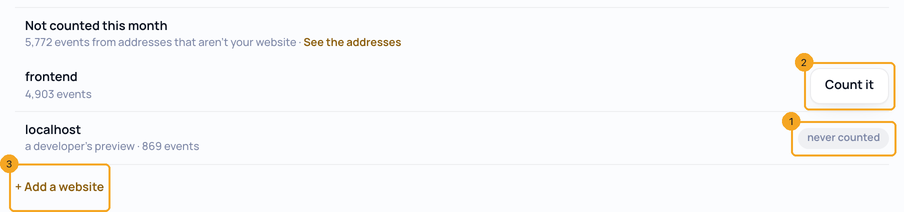
Open Signal on accounts.skode.ai and choose Install & websites. Under Where Signal listens, Not counted this month (1) says how many visits came from addresses that aren’t your website. Choose See the addresses (2) to list them.

2Count an address that is yours
A developer’s preview such as localhost says never counted (1) — it is never your website. On any other address that is really yours, choose Count it (2); its visits are stored from then on. To add a whole new website instead, use + Add a website (3).
© 2026 SkedX · Sample data only · Share and link freely · Copying the product or its design is not allowed · Terms
Common questions
We have several websites and landing pages. Do we need several Signal scripts?
No. Your company has one Signal, and the same script goes on every website and landing page you own — add each address here. One record per company means a person who reads your landing page and then fills in a form on your main website is one person, with the ad that first brought them. A second Signal is only for a separate brand, and SkedX support sets it up with you.
Are the visits that were not counted stored anywhere?
No. Signal keeps only the address and how many visits came from it, for up to 35 days. No page, person or visit is stored.
My site is on netlify.app — will Signal ignore it?
Not if you count it. Hosting addresses are left out until you choose Count it on yours; Signal then adds that exact address, not every site on the same service.
Can I count localhost?
No. A developer’s machine or preview is never your website, so its visits are never stored.
Next in Your organizationLead forms count as goals by themselves →
Useful links
Previous: Turn someone off in every SkedX app · All Your organization guides
Did this guide help?
Still stuck?Chat with support →


