Turn them off everywhere, and turn them back on later.
In review: written from the product, not yet walked through live.
1Turn them off
In Access, click Turn off next to the person. The confirm (1) says they are switched off in every SkedX app and can be turned back on. Click Yes, turn off (2).

2Turn them back on
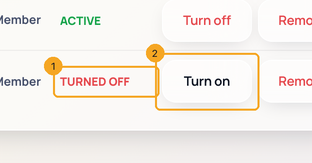
A turned-off person shows TURNED OFF (1). Click Turn on (2) to bring them back with the same role.
3What they see
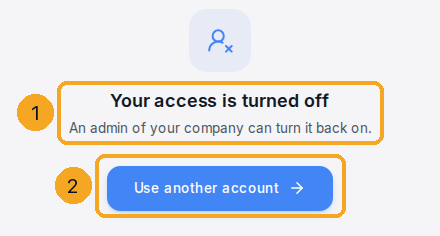
When they open SkedX CRM — and work in no other company there — they see Your access is turned off · An admin of your company can turn it back on. (1), with Use another account (2) to sign in as someone else. It never names your company or anyone in it. The same card shows for someone turned off on your bill date after you keep fewer users.
© 2026 SkedX · Sample data only · Share and link freely · Copying the product or its design is not allowed · Terms
Common questions
Does turning off free a seat?
A turned-off person does not use a seat in the CRM. To take someone out for good, use Remove.
Can I turn off the owner?
No. The owner is marked Owner — protected.
What was Revoke?
The same switch, renamed Turn off on 14 Oct 2026. Restore is now Turn on.
Next in Your organizationChoose which website addresses Signal counts →
Previous: Remove someone from your company in every SkedX app · All Your organization guides
Did this guide help?
Still stuck?Chat with support →


