Add them from the meeting in one click. Their name and email come from the invite, and the meeting goes on their record.
In review: written from the product, not yet walked through live.
Part of Open a meeting, change it, and keep notes on it — its video shows the whole feature.
1Find the guest in My Work
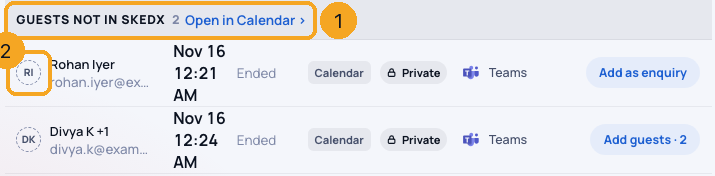
Open My Work → My day → Meetings and bookings. After a calendar meeting ends, a guest who is not in SkedX waits under Guests not in SkedX (1) until midnight, with a dashed circle (2).
2Add them in one click
Click Add as enquiry on the row. It leaves at once and a green bar says Added as an enquiry (1), with Open enquiry (2) to go to the new record.

3Several guests on one meeting
A meeting with more than one such guest says Add guests with their number (1). It opens the meeting’s guest list, where each guest has their own Add as enquiry. One click never makes more than one record.

4Or add them from the meeting
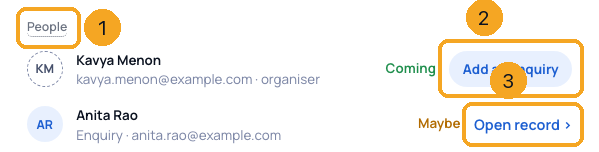
Open the meeting in Calendar or from My Work. Under People (1), a guest with a dashed circle has Add as enquiry (2) — before the meeting too. A guest SkedX holds says Open record › (3).
© 2026 SkedX · Sample data only · Share and link freely · Copying the product or its design is not allowed · Terms
Common questions
What does the new enquiry hold?
The name and email from the invite, the source Calendar, and you as its owner — unless your company has an assignment rule, which then picks the owner. An invite carries no phone number, so none is filled in.
What if they are already in SkedX?
Nothing new is made. The meeting is linked to the record that holds that email, and the bar says Linked.
Why is a colleague not offered?
Anyone who writes from your own company’s email address counts as a colleague, whether or not they use SkedX. Free inboxes such as gmail.com are not treated as a company.
Does connecting my calendar create enquiries by itself?
No. The sync only links guests SkedX already holds. A new enquiry is made only when you click Add as enquiry.
Who can see the button?
Only the host of the meeting. A colleague’s calendar meetings show to others as Busy, with no guests.
Do my automations run for the new enquiry?
Yes. It is a normal new enquiry, so anything you built for a new enquiry runs, as when you add one by hand.
The button says my role cannot add enquiries.
Your role is not allowed to create enquiries. Ask an admin to add the guest, or to change your role.
Next in CalendarSee an Outlook or Google meeting in full →
Previous: Invite guests to a meeting and see who is coming · All Calendar guides
Did this guide help?
Still stuck?Chat with support →