Your Outlook and Google meetings open in SkedX in full: who is coming, where, when in your own time zone, and what the invite says.
Change them where they live.
In review: written from the product, not yet walked through live.
Part of Open a meeting, change it, and keep notes on it — its video shows the whole feature.
1Open the meeting
Open your Calendar, or My Work → My day → Meetings and bookings, and click the meeting. It opens in the meeting panel: its title and time (1), and pills under them (2) — by the clock, Private, and Outlook or Google.

2See who is coming
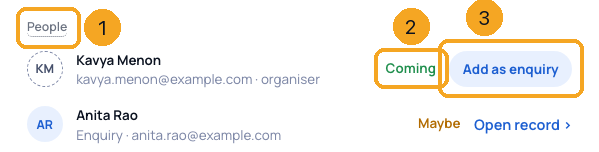
Under People (1), each guest shows their answer (2) and the organiser is named. A guest with a dashed circle is not in SkedX yet: Add as enquiry (3) adds them.
3Where, when and the calendar it lives on
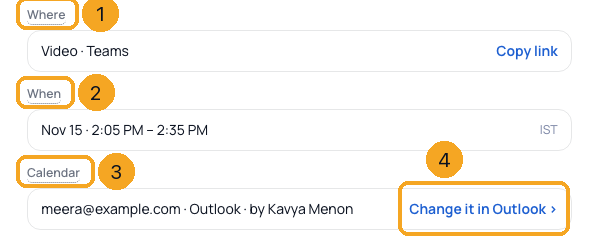
Where (1) has Copy link. When (2) is in your own time zone. Calendar (3) names the calendar and who organised it — to move it or change its guests, click Change it in Outlook (4).
4After the meeting
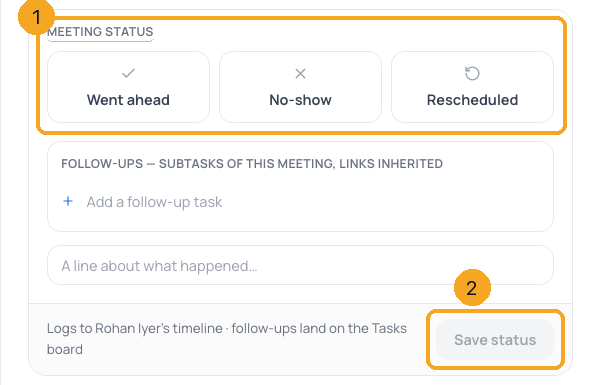
Once it has ended, Meeting status (1) comes first: Went ahead, No-show or Rescheduled, then Save status (2). It is optional for a calendar meeting, and once saved it shows as a pill under the title.
© 2026 SkedX · Sample data only · Share and link freely · Copying the product or its design is not allowed · Terms
Common questions
Can I move the meeting or change its guests in SkedX?
No. It belongs to your Outlook or Google calendar. Click Change it in Outlook (or Google) and change it there; SkedX shows the change when the calendar syncs.
Why is the time different from the invite?
SkedX shows every time in your own time zone, named beside it, wherever the invite was sent from.
Who can see the description?
Only you, the person whose calendar it is on. Colleagues see the meeting as Busy, with no title, guests or description.
What do the pills under the title mean?
Where the meeting stands by the clock (in 12 min, Now or Ended), that it is Private, where it came from (Outlook or Google), and its status once you set one.
Do my notes go on the invite?
No. Notes you write in SkedX stay in SkedX; the guests never see them.
Do I have to set a Meeting status for a calendar meeting?
No. It is there if you want it. My day never asks about a calendar meeting.
Next in CalendarKeep a meeting private →
Previous: Add a meeting guest as an enquiry · All Calendar guides
Did this guide help?
Still stuck?Chat with support →