Mark them private: your team still sees the time, never what it is about.
In review: written from the product, not yet walked through live.
Part of Open a meeting, change it, and keep notes on it — its video shows the whole feature.
1Mark a meeting private
Open the meeting in Calendar or from My Work. Under Who sees it (1), turn on Private (2). It saves at once. Only the meeting’s host or the person who made it sees this switch.

2Make a new meeting private
In New meeting, under Who sees it (1), turn on Private (2) before you save.

3Make every booking on a link private
In Calendar settings → Booking links, edit the link. On Meeting, under Who sees it (1), turn on Bookings are private (2). Every new booking on the link is private; bookings already made stay as they are.

4What your team sees
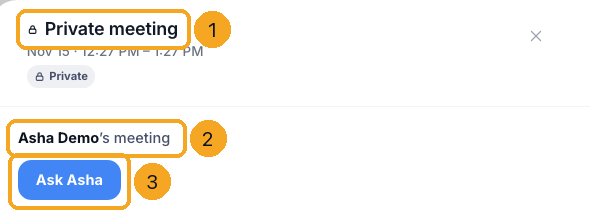
Your team sees Private meeting with a lock (1) and its time. Opened, it shows whose meeting it is (2) and Ask (3), which opens a chat with the host. A cancelled one says Cancelled.
© 2026 SkedX · Sample data only · Share and link freely · Copying the product or its design is not allowed · Terms
Common questions
Who can see what a private meeting is about?
Its host, the person who made it, and every colleague on it. Everyone else — managers and admins too — sees Private meeting and its time.
Why does my team still see the time?
So nobody books over it. The time and the host show; the title, notes, place, link, guests and the person it is with do not.
Can a manager or an admin turn Private off?
No. Only the meeting’s host or the person who made it can turn it on or off.
Do automations still run for a private meeting?
Yes. Automations, webhooks, the API and Zapier get the event, titled Private meeting, without its notes, place or guests.
Does a private meeting show in reports and search?
It counts in reports and dashboards as Private meeting. Search, exports and SkedX AI never show or find its words.
What about my Outlook or Google meetings?
They keep their own calendar’s privacy: a colleague sees them as Busy. Mark one private in Outlook or Google itself.
I made a meeting private after it was booked. Is its history hidden?
New activity on it is. Lines written before you marked it private keep the words they had.
Next in CalendarOpen a meeting, change it, and keep notes on it →
Previous: See an Outlook or Google meeting in full · All Calendar guides
Did this guide help?
Still stuck?Chat with support →