A meeting only happens if the other person has it in their calendar — so SkedX puts it there, keeps it right, and tells you whether they are coming.
In review: written from the product, not yet walked through live.
1The invite goes when you book
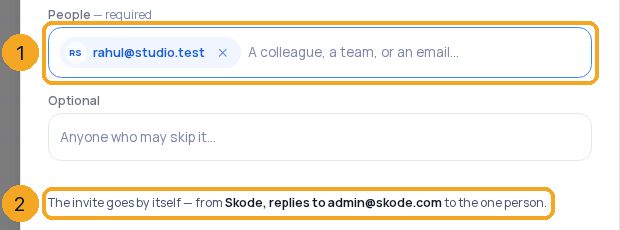
In New meeting, add the people under People (1) — and Optional for anyone who may skip it. The line under them (2) says the invite goes by itself, and where it comes from — your own mailbox, or SkedX with replies to you.
2See who is coming
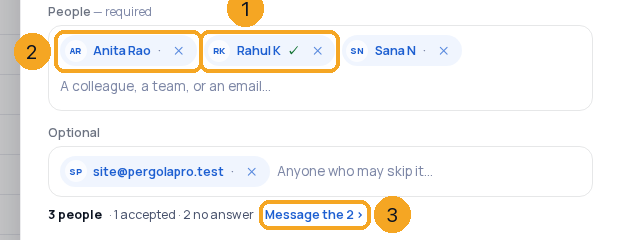
Open the meeting. Each person’s chip shows their answer: ✓ accepted (1), · no answer yet (2), struck through when they declined. Answers arrive from their reply or their calendar, usually within minutes. Message the n (3) sends the invite again to everyone who has not answered — it asks first, once an hour.
3Invite after booking
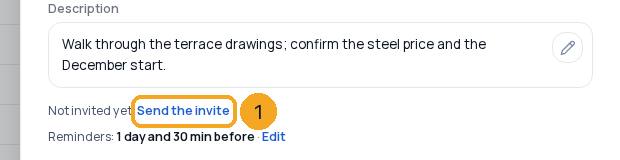
A meeting booked without the invite says Not invited yet. Send the invite (1) sends it to everyone on it. Someone you add later under People or Optional gets it when you save.
4Move or cancel — guests are told
Move the meeting and every guest's calendar moves with it, and they are asked again. Take someone off, or cancel the meeting, and it leaves their calendar.
5When answers do not show
When SkedX sent the invite and the Inbox can’t read your mailbox yet, guests' answers go to your own email. The meeting says so, with Allow in Inbox › (1) — it opens Settings › Email; connect your Outlook or Gmail for the Inbox there and you are taken back to Calendar. The next answers show here.

© 2026 SkedX · Sample data only · Share and link freely · Copying the product or its design is not allowed · Terms
Common questions
Who is the invite from?
From your own Gmail or Outlook when the Inbox may use it in SkedX (Settings › Email) — exactly as if you had sent it. Otherwise from SkedX's address as “your name via SkedX”; Reply goes to you.
Does the guest need SkedX?
No. It is an ordinary calendar invite; Gmail, Outlook, Apple Calendar and most others show Accept and Decline.
Can someone answer for a guest?
No — an answer counts only when it comes from the guest’s own email address. A forwarded invite answered by someone else changes nothing.
Will a colleague get the meeting twice?
No. When the invite lands in a colleague's connected calendar, SkedX knows it is the same meeting and only reads their answer from it.
What does the guest see of my notes?
Nothing. The invite carries the title, time, place and video link. Notes and the description stay in SkedX.
My meeting has a Google Meet or Teams link SkedX created — who invites then?
Google or Microsoft, from your calendar, as before. Their answers show from your calendar.
Next in CalendarOpen a meeting, change it, and keep notes on it →
Previous: Create a meeting from the Calendar — with the person it is for · All Calendar guides
Did this guide help?
Still stuck?Chat with support →


