Everything with a time is in one place now: your meetings and your reminders.
In review: written from the product, not yet walked through live.
1Open your reminders
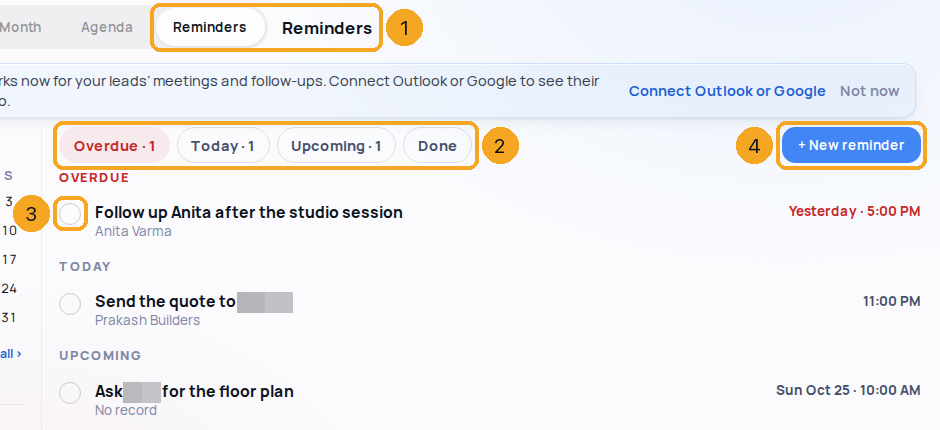
In Calendar, choose Reminders (1). Overdue ones come first, in red, then today’s and upcoming ones; the chips (2) show one group, or what was done.
2Tick one off, or add one
Tap the circle (3) to complete a reminder — Undo is offered for a moment. Click its title to open it with its record. + New reminder (4) adds one with a time.
3Tasks shows your to-dos
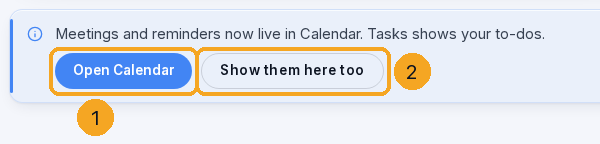
On the Tasks page a note says meetings and reminders now live in Calendar: Open Calendar (1) goes there, Show them here too (2) keeps them in Tasks as well, for you alone.
© 2026 SkedX · Sample data only · Share and link freely · Copying the product or its design is not allowed · Terms
Common questions
Did my reminders move?
Only where you see them. A reminder is still a task with a time, on its record, and it still rings.
I liked them in Tasks.
Choose Show them here too on the Tasks page — meetings and reminders show in both places, for you.
Can I see my team’s reminders?
If your role lets you see your team’s calendar, Me ▾ → My team or a colleague shows theirs too.
Next in CalendarMeeting reminders: for the person who booked, and for you →
Previous: Open a meeting, change it, and keep notes on it · All Calendar guides
Did this guide help?
Still stuck?Chat with support →


