In review: written from the product, not yet walked through live.
1Choose the reminders for the person who booked
In Calendar settings, open Reminders. Under the person who booked, each chosen reminder is a chip (1) — tap one to remove it; Add picks another, up to three.

2Choose your own
Under You, pick when you are reminded before each booked meeting (1). Turn on Your day (2) for one morning email with that day’s meetings, and set its time.

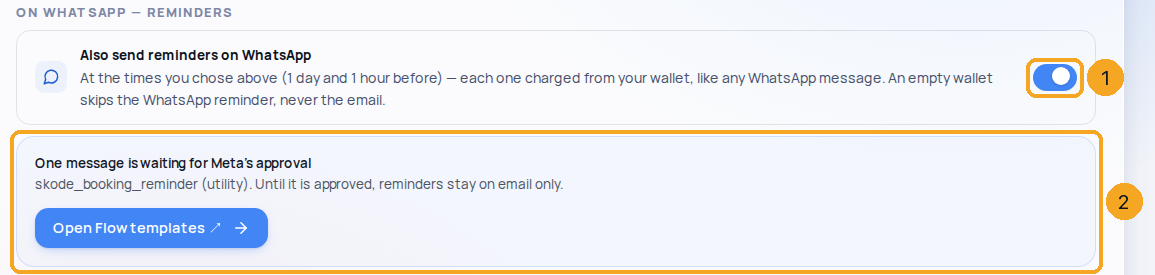
3Also send them on WhatsApp
Switch on Also send reminders on WhatsApp (1). Each one is taken from your wallet. Until the reminder message is approved by Meta, it says so (2) and reminders stay on email.
© 2026 SkedX · Sample data only · Share and link freely · Copying the product or its design is not allowed · Terms
Common questions
Which address do reminder emails come from?
From the mailbox the meeting was booked from — book from your Outlook and your guests’ reminders come from that Outlook, even when your company has other mailboxes connected. If that mailbox can’t send email (it is connected for Calendar only, or no longer connected), the reminder comes as “your name via SkedX” instead — never from a different mailbox. A meeting booked without a mailbox uses your company’s usual sender.
Do meetings from my Outlook or Google calendar get reminders?
Only you get one, before a meeting that is still to come. SkedX never emails the guests of a meeting it copied from your calendar — their own calendar already reminds them — and a copied meeting that is over, cancelled or done reminds nobody.
Can reminders go on WhatsApp?
Yes — switch on Also send reminders on WhatsApp. They go to people who ticked WhatsApp when booking, at the same times as the emails, once the skode_booking_reminder message is approved in Flow. Each is taken from your wallet; an empty wallet skips the WhatsApp reminder, never the email.
Do my reminders change my colleagues’?
No — every person sets their own. The company default is what “Company default” uses.
How do I see the WhatsApp messages people get?
In Calendar settings › Reminders, press See them beside “Confirmation and changes”. It shows the three messages — booked, moved and cancelled — as the person reads them, and whether they can go yet: ready, a template still waiting for Meta’s approval (with Open Flow templates), or no WhatsApp number yet (with Connect a number in Flow). Until they can go, email carries everything.
What does the confirmation say about reminders?
Exactly what you chose here: “A reminder comes an hour before, by email.” or “Reminders come a day and an hour before, by email.” — and nothing at all when you send none. The booking page says the same.
Next in CalendarColleagues booking you: who may add meetings to your calendar →
Previous: Your reminders, in Calendar: see, tick and add them · All Calendar guides
Did this guide help?
Still stuck?Chat with support →


