In review: written from the product, not yet walked through live.
1Open Colleagues booking you
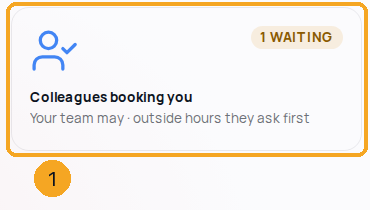
In Calendar, open Calendar settings and choose Colleagues booking you (1). Its line says your rules today, and how many requests are waiting.
2Choose who may add you, and outside your hours
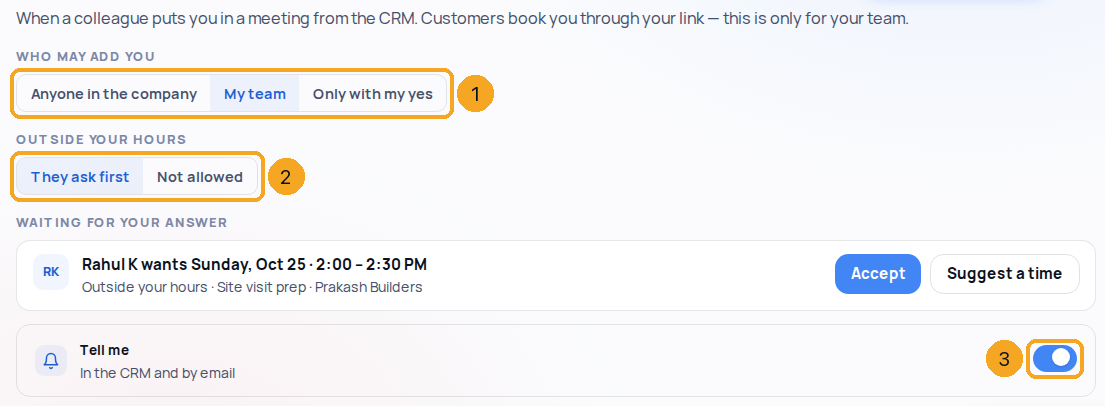
Under Who may add you (1) pick Anyone in the company, My team or Only with my yes. Under Outside your hours (2) pick They ask first or Not allowed. Each choice saves at once. Tell me (3) decides whether the bell and an email tell you when a colleague adds you.
3Answer a request
A request names who wants which time and why — outside your hours, not your team, or only with your yes. Accept (1) puts it on your calendar; Suggest a time (2) sends them another time to move it to. Either way they are told. The bell brings you here too.

4When a colleague does not take meetings then
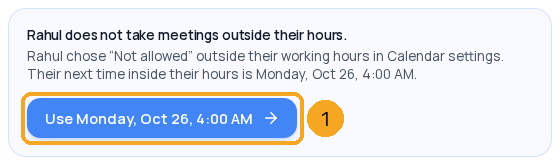
If you add someone outside their hours and they chose Not allowed, the meeting is not saved. The New meeting form says who and why, and offers their next time inside their hours (1) — one press moves the meeting there; then Create meeting.
© 2026 SkedX · Sample data only · Share and link freely · Copying the product or its design is not allowed · Terms
Common questions
Does this change who can book me through my booking link?
No. Your booking link always offers only your working hours, minus what is busy. These rules are for colleagues adding you from the CRM.
What is “My team”?
Anyone on a team with you in Settings › Users › Teams, and your manager’s team. Anyone else asks first.
What counts as outside my hours?
Any time outside Working hours & time zone in Calendar settings — a special day uses its own hours, and time off is always outside.
Do I hear when a meeting I am on moves?
Yes, when it is moved in SkedX — once per change, in the bell. A few quick moves in a row are one notice. Switch Tell me off and these stay quiet; a request for your yes always reaches you. A meeting copied in from someone’s Outlook or Google calendar never rings — your own calendar already told you.
Can someone get around it by moving the meeting?
No. Dragging, rescheduling or editing a meeting checks the same rules for everyone on it.
Previous: Meeting reminders: for the person who booked, and for you · All Calendar guides
Did this guide help?
Still stuck?Chat with support →


