Keep every call written out, with notes, at the Pro price — one tap, from your next payment.
In review: written from the product, not yet walked through live.
1Open the offer
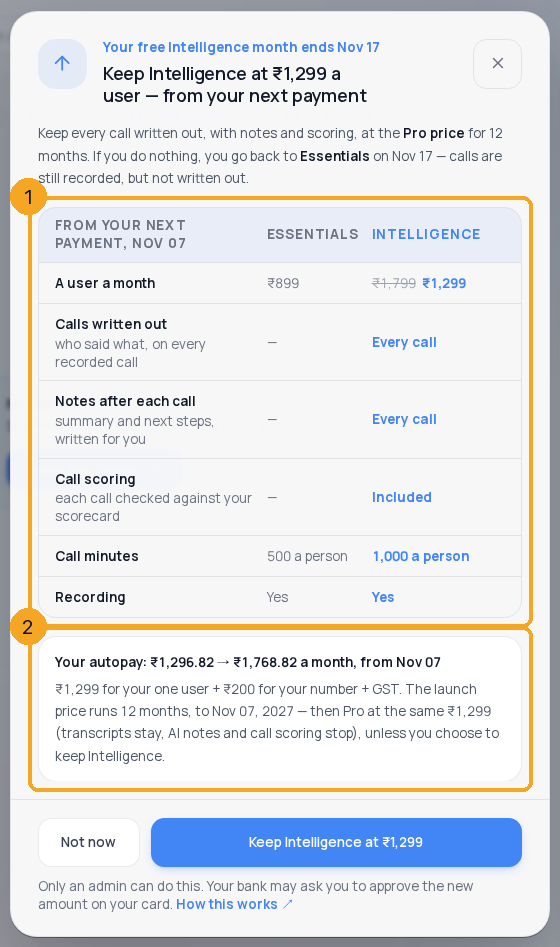
While the free month runs, an admin sees the offer as a pop-up on the Calls page: Keep Intelligence at ₹1,299 a user — from your next payment. If you pressed Not now, it waits in Calls → settings → Numbers & plan above your plan (1) until your next payment — press See the offer (2) to open it again.

2Check what changes
The pop-up compares, from your next payment, the plan you would go back to with Intelligence at the launch price (1): a user a month, with the full price crossed out, and what each plan does for your calls. Below it (2): your autopay now → from your next payment, with GST, how long the launch price runs, and what happens after it. If the pop-up is taller than your window, a round down arrow at its foot shows the rest.
3Keep Intelligence
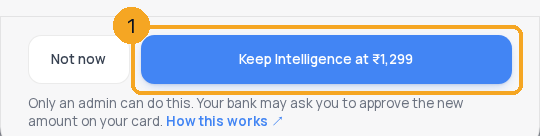
Press Keep Intelligence at ₹1,299 (1). From your next payment your autopay is the new amount, and you do not go back to your old plan when the gift ends. Your bank may ask you to approve the new amount on your card. Not now closes it without changing anything. Only an admin who may manage the plan sees the button.
4See what you kept
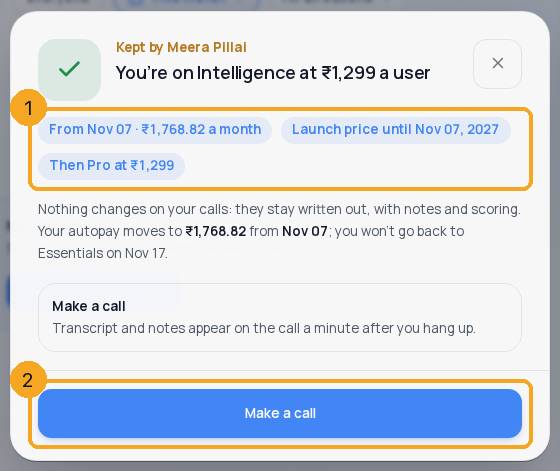
The pop-up then says You’re on Intelligence at ₹1,299 a user, with the date and amount of your next autopay, until when the launch price runs, and the plan after it (1). Make a call (2) opens the dialer — calls stay written out, with notes and scoring. Everyone else on your team is told once.
5See it on Numbers & plan
Calls → settings → Numbers & plan then reads your plan with the price you pay: the full price crossed out, ₹1,299 a user · launch price until the day it ends (1).

© 2026 SkedX · Sample data only · Share and link freely · Copying the product or its design is not allowed · Terms
Common questions
When do I start paying the new price?
From your next autopay after you keep it. The free month covered Intelligence until then.
What happens after the 12 months?
The plan moves to Pro at the same ₹1,299 a user — transcripts stay, AI notes and call scoring stop — unless an owner or admin presses Keep Intelligence on Billing, which is ₹1,799 a user from then.
Who sees the offer?
Only someone whose role may manage SkedX Call numbers and the plan (Settings → Users → Roles → Calls → “Numbers, Plan & Compliance”). Once it is kept, everyone on the team is told once what it was kept at.
My bank did not accept the new amount. What now?
If your Call plan has an autopay of its own, nothing changes and we are told at once; the pop-up says so and offers to contact us. If it rides on one bill with your other plans, Intelligence is kept, and when the autopay is UPI — which can’t change its own amount — the Autopay card on Billing asks you to approve the new amount once.
What if I do nothing?
You go back to the plan you had when the gift ends, at the price you paid before. Calls, recordings, transcripts and notes made during the month stay.
Next in CallingGet your calls answered →
Previous: A plan gift from SkedX: accept it, and what happens after · All Calling guides
Did this guide help?
Still stuck?Chat with support →


