A big automation is often built as pieces: one starts on a new message, then hands over to <i>Welcome</i>, <i>Menu</i>, <i>Checkout</i> with a <b>Start another automation</b> step.
Each piece is its own automation and counts on your plan, so the Workflows page shows every one of them and says what starts it. About two minutes.
In review: written from the product, not yet walked through live.
1Open Workflows and read the totals
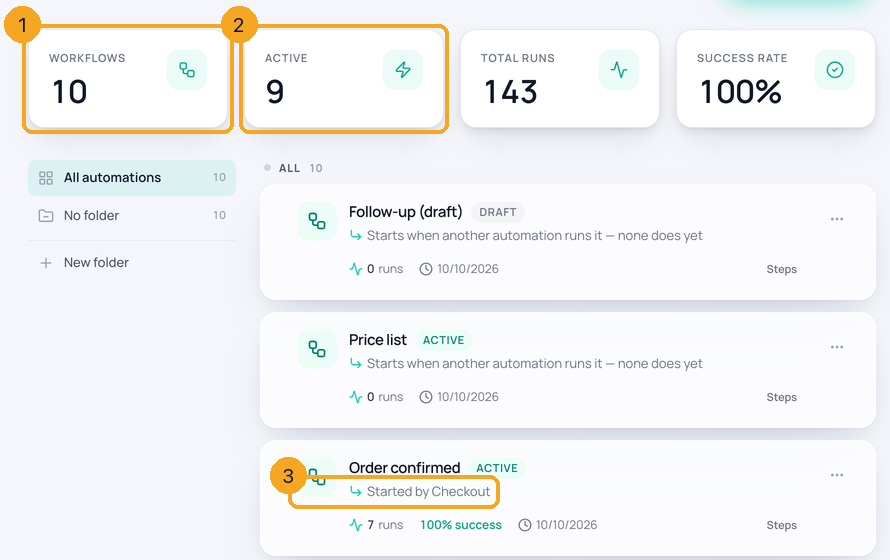
Go to Automation → Workflows. Workflows (1) counts every automation, drafts included. Active (2) counts the ones that are on — the same number your plan counts. Every automation is listed, including the ones another automation starts: they carry a Started by line (3) under their name.
2See what starts each one
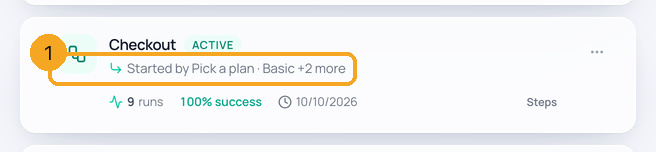
↳ Started by names the automation whose Start another automation step runs this one. When several start it, the line names the first and adds +2 more (1). On a computer, point at the line to read every name; on a phone the line wraps to two lines so the name stays readable.
3When it says “none does yet”
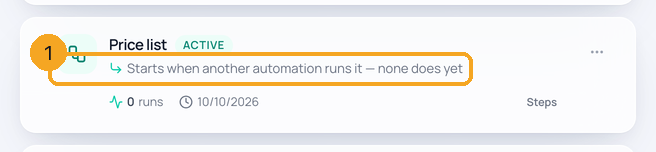
Starts when another automation runs it — none does yet (1) means nothing starts this automation, so it never runs. Open the automation that should start it and add a Start another automation step pointing at it — or, if you no longer need it, delete it. If it is on, it still counts on your plan until you turn it off or delete it.
4Check your plan
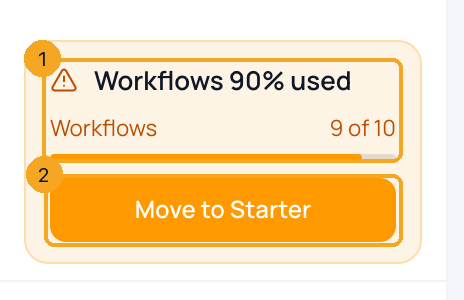
The card at the bottom of the sidebar shows how much of your plan’s automations you use — Workflows 90% used, 9 of 10 (1) — counting every automation that is on, including the ones another automation starts. Drafts are free. Move to Starter (2) opens the bigger plan. When the plan is full, it says Workflows that are on keep running; turning on another needs the plan above.
© 2026 SkedX · Sample data only · Share and link freely · Copying the product or its design is not allowed · Terms
Common questions
Why does my plan count more automations than I built?
Because each piece of a chain is its own automation. If one automation starts Welcome, which starts Menu, which starts Checkout, that is four automations, and every one that is on counts. The Active tile on the Workflows page shows the same number as the plan card.
Does a draft count on my plan?
No. Only automations that are on count. A draft shows in the Workflows tile and in the list, but not in Active or on the plan card — build as many drafts as you like.
What does “none does yet” mean, and what should I do?
Nothing starts that automation, so it never runs. Open the automation that should start it and add a Start another automation step that points at it; or open it to check what it does; or delete it if you no longer need it. While it is on, it counts on your plan.
My plan is full. What happens?
Automations that are on keep running. Turning on another one is refused until you click Move to Starter for a bigger plan, or turn off one you no longer need. Saving drafts still works.
Can I see every automation that starts this one?
Yes — on a computer, point at the Started by line and every name shows. You can also open each automation and look for its Start another automation step.
Next in AutomationSearch automations by name or anything inside →
Useful links
- Workflows in SkedX Flow — every automation, its totals and what starts it
Previous: Set the rules for a whole automation · All Automation guides
Did this guide help?
Still stuck?Chat with support →


