So that one place decides how the whole automation behaves — who gets it, when, and what happens when something does not go to plan.
1Who enters, and when it runs
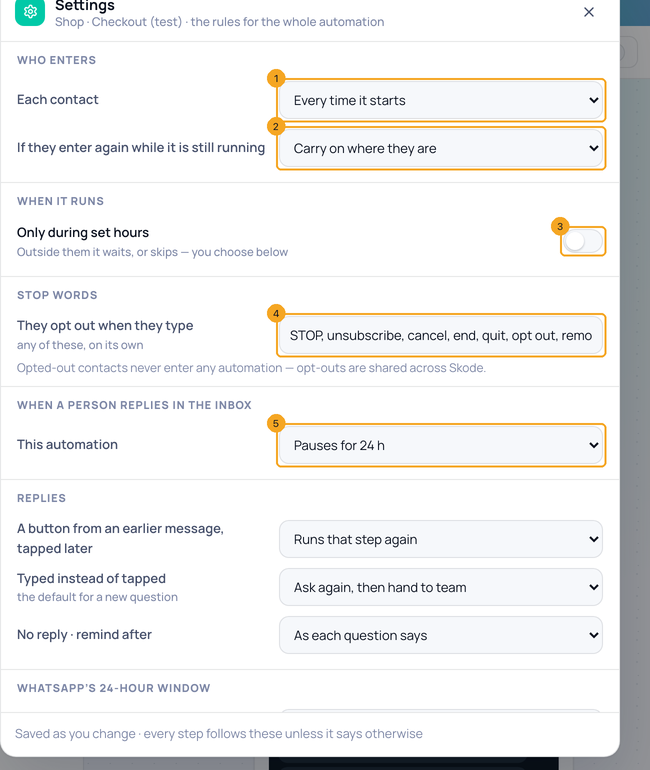
Click Settings in the top bar. Choose how often Each contact enters (1) and what happens if they enter again while it is still running (2). Turn on Only during set hours (3) to keep it to your hours. The stop words (4) opt a person out of every automation. Choose what happens when a person replies in the inbox (5).
2Replies, the 24-hour window, and failed steps
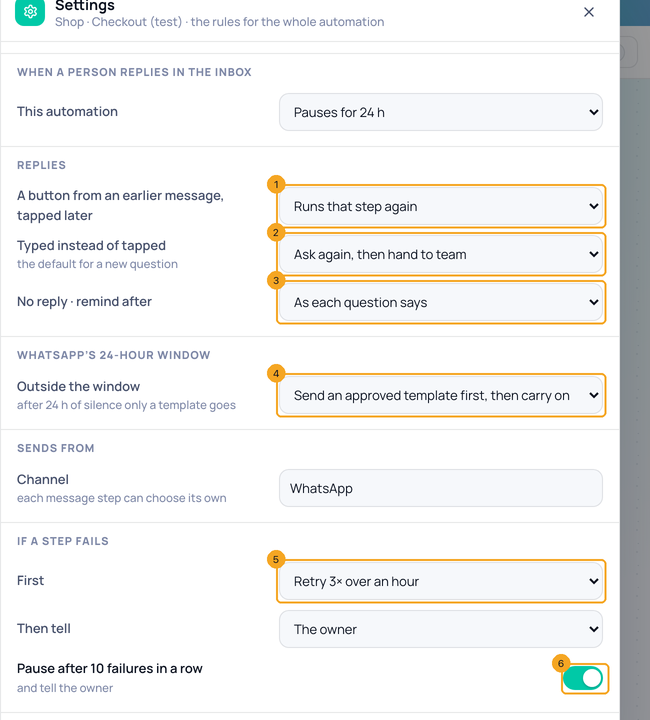
Scroll down. Under Replies: a button from an earlier message, tapped later (1); a typed answer instead of a tap (2) — the default for new questions; and when to remind someone who has not replied (3). Under WhatsApp’s 24-hour window (4), choose what happens after 24 hours of silence. Under If a step fails, choose whether it retries 3× over an hour (5), and keep Pause after 10 failures in a row (6) on so a broken step stops before it reaches everyone.
© 2026 SkedX · Sample data only · Share and link freely · Copying the product or its design is not allowed · Terms
Common questions
Do I have to save?
No — every change saves at once, for the whole automation.
Can one step do something different?
Yes. A step’s own setting wins — for example a question can have its own reminder time.
Are opt-outs per automation?
No. Someone who opts out never enters any automation, and opt-outs are shared across SkedX.
Next in AutomationSee every automation on the Workflows page — and what starts each one →
Previous: Save what a customer says to their contact · All Automation guides
Did this guide help?
Still stuck?Chat with support →


