A customer should talk to a bot or to a person — never both at once.
Choose, for each automation, whether it steps aside in a chat as soon as someone on your team replies. Automations keep running unless you turn the pause on.
In review: written from the product, not yet walked through live.
1Turn the pause on for an automation
Open the automation and click Settings in the top bar. Under When a person replies in the inbox, the setting (1) reads Keeps running until you change it. Choose Pauses for 24 h — or 1 hour, until the chat is closed, or Answers button taps only to keep answering button taps while what the customer types waits for you. Leave it on Keeps running, the default, for an automation that should never stop for a reply. It saves at once.

2Reply to the customer — automations set to pause step aside
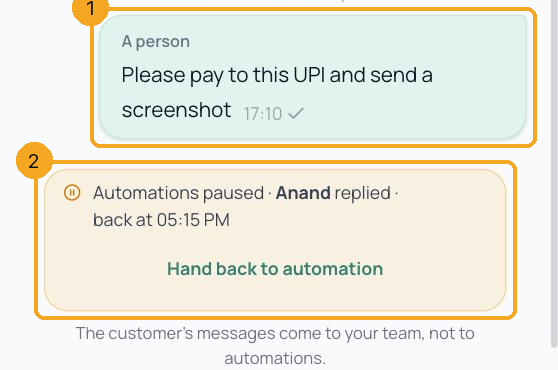
Reply in the chat as you always do (1). Where one of your automations is set to pause, the chat now shows Automations paused · your name replied · back at time (2): for the next 24 hours the customer’s messages come to your team instead of that automation, and a question it was waiting on is cancelled. Every later reply from your team moves the 24 hours on. Automations left on Keeps running carry on as before.
3A reply from the WhatsApp Business app counts too
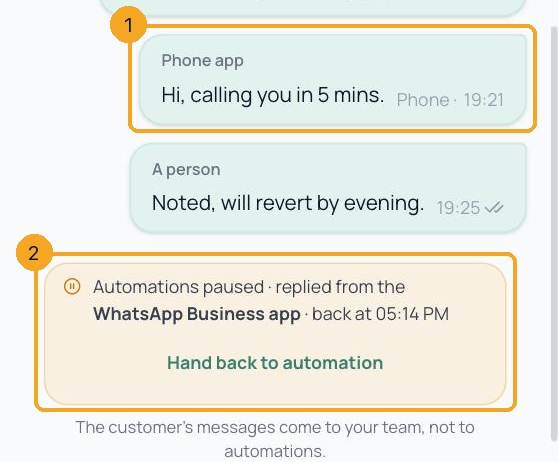
If your number is also on the WhatsApp Business app, a reply typed on the phone (1) pauses automations the same way. The line says replied from the WhatsApp Business app (2).
4Done? Hand the chat back to automation
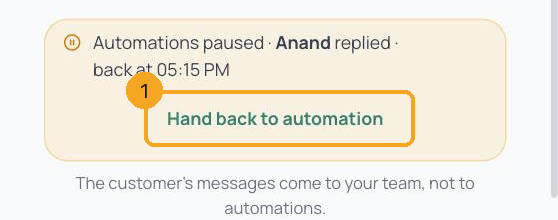
Click Hand back to automation (1). The line goes away and the customer’s next message starts your automations again. You don’t have to: after 24 hours with no reply from your team, the chat goes back to automations by itself. Starting an automation by hand from the chat also hands it back.
© 2026 SkedX · Sample data only · Share and link freely · Copying the product or its design is not allowed · Terms
Common questions
What counts as my team replying?
A message a person sends the customer: a reply in the Flow inbox, a template sent from the inbox, a DM in answer to a comment, a reply from the CRM inbox or the browser extension, and a reply typed in the WhatsApp Business app. Messages sent by automations, the AI, campaigns, and internal notes do not pause anything.
Does it stop automations that are not about the chat?
No. It stops automations from starting or continuing on the customer’s messages in that chat. An automation started by something else — a form, a CRM change, a schedule — still runs.
The customer tapped an old button from the automation. What happens?
For an automation set to pause, nothing automatic while the chat is paused: the tap shows in the chat for your team, and no automation continues from it. An automation set to Answers button taps only (next question) still answers it.
Can an automation keep answering button taps after we reply?
Yes. In the automation’s Settings, under When a person replies in the inbox, choose Answers button taps only — typed messages wait for you. After your team replies, anything the customer types still comes to you for 24 hours, but a button they tap — on the question the automation is waiting on, or on an earlier message — is answered as usual. If your canvas has no Settings yet, SkedX support can set it for you.
Do my webhooks and integrations still get the messages?
Yes. Every customer message still reaches your webhooks and integrations, marked
team_replied: true while your team is handling the chat.Is it on for every automation?
No. Since 28 October 2026 each automation keeps running when a person replies, unless you turn the pause on in its Settings (step 1). Automations that already had a choice of their own keep it. To let paused automations answer again in one chat, click Hand back to automation.
Does a reply stop Chats as Enquiries or other inbox settings?
No. Settings such as Chats as Enquiries keep making records whether or not your team has replied in the chat.
Can a message from our website pause automations too?
Yes, if you ask us. Messages your website or system sends through the Flow API pause nothing by default — a one-time code or a reminder is not the end of a conversation. For one API key you name — for example the key your website uses to send order confirmations — SkedX can switch it on: that key’s messages then pause the chat for 24 hours like a team reply, a question the automation was waiting on is cancelled, and the line reads Automations paused · Your website replied.
Next in AutomationSee where customers stop in an automation →
Useful links
- Inbox in SkedX Flow — the line sits at the bottom of the chat
Previous: Search automations by name or anything inside · All Automation guides
Did this guide help?
Still stuck?Chat with support →


