Leave your colleagues a note right inside the customer’s chat — what was promised, what to check, who should take it next.
The customer never sees it.
In review: written from the product, not yet walked through live.
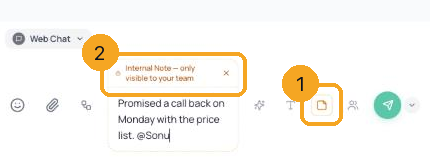
1Switch the composer to a note
Open the chat. In the composer, click the note button (1) — or press N. The composer turns amber and reads Internal Note — only visible to your team (2).
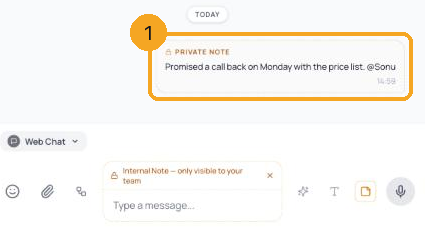
2Write the note and press Enter
Type the note and press Enter. It appears in the thread marked Private note (1). Note mode stays on for this chat, so the next Enter is a note too — click the note button again or press Esc to reply to the customer.
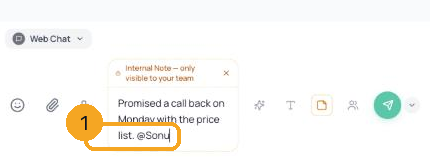
3Tell a teammate with @
Type @ and a teammate’s name in the note (1) — just type it, no list pops up. They get a notification that points to the chat.
© 2026 SkedX · Sample data only · Share and link freely · Copying the product or its design is not allowed · Terms
Common questions
Can the customer ever see a note?
No. A note is never sent on WhatsApp, Instagram, Messenger, email or web chat — it stays in SkedX Flow for your team.
It said “Couldn’t save that note — nothing was recorded”
The note was not saved and has been taken back out of the chat, so nobody is misled. Try again; if it keeps happening, tell SkedX support. (Until 12 Oct 2026 a fault made most notes fail this way; it is fixed.)
Why did my next message also go as a note?
Note mode stays on for the chat until you switch it off, so a second note never reaches the customer by mistake. Click the note button again or press Esc to reply.
Can I write a note on my phone?
The note button is on the desktop inbox. Notes your team writes on desktop show on the phone too.
Next in InboxPin a step so it starts in one click from any chat →
Useful links
- Inbox in SkedX Flow — the composer’s note button
Previous: Your inbox opens instantly and new messages arrive live · All Inbox guides
Did this guide help?
Still stuck?Chat with support →


