Pin them once and they wait at the top of <b>Run an automation</b> in every chat: one click and the customer has them. About two minutes.
In review: written from the product, not yet walked through live.
1Your pinned steps sit at the top
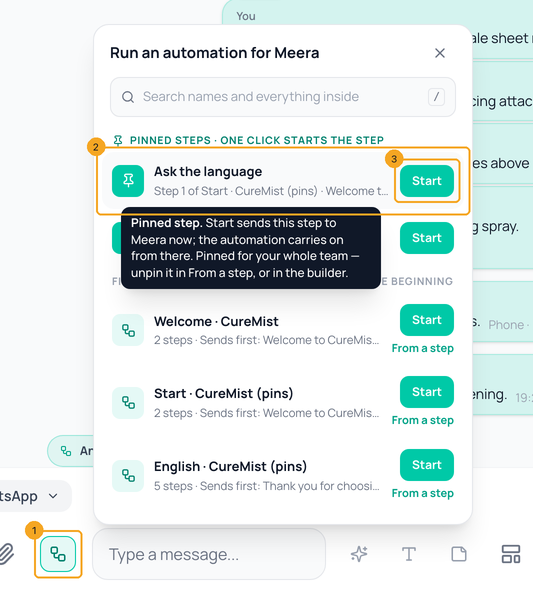
In a chat, click Run an automation (1) beside Send. Pinned steps come first (2): each shows the step’s own name and which automation it belongs to. Start (3) sends that step to the customer now, and the automation carries on from there. Point at a pinned step to read what it does.
2Pin a step from the chat
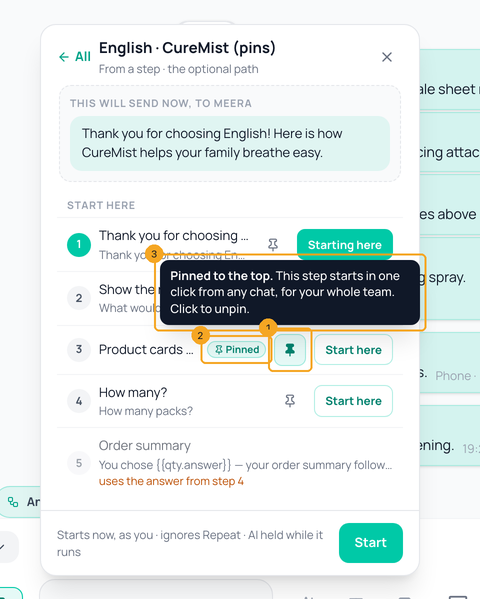
In Run an automation, click From a step on the automation. Beside each step that can start on its own is a pin (1): click it once. The step now says Pinned (2) and appears at the top for everyone on your team. Point at the pin to read what it does (3); click it again to unpin.
3Or pin it in the builder
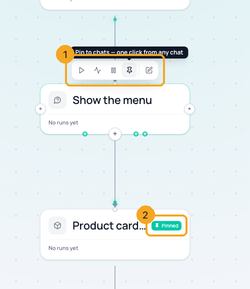
Open the automation in Automation → Workflows (it must be on). Point at a step: its bar (1) has Pin to chats. A pinned step’s card says Pinned (2); its bar offers Unpin from chats.
4On a phone
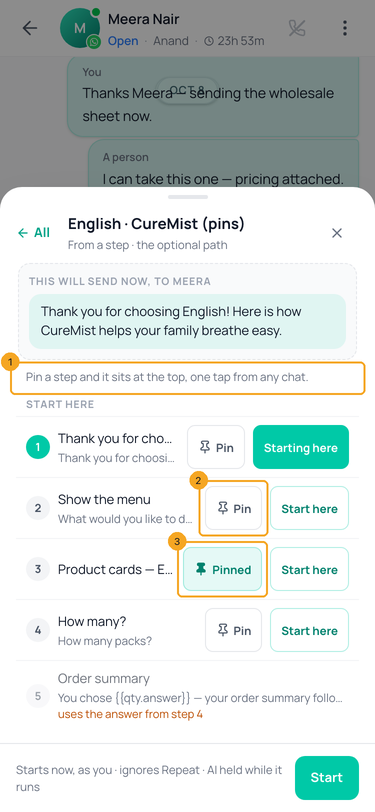
A phone has no pointer to hover, so From a step says it in words (1) and each pin carries its word: Pin (2) or Pinned (3). Tap to pin or unpin.
© 2026 SkedX · Sample data only · Share and link freely · Copying the product or its design is not allowed · Terms
Common questions
Who sees my pinned steps?
Everyone in your workspace. A pin is the team’s, so the step your team sends most is one click away for every agent.
Why can’t I pin this step?
It uses an answer from an earlier step (for example the quantity the customer chose), so it cannot start on its own. Pin that earlier step, or one before it, instead. The start of an automation is not pinned either — Start on the automation’s own row already runs it from the beginning.
My pinned step is greyed. Why?
It cannot start in this chat, and it says why: usually the chat’s 24-hour WhatsApp window is closed and the step sends free text — send a template first. If the automation is already running for this person, the button reads Restart here, which replaces that run.
Does pinning change my automation?
No. Pinning makes no new version and changes nothing your customers see. If you remove the step, or turn the automation off, its pin stops showing; turn it back on and the pin is back.
Can I find a step without pinning it?
Yes — type in the search box of Run an automation: it finds automations by their name and by any words inside them, and a found step starts in one click. See Search automations by name or anything inside.
Useful links
- Inbox in SkedX Flow — Run an automation is the button beside Send
- Workflows in SkedX Flow — pin from a step’s bar in the builder
Previous: Write a team note in a chat — only your team sees it · All Inbox guides
Did this guide help?
Still stuck?Chat with support →


