When a chat needs someone else, hand it over in two clicks — and say why, so they don’t have to ask.
Person and team are one control.
In review: written from the product, not yet walked through live.
1Click who has the chat
Open a chat. In the header, Arjun · Team 2 (1) says who has it and which team. Click it.

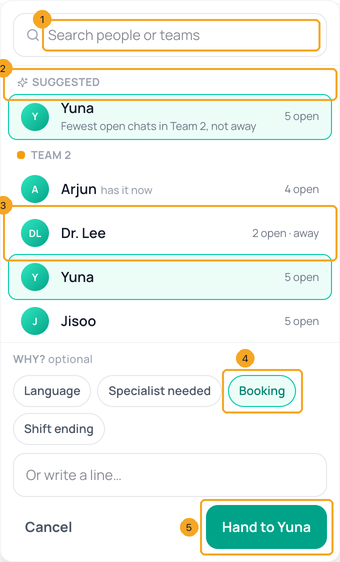
2Pick a person, and say why
Type a name or a team in the search box (1), or take the Suggested person (2) — in the chat’s team, not away, with the fewest open chats. Each person shows their open chats and away (3). Under Why? tap a reason (4) or write a line — it’s optional. Click Hand to Yuna (5).
3Or move it to a team only
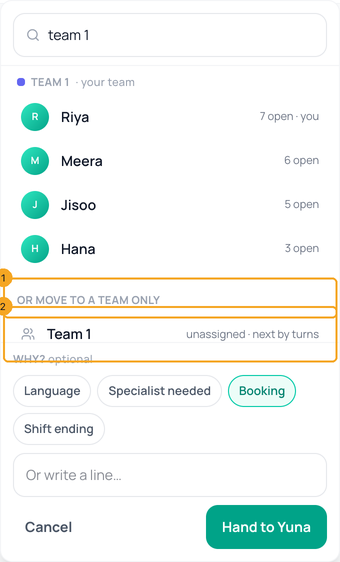
Under Or move to a team only (1), pick a team (2). Nobody is picked by hand: the team’s own turns choose the person, as for a new chat. The reason works the same way.
4The chat says who, to whom and why
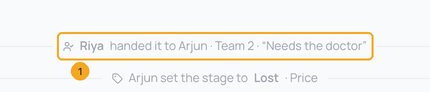
A line in the chat (1) records it — Riya handed it to Arjun · Team 2 · “Needs the doctor” — so the next person knows why without asking.
© 2026 SkedX · Sample data only · Share and link freely · Copying the product or its design is not allowed · Terms
Common questions
Can I do this from the Inbox in SkedX CRM?
Yes. The same person and team control sits in the chat’s header there: on a computer beside the stage, on a phone in its own row under the bar. It saves through Flow, so both show the same owner.
How do I assign many old chats at once?
Click Select at the top of the chat list, tick the chats, click Assign, search the person and, if you like, add a reason. This is how to share out chats from before your team rules — including history imported from Instagram, Facebook and WhatsApp.
I picked someone from the other team. Which team is the chat in now?
Theirs: picking a person from another team moves the chat to that team too.
What does away mean?
The person set themselves Out of office or Busy, or hasn’t been seen in Flow for 30 minutes. You can still hand them a chat.
Where did Assign agent and Team / Department go?
They are one control now, the person and team in the chat header. Both jobs are inside it. On a phone, the chat’s ⋮ menu has Person and team….
Does handing over count against the team’s split?
No. On the Team scorecard, Chats received stays with the team the chat was first sent to.
Useful links
- Inbox in SkedX Flow — the person and team in the chat header
Previous: Pin a step so it starts in one click from any chat · All Inbox guides
Did this guide help?
Still stuck?Chat with support →


