So that what a customer tells your automation — their name, their address, the pack they chose — is on their contact for your team and for the next message.
1Choose what goes where
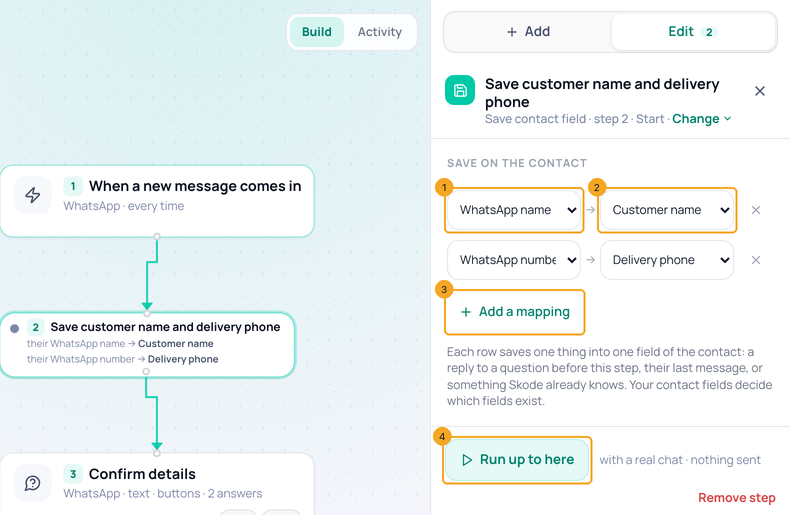
Add Contacts → Save contact field and open it. Pick what data (1) — a reply, what SkedX already knows, or a value you type — then which field (2). + Add a mapping (3) saves more in the same step. Run up to here (4) tries it with a real chat.
2Save into a new field
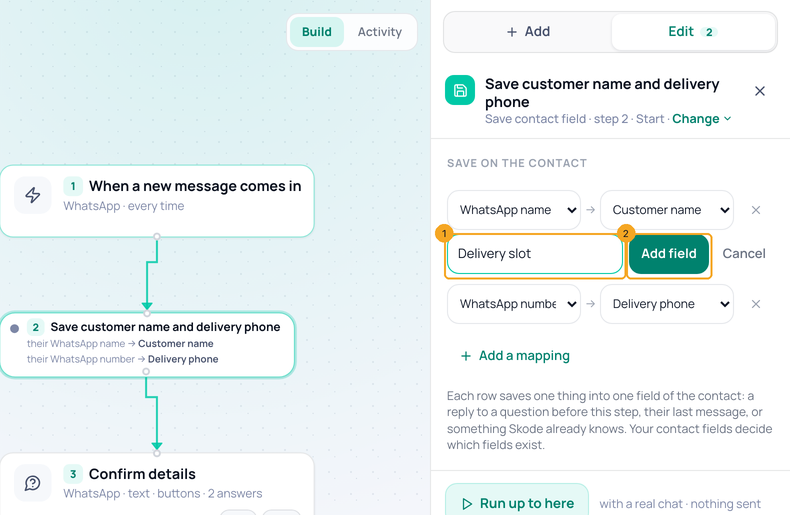
In which field, pick + New field…, type its name (1) and click Add field (2). It is added to Settings → Contact fields for everyone and picked for this row.
© 2026 SkedX · Sample data only · Share and link freely · Copying the product or its design is not allowed · Terms
Common questions
Can I save only if they answered Yes?
Not on this step yet. Put a branch before it on the reply you want, and the save on that branch.
Where do I see the saved value?
On the contact (Contacts, or the side panel of the chat), under the field you picked.
What is a new order number?
A fresh number each time the step runs — the date and that day’s count (261019-001). Later steps read it as the order number.
Next in AutomationSet the rules for a whole automation →
Previous: Find a step in a long automation: the steps list and its search · All Automation guides
Did this guide help?
Still stuck?Chat with support →


