So that every message your automation sends reads right on the customer’s phone, and every answer they tap leads somewhere.
1Open the message
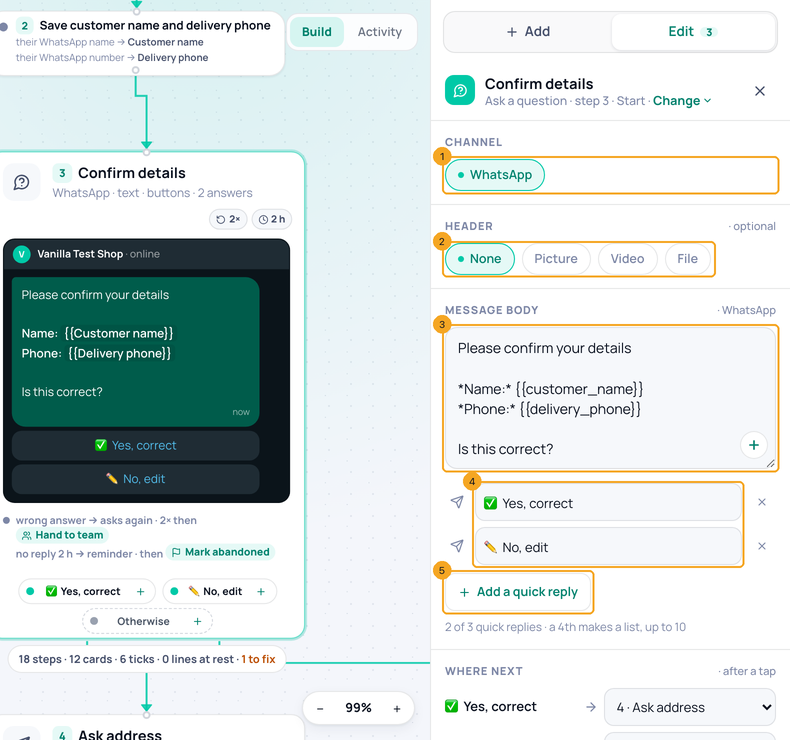
Click the message card. The panel shows its Channel (1), the optional Header — None, Picture, Video or File (2) — and the Message body (3); the + in its corner adds a field such as their name. Each quick reply is a row (4); + Add a quick reply (5) adds one.
2Say where each reply goes
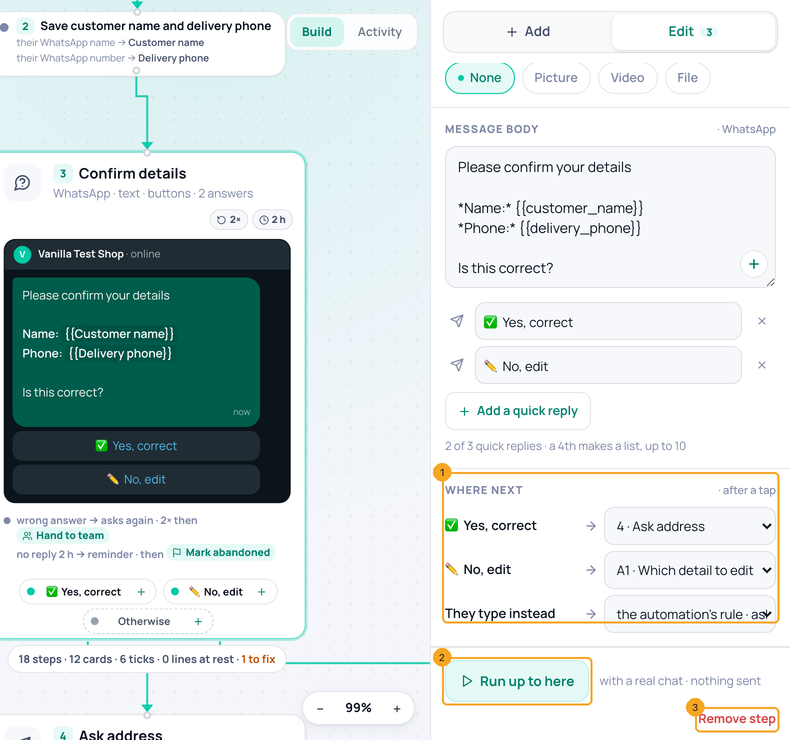
Under Where next (1), pick the step each reply leads to — and where it goes when they type instead. Run up to here (2) tests the message with a real chat, sending nothing; Remove step (3) takes it out.
3Buttons on each channel
WhatsApp: up to 3 quick replies show as buttons; a 4th makes them a list (up to 10). One link button, one form, one location request or one catalog can go instead. Instagram: up to 13 quick replies under the message (the phone app shows them) or up to 3 buttons on it. Messenger: up to 3 buttons on the message and up to 13 quick replies under it.
4Call and copy-code buttons
On WhatsApp, a call button and a copy-a-code button can only be on an approved template. Click Use a template and pick one; a template also goes out after 24 hours of silence, when only a template may.
© 2026 SkedX · Sample data only · Share and link freely · Copying the product or its design is not allowed · Terms
Common questions
What happens when they type instead of tapping?
The step’s safety net decides: it asks again (twice by default), then hands the chat to your team. The default is in Settings → Replies; AI fallback can answer from your knowledge base instead.
Can a message wait for their reply?
Yes — a message with quick replies waits; the card shows a reminder and what happens if nobody replies.
How do I ask for a typed answer — a name, a date, a number?
Open the message and use Change ▾ → Ask for a typed answer. It has no buttons: it waits for what they write, and under Where next you choose where Their answer goes. If they write something that does not fit, the automation’s rule in Settings decides.
Why can’t I add a Call button?
WhatsApp allows Call and Copy code only on an approved template. Use a template.
Next in AutomationFind a step in a long automation: the steps list and its search →
Previous: Build an automation step by step in SkedX Flow · All Automation guides
Did this guide help?
Still stuck?Chat with support →


