So that you know what each automation sells, what it costs, and which ads bring the people who buy.
1Mark the step that means a sale
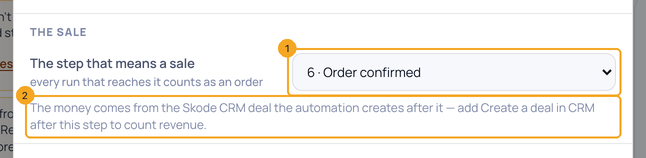
Click Settings in the top bar. Under The sale, pick The step that means a sale (1) — every run that reaches it counts as an order. The money comes from the SkedX CRM deal the automation creates after it (2).
2See it on the card
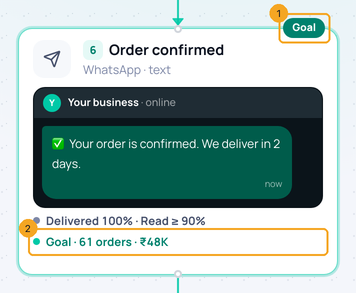
In Activity › Numbers, that step wears Goal (1) and says its orders and money (2).
3Read the sale line
The bar under the top bar reads how many started (1), ordered (2), the revenue (3) and what WhatsApp cost, per order (4), each against the previous period of the same length.

4See where the buyers came from
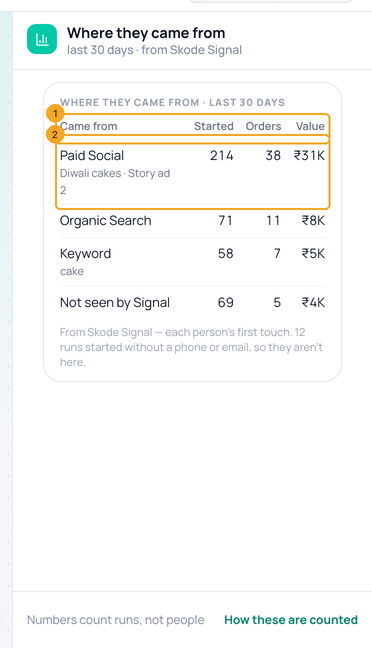
With no step open, the panel shows Where they came from, from SkedX Signal (1): each channel with how many started, ordered and the value, and its top campaigns (2).
© 2026 SkedX · Sample data only · Share and link freely · Copying the product or its design is not allowed · Terms
Common questions
Why is the revenue empty?
Revenue is the value of the SkedX CRM deals the automation creates. Add Create a deal in CRM after the sale step; until then the bar counts orders only.
What is “Not seen by Signal”?
People SkedX Signal has no first touch for yet — for example they messaged before your website or ads were connected.
There is no sale step yet — what now?
The bar says Choose the step that means a sale; click it to open that row in Settings.
Previous: See where customers stop in an automation · All Automation guides
Did this guide help?
Still stuck?Chat with support →


