So that a lead from an ad can fill a form, book a call or pay without leaving the chat — and what they give lands on their record — with one step and no consultant.
Part of Build an automation step by step in SkedX Flow — its video shows the whole feature.
1Add the step
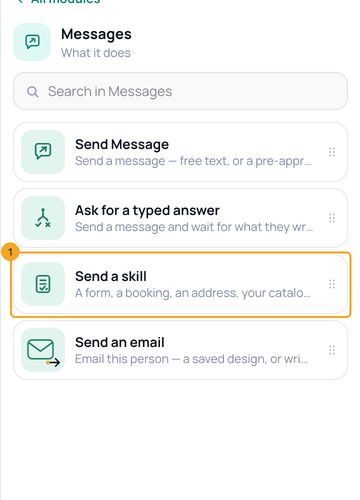
In an automation, click Then do this, open Messages and pick Send a skill (1).
2Pick the skill and the form
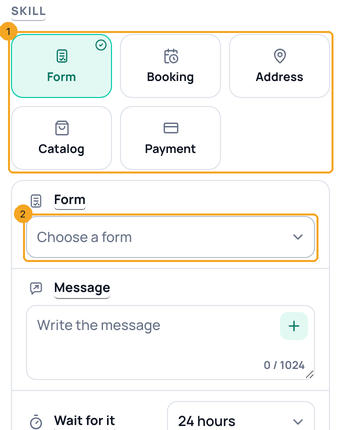
Pick the skill (1) — Form, Booking, Address, Catalog or Payment. For a form, choose it in Form (2), write the message and set Wait for it.
3Make a new form and come back
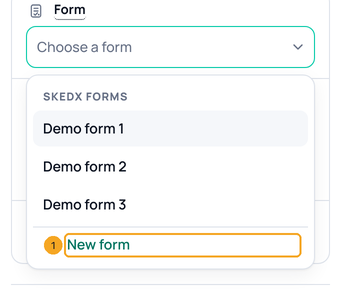
No form yet? Open the Form list and pick New form (1). The form designer opens in a new tab; your automation stays as it is.
4Publish and go back
Build the form, then press Publish and go back (1). The tab closes and the step has the new form picked.

5Offer a booking link
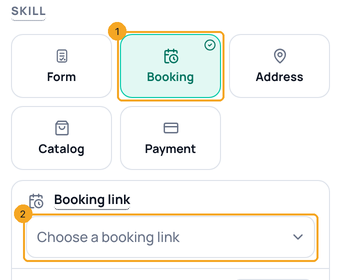
Pick Booking (1) and choose a Booking link (2) from Calendar. The time they tap is booked straight away; New booking link opens Calendar.
6Fill a dropdown from Zoho
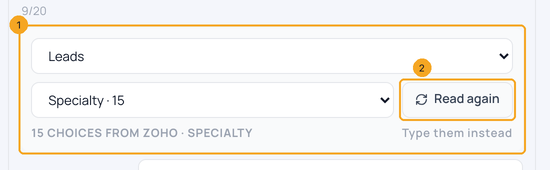
In the form designer, on a dropdown question, pick Choices from Zoho CRM, then the module and field (1). Read again (2) brings Zoho’s latest values.
© 2026 SkedX · Sample data only · Share and link freely · Copying the product or its design is not allowed · Terms
Common questions
Why is my WhatsApp form greyed out?
The automation starts on another channel. A WhatsApp form opens inside WhatsApp only; pick a SkedX Form, which goes as a link on Instagram, Messenger, web chat and SMS.
How many choices can a dropdown have?
Up to 200 in a WhatsApp form. A Zoho pick-list with more shows the first 200 and says how many Zoho has.
Will a form answer change what is already in Zoho?
No. An answer fills a Zoho field only where it is empty, and only on the lead already linked to the chat. No lead is created.
Which booking links can a chat book?
Links that are on, for one person and free. Team links and paid links need the booking page — share that link instead.
Do I need a Book the picked time step after Booking?
No. The time they tap is booked at once and confirmed in the chat. If someone took it first, they get the next times.
Next in AutomationSet up a message step and its buttons →
Useful links
- Workflows in SkedX Flow — where every automation is set up
Previous: Build an automation step by step in SkedX Flow · All Automation guides
Did this guide help?
Still stuck?Chat with support →